A charging dock changes a wireless mouse from a device you remember to plug in into one that is simply always ready: you lift it off the stand charged, and you set it back down when you stop playing. The catch is that very few gaming mice actually include the dock. Most flagship wireless models sell their dock or charging puck as a separate accessory, so the real decision is finding the bundles where the dock is in the box without giving up sensor or switch quality.
This roundup is for FPS players who want a light mouse parked on a stand between matches, MMO players who need a wide button grid and a mouse that tops itself up overnight, and tidy-desk players who are done with charging cables. Every pick below is a wireless gaming mouse whose Amazon listing includes a charging dock in the box, and the four were chosen from the sensors, battery figures and dock designs stated on those listings.
Top 3 picks at a glance


Quick Picks
As an Amazon Associate we earn from qualifying purchases.
| Product | Best for | Key spec from title |
|---|---|---|
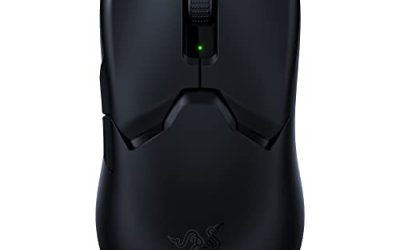
| Razer Viper Ultimate with Charging Dock | Competitive FPS players who want a light mouse that lives on its stand | Focus+ 20K DPI optical sensor, 74 g |
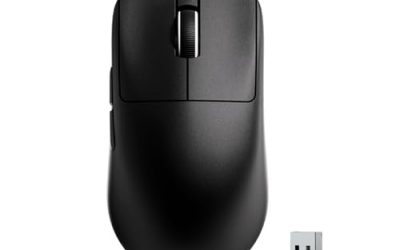
| ASUS ROG Spatha X | MMO and MOBA players who bind abilities to a 12-button grid | 19,000 DPI sensor, dock doubles as the receiver |
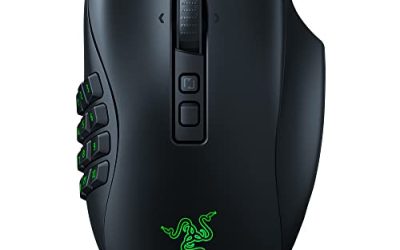
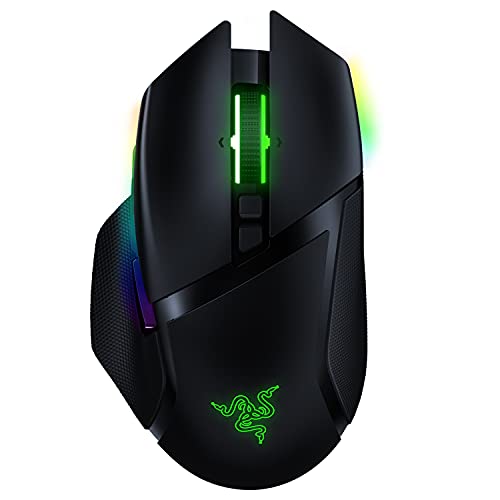
| Razer Basilisk Ultimate with Charging Dock | Right-handed players who want a thumb rest and long sessions | Focus+ 20K DPI sensor, up to 100-hour battery |
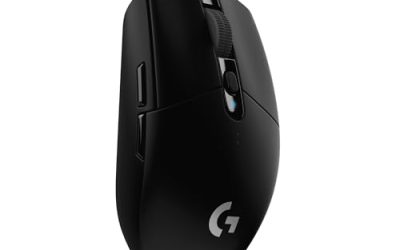
| MSI Clutch GM51 Lightweight Wireless | Players switching between a gaming PC and a Bluetooth laptop | 26,000 DPI sensor, up to 150-hour battery |
How to Choose
Check that the dock is actually in the box
The product name is the first filter. Listings that bundle the dock say so in the title — ‘with Charging Dock’ or ‘& Charging Dock’ — and the box-contents section repeats it. Listings that stay silent usually expect you to buy the dock separately, and several well-known wireless mice only work with a dock sold as an accessory. Also check what the dock connects to: some docks double as the wireless receiver, which saves a USB port, while others are charge-only stands that still need the mouse’s own dongle plugged in somewhere.
Compare battery life and top-up speed
A dock hides weak battery life, because the mouse refuels every time you set it down. What matters more is the top-up rate: how much play time a short sit on the dock buys you before a session. Listings state this plainly — ten or fifteen minutes for several hours of play on the faster models. Full-charge figures still count for travel and LAN weekends away from the dock, so compare the headline battery hours too, and remember those figures are usually quoted with the lighting turned off.
Match shape and weight to your grip
Dock bundles span a wide range: there is a 74-gram ambidextrous shell built for fingertip FPS play and a 168-gram right-handed frame carrying twelve buttons for MMO grids. Neither is better in the abstract — the heavy mouse gives your thumb more to press and feels planted during slow tracking, while the light one rewards fast flicks and low sensitivity swipes. Because these mice live on a stand, also picture the footprint: a tall dock and a long mouse need clear desk space beside your keyboard.
Weigh the sensor and switch package
Every mouse here clears the bar for competitive play on paper, but the details differ. Optical switches register clicks with light instead of metal contacts, which removes debounce delay and double-click wear; mechanical Omron switches give a familiar crisp feel with a rated click lifespan. On the sensor side, compare the maximum DPI only loosely — tracking quality at the 400 to 3,200 DPI range you actually use matters more. Finally, check the extra connections: Bluetooth support makes one mouse serve a work laptop as well.
The 4 Best Options
Razer Viper Ultimate with Charging Dock
The Viper Ultimate is the competitive pick of this group: an ambidextrous 74-gram shell, side buttons on both flanks, and a Focus+ sensor that keeps tracking consistent during fast, low-sensitivity sweeps. Its dock is more than a charger — the mouse lives on it between matches, the Chroma ring shows charge status at a glance, and the dongle stays plugged into the dock so your desk keeps one tidy cable run. Players who claw or fingertip-grip small mice will feel at home here; palm grippers with large hands may find the low profile cramped.
Specs
- Sensor: Razer Focus+ 20,000 DPI optical sensor
- Connectivity: Razer HyperSpeed wireless (2.4GHz), wired mode over the included cable
- Switches: Razer Optical Mouse Switches
- Buttons: 8 programmable buttons
- Battery life: up to 70 hours
- Weight: 74 g
- Lighting: Razer Chroma RGB on the mouse and the dock
- In the box: mouse and RGB charging dock
Best for: FPS players who want a light ambidextrous mouse that is always charged.
Watch out for: this mouse also exists in mouse-only and colour-variant listings — confirm the listing title names the RGB Charging Dock before ordering.
ASIN: B07YPC3BQC
ASUS ROG Spatha X
Nothing else in this roundup is built like the Spatha X. Twelve programmable buttons ring the left side in an MMO grid, the frame is broad and heavy at 168 grams, and the magnetic dock doubles as the wireless receiver, so the mouse charges on the same stand it connects through. The party trick underneath is the push-fit switch sockets: the main switches pull out and swap without soldering, and two spare ROG Micro Switches sit in the box. It suits players who bind entire rotations to their thumb.
Specs
- Sensor: ROG 19,000 DPI optical sensor
- Buttons: 12 programmable buttons
- Connectivity: 2.4GHz wireless and wired USB-C (dual-mode)
- Battery life: up to 67 hours; a 15-minute charge gives up to 12 hours of play
- Weight: 168 g
- Switches: ROG Micro Switches in push-fit hot-swap sockets
- Dock: magnetic charging stand that is also the wireless receiver
- In the box: mouse, receiver/charging dock, 2 ROG Paracord Type-C cables, 2 spare ROG Micro Switches, screwdriver, travel pouch
Best for: MMO and MOBA players who want a full thumb grid and a mouse that tops up on its stand.
Watch out for: at 168 g this is far too heavy for fast FPS flicks, and because the receiver lives in the dock, travelling with the mouse means taking the dock or using it wired.
ASIN: B09726KT4R
Razer Basilisk Ultimate with Charging Dock
The Basilisk Ultimate is the right-handed all-rounder: a sculpted shell with a thumb rest, a tilt-click scroll wheel and a removable multi-function paddle that acts as a temporary DPI clutch. Its battery is the longest-lasting here at up to 100 hours, and the dock turns that into a non-issue — ten minutes parked on the magnetic stand returns roughly five hours of play. Fourteen Chroma zones across the mouse and dock let it match a lit desk, and the optical switches keep clicks fast and consistent.
Specs
- Sensor: Razer Focus+ 20,000 DPI optical sensor
- Connectivity: Razer HyperSpeed wireless (2.4GHz), wired mode over the included Speedflex cable
- Switches: Razer Optical Mouse Switches
- Buttons: 11 programmable buttons, including tilt scroll wheel and multi-function paddle
- Battery life: up to 100 hours
- Charging: about 5 hours of play from a 10-minute sit on the dock
- Weight: 107 g
- Lighting: 14 Razer Chroma RGB zones
- In the box: mouse and magnetic RGB charging dock (Mouse + Dock style)
Best for: right-handed players who mix genres and want a thumb rest, a DPI paddle and marathon battery life.
Watch out for: the same listing family also sells a mouse-only style — make sure the Mouse + Dock option is the one selected before you check out.
ASIN: B08564NLZG
MSI Clutch GM51 Lightweight Wireless

The Clutch GM51 is the flexible option for a desk that holds more than one machine. Alongside its 2.4GHz connection it adds Bluetooth, so the same mouse can drive a gaming PC in the evening and a laptop during the day, then go home to its dock at night. The rated battery life is the biggest number here — up to 150 hours — and MSI’s Snap Charging refills quickly either on the dock or over the cable. At 85 grams it is mid-weight despite the Lightweight name, with a right-handed ergonomic shape.
Specs
- Sensor: 26,000 DPI optical sensor
- Connectivity: 2.4GHz wireless, Bluetooth and wired USB-C
- Switches: Omron switches rated for 60 million clicks
- Buttons: 5 programmable buttons
- Battery life: up to 150 hours
- Weight: 85 g
- Charging: charging dock included; 15 minutes of charging gives up to 7 hours of play
- Lighting: RGB
Best for: players who split time between a gaming PC and a Bluetooth laptop and want one docked mouse for both.
Watch out for: MSI also sells a wired-only Clutch GM51 Lightweight with a very similar name — confirm the listing title says Wireless and names the charging dock.
ASIN: B0BXL7QYZK
Which One Fits Your Situation
You play competitive FPS most nights
Pick the Razer Viper Ultimate with Charging Dock. The 74-gram ambidextrous body and optical switches suit fast flicks and repeated clicking, and the dock removes the one chore wireless FPS players forget: charging before a match. Set it down after every session and the 70-hour battery effectively never runs dry mid-game.
Your MMO rotation lives on your thumb
Pick the ASUS ROG Spatha X. Twelve programmable buttons put a full ability grid under your thumb, and the heavy, planted frame stays controlled during slow cursor work in menus and raids. The dock is also the receiver, so one stand handles charging and connection, and the swappable main switches extend the mouse’s working life.
You want one mouse for long mixed-genre sessions
Pick the Razer Basilisk Ultimate with Charging Dock. The thumb rest and paddle fit longer sittings and mixed genres, from shooters that reward a DPI clutch to RPGs that use the extra buttons. With up to 100 hours of battery plus a dock that adds hours back in minutes, charging stops being part of your routine.
Your desk runs a PC and a laptop
Pick the MSI Clutch GM51 Lightweight Wireless. Bluetooth pairing covers the laptop while the 2.4GHz dongle serves the gaming PC, and the dock waits on the desk for whichever session ends last. The 150-hour battery figure means the dock is a convenience rather than a necessity, which suits desks where the stand cannot always stay plugged in.
Common Mistakes
- Assuming a wireless mouse includes its dock because a dock exists for it — most flagship mice sell the dock or charging puck separately, so read the box contents.
- Ordering the mouse-only style on a listing that also offers a Mouse + Dock style, then discovering the stand was never part of that option.
- Parking the dock where the mouse cannot sit flat on its contacts, which leaves it uncharged despite living on the stand.
- Comparing headline DPI figures instead of how a sensor tracks at the everyday settings you actually play on.
- Unplugging a dock to tidy the desk without realising it is also the wireless receiver, which disconnects the mouse entirely.
Frequently Asked Questions
Does the charging dock come in the box with these mice?
Yes — that is the filter for this entire roundup. Every mouse listed here is sold in a listing whose title and box contents include a charging dock, so the stand arrives in the same package as the mouse. That is rarer than it sounds: several better-known wireless gaming mice only offer their dock as a separate accessory purchase.
Is a dock faster than charging with a cable?
Not always for a full charge, but it wins on habit. A docked mouse refuels a little after every session, so it rarely needs a long charge at all. Where listings state top-up figures, ten to fifteen minutes on the stand returns several hours of play, which covers the ‘forgot to charge’ emergency better than hunting for a cable.
Can I still use the mouse while it charges?
Yes, every mouse here also works wired. Each listing includes a USB cable in the box, and plugging it into the mouse switches it to a wired connection while the battery refills. That fallback matters on the models whose dock doubles as the receiver, because moving the dock means moving your wireless connection with it.
Will these docks charge other wireless mice?
Generally no. Each dock is shaped and wired for its own mouse: contact pins, magnets and charging circuits are model-specific, and the Razer, ASUS and MSI stands here are not interchangeable. A dock from one bundle should be treated as part of that mouse’s kit, not as a universal charger for the next mouse you buy.
Related guides
More from Amazon
Programs that pair well with the guide above. Offers and eligibility are set by Amazon and may change.
Free shipping on eligible items, Prime Video and more. Eligible new members can start with a free trial.
Start a Prime free trialAd-free music streaming. Eligible new subscribers can start with a free trial.
Try Music Unlimited freeA Prime membership for ages 18-24 with a trial period. Eligibility is set by Amazon.
See Prime for Young AdultsAudiobooks and podcasts to listen to on the go. Eligible new members can start with a free trial.
Try Audible freeAs an Amazon Associate we earn from qualifying purchases.