
A small business laptop has a different job from a student laptop or a gaming rig. It needs to stay responsive through a day of email, spreadsheets, video calls, and accounting software, it has to survive years of daily use, and it should not become a security or compatibility headache when you add a second or third employee. The decision usually comes down to a few practical questions: how much memory the machine needs for everyday multitasking, whether the storage is large enough for client files, which version of Windows it ships with, and whether the screen and keyboard suit a full workday at a desk or a counter.
This list works through eight business-oriented Windows laptops from HP and Lenovo, plus one generic slim model, and sorts them by who they fit: the owner who needs a large screen and a number pad for bookkeeping, the manager who wants an inexpensive second machine for the front desk, and the traveling consultant who values weight over screen area. Everything below rests on the specs each listing states, and where a headline claim looks like marketing, it is flagged. In 2026 the gap between a comfortable work laptop and a frustrating one often comes down to 16GB of memory and a 512GB drive, and several of these models sit on one side of that line or the other.
Our Top Picks
 Lenovo V15 Gen 4 Business Laptop16GB RAM | 512GB SSD14.13 x 9.29 x 0.78 inches3.64 poundsCheck on Amazon


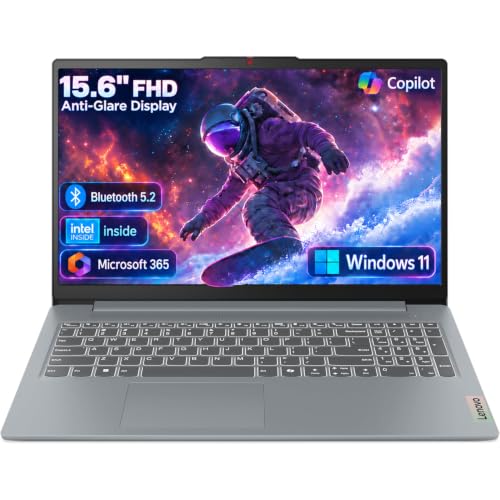


Top 3 picks at a glance
Quick Picks
As an Amazon Associate we earn from qualifying purchases at no extra cost to you.




| Product | Best for | Key spec from the title |
|---|---|---|
| HP 17-inch Ryzen 5 Business Laptop | Bookkeeping and spreadsheet-heavy desks | Ryzen 5, 16GB RAM, 512GB SSD, 17.3-inch FHD, numeric keypad |
| HP 15.6-inch N200 Laptop | Light front-desk and kiosk tasks | Intel N200 4-core, 4GB RAM, 128GB SSD, Windows 11 Home in S mode |
| Lenovo Business 15.6-inch (DDR5) | Office-suite users who want Wi-Fi 6 | 8GB DDR5, 128GB storage, Wi-Fi 6, USB-C, anti-glare screen |
| Lenovo V15 Gen 4 | Wired-network offices and daily multitasking | Core i5-13420H, HDMI, RJ45, Windows 11 Pro, numeric keypad |
| HP 255 G10 | Privacy-minded teams | AMD quad-core, 16GB RAM, 512GB SSD, W11 Pro, webcam shutter |
| HP 17.3-inch Ryzen 5 7430U | Owners who want a large screen and fast Wi-Fi | Ryzen 5 7430U, 17.3-inch FHD, Wi-Fi 6, 16GB RAM, 512GB PCIe |
| Slim 15.6-inch Core M3 Laptop | Buyers who value a longer warranty | Windows 11 Pro, 2-year warranty, 15.6-inch FHD IPS, Wi-Fi 5 |
| HP 14-inch 128GB UFS Laptop | Students and light mobile work | 128GB UFS, 14-inch LED display, Wi-Fi 6, 500GB external drive |
How to Choose
Memory and storage are the real performance spec
For a business desk running a browser with many tabs, an email client, spreadsheets, and a video call, 8GB of memory is the practical minimum and 16GB is the comfortable target. Anything at 4GB will struggle once you open more than a few tabs alongside an office suite. On storage, 256GB is a sensible floor and 512GB is better if you keep client files, scans, and accounting archives locally. Several listings here show 128GB, which can fill up quickly after Windows updates and a few years of documents. Also note the difference between an SSD and the eMMC or UFS storage common in budget models: the latter can be fine for light use but is typically slower for heavy file work.
Windows edition and security features
Windows 11 Pro adds business features such as BitLocker drive encryption, domain join, and remote desktop hosting, which matter if you handle customer data or want to manage multiple machines. Windows 11 Home in S mode, which one listing here uses, restricts installs to the Microsoft Store unless you switch out of it, and some line-of-business apps will not run until you do. If you rely on specialized accounting, point-of-sale, or industry software, confirm compatibility with the edition before you buy. A webcam shutter, like the one named on the HP 255 G10, is a small but useful privacy feature for shared offices.
Screen size, keyboard, and ports
A 15.6-inch Full HD (1920 by 1080) panel is the standard for office work, and 17.3 inches helps if you live in spreadsheets, though it adds weight. A numeric keypad is worth having for anyone who enters figures all day, and a 14-inch screen sacrifices it in exchange for portability. Look for HDMI for presentations and external monitors, USB-C for charging or docks, and an RJ45 Ethernet port if your office relies on wired networking. Wi-Fi 6 is a more future-proof choice than Wi-Fi 5 if your router supports it, though both handle normal office tasks.
What to ignore and where budget models cut corners
Be skeptical of titles that claim a processor “beats” a higher-tier chip. Those comparisons are the seller’s own and rarely tell you how the laptop behaves in sustained use. Ignore stacked marketing terms like “Copilot AI” when judging real performance, since memory, storage, and processor class matter more. Budget models typically cut corners on memory, storage speed, display brightness, and the number of ports. The lowest-tier choices below pair 4GB or 8GB of memory with 128GB of storage, which is workable for narrow tasks but limits growth.
The 8 Best Options
HP 17-inch Ryzen 5 Business Laptop
This model pairs a Ryzen 5 processor with 16GB of memory, a 512GB SSD, a 17.3-inch Full HD display, and a numeric keypad. That combination suits an owner or bookkeeper who spends most of the day in spreadsheets and accounting software and wants a big workspace without juggling two windows side by side on a cramped panel.
- Strength: 16GB and 512GB match the comfortable target for everyday multitasking.
- Strength: the 17.3-inch screen and number pad suit data entry.
- Trade-off: a 17-inch chassis is bulky for travel and awkward in a shared car or on a train.
Skip it if you commute with a laptop or need a machine for client visits, because the screen alone makes it a desk laptop.
HP 15.6-inch N200 Laptop
This listing names an Intel N200 4-core processor with 4GB of memory and a 128GB SSD, running Windows 11 Home in S mode. It fits narrow tasks such as a point-of-sale lookup terminal, a shared reception browser, or a basic spare machine that stays plugged in and rarely leaves one spot.
- Strength: the entry-level hardware places it in the budget tier.
- Strength: a 15.6-inch screen with long battery life is claimed in the title.
- Trade-off: 4GB of memory limits multitasking, and S mode restricts which software you can install.
Skip it if employees run several programs at once or rely on specialized business applications, since both limits show up quickly.
Lenovo Business 15.6-inch (DDR5)
The title lists an Intel processor, 8GB of DDR5 memory, 128GB of storage, Wi-Fi 6, USB-C, an anti-glare Full HD screen, and Office 365 access. It is a fit for an administrative assistant who works mostly in documents, email, and web apps rather than local databases.
- Strength: DDR5 memory and Wi-Fi 6 are modern touches in a budget-to-mid-range model.
- Strength: an anti-glare display helps in bright offices.
- Trade-off: the 128GB drive fills quickly after updates and a few years of documents.
Skip it if you keep large local files or plan to use it for more than basic office work, as storage will be the first thing to run out.
Lenovo V15 Gen 4
This business-line laptop lists a Core i5-13420H processor, a 15.6-inch Full HD display, HDMI, an RJ45 Ethernet port, a webcam, a numeric keypad, and Windows 11 Pro. It suits an office with wired networking that wants a straightforward daily driver with a Pro edition for managing several machines the same way.
- Strength: Windows 11 Pro and an Ethernet port suit managed office environments.
- Strength: the H-series Core i5 is a more capable processor class than the entry chips elsewhere on this list.
- Trade-off: the visible title does not state memory or storage, so you must verify those in the full listing.
Skip it if you cannot confirm that the configuration has at least 16GB and a 512GB drive, since the title leaves both out.
HP 255 G10
The 255 G10 lists an AMD quad-core CPU, 16GB of memory, a 512GB SSD, Windows 11 Pro, a 15.6-inch Full HD display, a webcam with a privacy shutter, and a numeric keypad. It is the all-rounder for a small team that wants Pro features and sensible specs without stretching into premium pricing.
- Strength: the spec sheet shows 16GB and 512GB, which covers the comfortable baseline.
- Strength: the shutter helps in shared or client-facing spaces.
- Trade-off: a quad-core processor will not match higher-tier chips under heavy workloads such as large exports.
Skip it if you run demanding design or video software, where a stronger processor class pays off.
HP 17.3-inch Ryzen 5 7430U
This one names a Ryzen 5 7430U, a 17.3-inch Full HD display, Wi-Fi 6, 16GB of memory, and a 512GB PCIe drive. It suits an owner who wants a large screen with solid memory and fast storage for everyday business apps, plus video calls that stay smooth.
- Strength: 16GB of RAM and PCIe storage support smooth multitasking.
- Strength: Wi-Fi 6 and a big display suit video calls and spreadsheets.
- Trade-off: weight and size, as with any 17-inch machine. The title also claims the processor beats a higher-class Intel chip, which is a seller comparison to treat cautiously.
Skip it if portability matters more than screen space, or if the laptop must fit a small bag.
Slim 15.6-inch Core M3 Laptop
This unbranded model lists a Core M3 processor, a 15.6-inch Full HD IPS screen, Windows 11 Pro, Office 365, Wi-Fi 5, a full-size keyboard, and a 2-year warranty. It fits a buyer who wants a longer coverage period on a budget machine, for owners who dislike surprise repair bills.
- Strength: the 2-year warranty stated in the title is a rare extra at this tier.
- Strength: an IPS panel offers better viewing angles than many basic screens.
- Trade-off: the older Core M3 processor class and Wi-Fi 5 signal modest performance.
Skip it if you need a laptop for several years of growth or heavier multitasking, since the listed class is dated.
HP 14-inch 128GB UFS Laptop
The title lists an Intel CPU, 128GB of UFS storage, a 14-inch LED display, Wi-Fi 6, Copilot AI, and a bundled 500GB external hard drive. It targets students and light mobile users who want something compact for a bag, a classroom, or a shared desk.
- Strength: the 14-inch body is the lightest format on this list.
- Strength: the included external drive adds storage for backups.
- Trade-off: UFS storage is typically slower than a standard SSD, and the internal capacity is small.
Skip it if your day involves heavy spreadsheets or a number pad, because the compact format leaves little room for either.
Which One Fits Your Situation
You manage the books and live in spreadsheets
Choose the HP 17-inch Ryzen 5 model. The 16GB memory, 512GB SSD, large screen, and numeric keypad all line up with data-heavy work.
You run a small office with wired networking and shared files
The Lenovo V15 Gen 4 fits well thanks to its Ethernet port, HDMI output, and Windows 11 Pro edition. Confirm the memory and storage in the full listing before you order.
You care about privacy and want a safe default
The HP 255 G10 combines 16GB, 512GB, Windows 11 Pro, and a webcam shutter, which makes it the balanced pick for client-facing teams.
You need a low-cost spare for simple tasks
The HP 15.6-inch N200 works as a front-desk or reception machine, provided nobody needs to install outside software while it is in S mode. For a little more headroom, the Lenovo Business 15.6-inch with DDR5 memory is the better stepping stone.
Common Mistakes
- Buying a model with 4GB of memory for multi-tab work and then wondering why it lags.
- Overlooking Windows 11 Home in S mode and finding out later that a key business app will not install.
- Trusting “beats a higher-class chip” claims instead of comparing memory, storage, and processor class.
- Choosing 128GB of storage for a laptop that will hold years of client documents.
- Skipping the port check, then discovering that the office needs Ethernet or HDMI and the laptop lacks it.
Related guides
- Gaming Chair Cushions And Lumbar Supports
- Business Laptops With Long Battery Life
- How To Use Camelcamelcamel For Amazon Deals
Frequently Asked Questions
How much memory does a small business laptop need?
Plan on 8GB at the minimum and 16GB if you keep many browser tabs, spreadsheets, and calls open together. Four gigabytes works only for very light, single-task use.
Is Windows 11 Pro worth it over Home?
For most businesses, yes. Pro adds drive encryption, remote desktop hosting, and domain features, which matter when you store customer data or manage several computers.
Do I need a laptop with a numeric keypad?
If you enter numbers daily, a number pad saves time and reduces errors. If you travel often, a 14-inch model without one may be more practical, and you can add a small external keypad.
What is S mode and should I avoid it?
S mode limits app installation to the Microsoft Store for security and simplicity. It is fine for browser-based work, but it can block specialized desktop software unless you switch out of it.
Related guides
More from Amazon
Programs that pair well with the guide above. Offers and eligibility are set by Amazon and may change.
Free shipping on eligible items, Prime Video and more. Eligible new members can start with a free trial.
Start a Prime free trialAd-free music streaming. Eligible new subscribers can start with a free trial.
Try Music Unlimited freeA Prime membership for ages 18-24 with a trial period. Eligibility is set by Amazon.
See Prime for Young AdultsAudiobooks and podcasts to listen to on the go. Eligible new members can start with a free trial.
Try Audible freeAs an Amazon Associate we earn from qualifying purchases.









