Short answer: put your money into the graphics card and its memory first, keep the processor one step behind it, and treat everything else as supporting detail. The most balanced prebuilt in this guide is the Skytech Omega, because its RTX 4070 Super and 32GB of DDR5 leave no obvious weak link. If your budget is tighter, the Skytech Nebula covers 1080p honestly without charging you for parts you will not feel.
This guide is for buyers comparing prebuilt towers across every tier, from a first 1080p machine to a 4K system meant to last years. Each pick below was chosen from the specifications printed on its Amazon listing, and each one is used to show where money does real work and where a listing is mostly decoration.
Our Top Picks

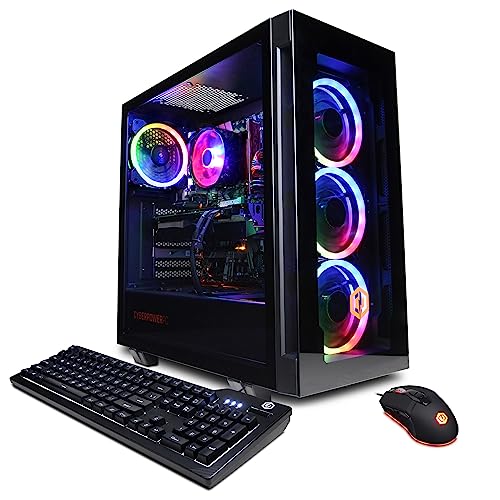
Top 3 picks at a glance
Quick Picks
As an Amazon Associate we earn from qualifying purchases
| Product | Best for | Key spec from title |
|---|---|---|
| Skytech Nebula | A first tower for 1080p play | RTX 4060 8GB and 1TB NVMe SSD |
| iBUYPOWER Slate MESH SMI7N4601 | Gaming plus streaming and editing | Core i7-14700F and 32GB DDR5 |
| CyberPowerPC Gamer Xtreme VR GXiVR8040A14 | 1440p with generous graphics memory | RTX 4060 Ti 16GB |
| Skytech Omega | Balanced high-refresh 1440p | RTX 4070 Super 12GB and 32GB DDR5 |
| CyberPowerPC Gamer Xtreme VR GXiVR8680A12 | 4K headroom and a large game library | RTX 5070 Ti 16GB and 2TB SSD |
How to Choose
Spend on the graphics card and its memory first
Frame rates come from the graphics card, so this is where a tier should be won or lost. Read two numbers: the card model and the memory size printed beside it. A higher model with less memory can stumble in newer games that load large textures, while a modest card with generous memory holds settings longer. The CyberPowerPC GXiVR8040A14 below is a good example of memory done right, pairing a midrange card with 16GB. When two machines sit in the same tier, choose the stronger card before you choose anything else on the page.
Treat headline processor names with suspicion
Listings lead with the processor because a Core i7 or Ryzen 9 badge looks impressive, yet games lean far harder on the graphics card once you pass a competent midrange chip. The iBUYPOWER SMI7N4601 in this guide pairs a very strong Core i7-14700F with an entry-level RTX 4060, a balance that suits editing timelines better than frame rates. If a tower advertises a flagship processor beside a modest card, you are paying for rendering and multitasking muscle. That is worth it for streamers and editors, and mostly wasted on a machine bought only to play.
Read the memory and storage lines literally
Two towers can both say 16GB and 1TB while meaning very different things. Check whether memory is DDR4 or DDR5, and whether the speed is printed at all; a listing that hides the speed usually has nothing to boast about. For storage, confirm the drive is an NVMe SSD and note the real capacity, because a large game library fills 1TB faster than most buyers expect. Only one machine in this guide ships with 2TB, and that difference matters more over three years than a faster boot screen you will notice twice.
See past the lighting, coolers and bundle extras
Tempered glass, synchronized lighting and a forest of fans photograph beautifully, and listings lean on them because they are cheap to add and easy to see. None of them adds a single frame. The same applies to bundled keyboards and mice, which are usually basic peripherals you will replace, and to oversized liquid coolers fitted to processors that a simple tower cooler handles quietly. Judge a machine with the glass panel mentally removed: card, processor, memory, storage, power supply. If those five lines are strong for the tier, the decoration is a bonus rather than the product.
The 5 Best Options
Skytech Nebula

The Nebula is the honest end of this guide: a Ryzen 5 5500 and an RTX 4060 are a matched pair for 1080p, and nothing in the configuration pretends otherwise. You get 16GB of DDR4 and a full 1TB of NVMe storage, so the corners cut are the platform’s age rather than your day-to-day experience. It suits a first gaming PC, a student desk, or a living-room tower for esports and older AAA games. Buyers planning a 1440p monitor soon should step up a tier instead of asking this card to stretch.
Specs
- Processor: AMD Ryzen 5 5500, 3.6 GHz (4.2 GHz Turbo Boost)
- Graphics: NVIDIA GeForce RTX 4060 8GB GDDR6X (brand may vary)
- Memory: 16GB DDR4 RAM 3200 with heat spreader
- Storage: 1TB NVMe M.2 SSD
- Power supply: 650W Gold
- Wireless: 802.11AC Wi-Fi
- Operating system: Windows 11 Home 64-bit
- Case: Skytech Nebula, black, front mesh with ARGB fans
Best for: First-time buyers who play at 1080p and want balanced parts.
Watch out for: The AM4 platform and DDR4 memory limit future processor upgrades, and stock on this listing runs through third-party sellers, so confirm the seller before ordering.
ASIN: B0D9KVXPP6
iBUYPOWER Slate MESH SMI7N4601
This Slate MESH build is the clearest lesson in the guide. Its Core i7-14700F and 32GB of DDR5 are creator-grade parts, yet the RTX 4060 remains an entry-level gaming card, so frame rates will look like a cheaper machine’s while editing timelines fly. Buy it if the same desk handles streaming, video work or heavy multitasking alongside play. If gaming is the only job, the same money aimed at a stronger card and a humbler processor, like the Omega below, returns far more on screen.
Specs
- Processor: Intel Core i7-14700F
- Graphics: NVIDIA GeForce RTX 4060 8GB
- Memory: 32GB DDR5 RGB, 5200 MHz
- Storage: 1TB NVMe SSD
- Connectivity: Wi-Fi ready
- Operating system: Windows 11 Home
- Cooling: Tower air cooler with RGB case fans
- Included: RGB gaming keyboard and mouse
Best for: Players who also stream, edit video or multitask heavily on the same machine.
Watch out for: The processor is far stronger than the graphics card for pure gaming, and the bundled keyboard and mouse are starter peripherals rather than lasting gear.
ASIN: B0D6BYQ23R
CyberPowerPC Gamer Xtreme VR GXiVR8040A14
CyberPowerPC spends this machine’s budget where it shows: the RTX 4060 Ti here carries 16GB of graphics memory, double the common version, which buys headroom for texture-heavy games at 1440p. The Core i7-13700F is more processor than the card strictly needs, and 16GB of system memory is adequate rather than generous. Treat it as a 1440p tower with a long texture leash, not a 4K machine. Buyers who keep many games installed should plan on adding a second drive sooner than the other picks demand.
Specs
- Processor: Intel Core i7-13700F, 2.1 GHz, 8+8 cores
- Chipset: Intel B760
- Graphics: NVIDIA GeForce RTX 4060 Ti 16GB, 1x HDMI and 2x DisplayPort
- Memory: 16GB DDR5
- Storage: 1TB PCIe Gen4 NVMe SSD
- Operating system: Windows 11 Home 64-bit
- Connectivity: Wi-Fi ready
Best for: 1440p players who want extra graphics memory for texture-heavy games.
Watch out for: System memory stops at 16GB and storage at 1TB, and current offers may come from third-party sellers, so check who is fulfilling the order.
ASIN: B0CBL8N3FC
Skytech Omega

The Omega is what a tier looks like when nothing is inflated. The RTX 4070 Super does the heavy lifting for high-refresh 1440p, the Ryzen 7 7700X stays a step behind it instead of grandstanding, and 32GB of DDR5 removes memory from your list of worries. The 360mm liquid cooler is more than the processor demands, yet here it is garnish on a sound build rather than a substitute for one. If you want a single recommendation from this guide to act on, this is the configuration to beat.
Specs
- Processor: AMD Ryzen 7 7700X, 4.5 GHz (5.4 GHz Max Boost)
- Graphics: NVIDIA GeForce RTX 4070 Super 12GB GDDR6X
- Memory: 32GB DDR5 RAM RGB with heat spreader
- Storage: 1TB NVMe Gen4 SSD
- Cooling: 360mm AIO liquid cooler
- Power supply: 750W Gold
- Wireless: 802.11AC Wi-Fi
- Operating system: Windows 11 Home 64-bit
Best for: High-refresh 1440p play with balanced parts and no weak link.
Watch out for: Skytech sells an Omega variant with a different processor under another listing, so confirm the configuration on the page matches the Ryzen 7 7700X build described here.
ASIN: B0CSJH1LWK
CyberPowerPC Gamer Xtreme VR GXiVR8680A12
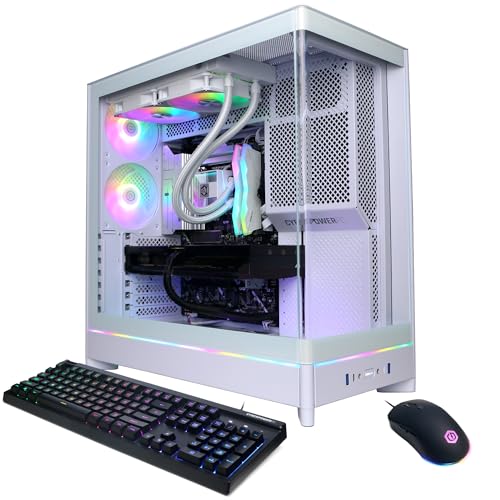
At the top of this guide the spending finally matches the marketing. An RTX 5070 Ti with 16GB of memory is a genuine 4K card, the Core Ultra 7 265KF keeps it fed, and the 2TB SSD means a large library stays installed instead of being rotated. Nothing here needs apology, but the tier only makes sense with a 4K or high-refresh 1440p monitor attached; on a basic 1080p screen most of this machine’s ability goes unseen. Buy it as a long-cycle system, not as a first tower.
Specs
- Processor: Intel Core Ultra 7 265KF
- Graphics: NVIDIA GeForce RTX 5070 Ti 16GB
- Memory: 32GB DDR5
- Storage: 2TB PCIe 4.0 SSD
- Connectivity: Wi-Fi ready
- Operating system: Windows 11 Home
Best for: 4K play and large libraries on a system bought for the long term.
Watch out for: Confirm the exact model number GXiVR8680A12 on the listing before ordering, since CyberPowerPC sells many similar Gamer Xtreme configurations.
ASIN: B0DXVD4PX4
Which One Fits Your Situation
You play esports titles and 1080p story games
Start with the Skytech Nebula. Its RTX 4060 is built for exactly this workload, the 1TB drive holds a healthy library, and the money you do not spend here can go toward a faster monitor, which you will notice every match. Skip the stronger processors in this guide; at 1080p esports settings they add little you can see.
You stream or edit on the same desk
The iBUYPOWER Slate MESH SMI7N4601 earns its place here. Its Core i7-14700F and 32GB of DDR5 are wasted on games alone, but recording, encoding and editing timelines use exactly that muscle while you play. Accept that its RTX 4060 caps gaming at 1080p and some 1440p, and this becomes the most sensible two-job machine in the guide.
You just bought a 1440p high-refresh monitor
Choose between the two middle-heavy picks by what you play. Texture-rich story games favor the CyberPowerPC GXiVR8040A14 and its 16GB of graphics memory, while fast competitive titles favor the Skytech Omega, whose RTX 4070 Super pushes higher frame rates and whose 32GB of system memory leaves streaming headroom. Either way, your monitor finally gets the card it was bought for.
You want one machine for the next several years
Buy the CyberPowerPC GXiVR8680A12 and stop shopping. The RTX 5070 Ti has the memory and muscle for 4K now and high settings later, the 2TB drive postpones storage juggling, and 32GB of DDR5 is the capacity this tier should have started with. It only pays off fully with a monitor that can show what it renders.
Common Mistakes
- Paying for a flagship processor paired with an entry-level graphics card, then wondering why frame rates match a cheaper machine.
- Comparing headline memory numbers without checking whether the RAM is DDR4 or DDR5, or whether the listing prints a speed at all.
- Treating a 1TB drive as plenty when modern game installs routinely pass a hundred gigabytes each.
- Counting fans, lighting and glass panels as performance features when comparing two towers in the same tier.
- Buying a 4K-capable tower for a 1080p monitor, or a 1080p tower for a 1440p monitor, and blaming the PC later.
Frequently Asked Questions
How much RAM does a gaming PC actually need?
Sixteen gigabytes remains workable for gaming alone, and every pick in this guide meets that floor. Thirty-two gigabytes is the comfortable choice if you stream, keep browser tabs and voice chat open while playing, or want the machine to age gracefully. Beyond that, games alone rarely reward the extra capacity, so treat very large memory figures in a listing as creator equipment, not gaming equipment.
Should I pay more for a stronger processor or a stronger graphics card?
For gaming, the graphics card almost always deserves the next step up. A midrange processor feeds a strong card properly in most titles, while a flagship processor cannot rescue a weak card at higher resolutions. The exception is a machine that also records, streams or edits, where processor cores and memory do real work after the game is already running.
What does “brand may vary” mean on a prebuilt listing?
It means the maker reserves the right to fit any board partner’s version of the named graphics card, so the exact cooler and casing on the card can differ from the photos. The chip and memory are still the ones named in the title, which are the parts that decide performance. Judge the listing by those named components, not by the photographed card.
Is a prebuilt gaming PC a mistake compared with building my own?
No. A prebuilt trades some parts choice for assembly, a single warranty and a machine that works the day it arrives, which suits many buyers. The real mistake is paying prebuilt money without reading the configuration closely. Check the card, its memory, the RAM type and the drive capacity against the tier, and a prebuilt becomes a rational purchase rather than a gamble.
Related guides
More from Amazon
Programs that pair well with the guide above. Offers and eligibility are set by Amazon and may change.
Free shipping on eligible items, Prime Video and more. Eligible new members can start with a free trial.
Start a Prime free trialAd-free music streaming. Eligible new subscribers can start with a free trial.
Try Music Unlimited freeA Prime membership for ages 18-24 with a trial period. Eligibility is set by Amazon.
See Prime for Young AdultsAudiobooks and podcasts to listen to on the go. Eligible new members can start with a free trial.
Try Audible freeAs an Amazon Associate we earn from qualifying purchases.