
A 17-inch laptop is a decision about desk space and eyesight as much as horsepower. The 17.3-inch panel gives you roughly one extra column of spreadsheet data or a second window snapped beside the first, and most models in this size carry a full keyboard with a numeric keypad. The cost is bulk: these machines live on a desk, a kitchen table, or a dorm room bed, and rarely in a commuter bag.
This guide is for people who spend long hours on documents, accounting sheets, lecture slides, or video calls and want the screen to do the heavy lifting. It covers seven models, mostly HP, spanning entry-level Celeron and Core i3 configurations up to Ryzen 5 machines with 16GB or 32GB of memory. As of 2026, the spread between the cheapest and the best-equipped 17-inchers is mainly RAM, storage, and processor generation, so those are the specs worth comparing line by line.
Our Top Picks
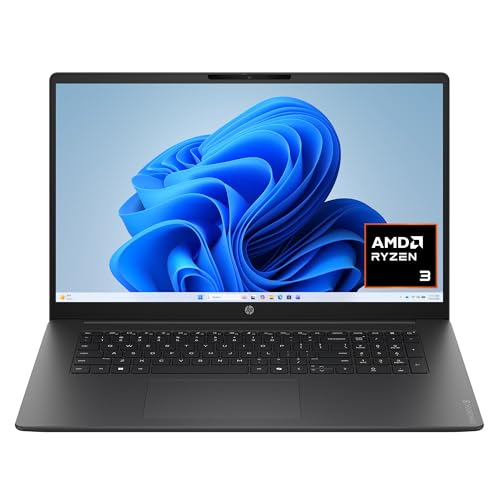 HP OmniBook 3 17.3 inch Laptop PCRyzen3|8GB|256GB|Touch15.65 x 10.09 x 0.65 inches4.43 poundsCheck on Amazon


Top 3 picks at a glance
Quick Picks
As an Amazon Associate we earn from qualifying purchases at no extra cost to you.




| Product | Best for | Key spec from the title |
|---|---|---|
| HP 17 Business Laptop (Ryzen 5) | Office work with a numeric keypad | Ryzen 5, 16GB RAM, 512GB SSD, 17.3″ FHD |
| HP OmniBook 3 17 | Light everyday browsing | Ryzen 3 30, 8GB RAM, 512GB SSD, Radeon 610M |
| HP 17 FHD (32GB / 1TB) | Heavy multitasking and file storage | R5 7430U, 32GB RAM, 1TB SSD, Windows 11 Pro |
| NBVCXSD 17 | Bare-minimum budget use | Celeron quad-core up to 2.9GHz, 8GB RAM, 256GB SSD |
| HP 17 (Core i3) | Basic Windows tasks with HDMI | Core i3-1125G4, 8GB RAM, 256GB SSD, HD+ display |
| HP 17.3 FHD IPS (Ryzen 5 7520U) | Students who want DDR5 memory | Ryzen 5 7520U, 8GB DDR5, 512GB SSD |
| IJKKJI 17 | Port-hungry home setups | Ryzen 5, 8GB RAM, RJ45, HDMI, USB 3.0, backlit keyboard |
How to Choose
Resolution and panel type
Full HD (1920 x 1080) is the floor you want at 17.3 inches. A lower HD+ resolution stretches fewer pixels across a large surface, so text looks softer and you fit less on screen. IPS panels hold their color and brightness when you view from an angle, which matters on a wide display shared by two people. Ignore marketing about “eye care” unless the spec sheet gives a brightness figure; look for around 250 nits or more if the laptop will sit near a window.
Processor and memory
For browsing and office apps, 8GB of RAM works but leaves little room for a browser with many tabs. Sixteen gigabytes is the comfortable tier, and 32GB only pays off for large spreadsheets, virtual machines, or photo editing. On processors, a Ryzen 5 or Core i3 from a recent generation will feel smoother than a Celeron-class chip, which is built for light tasks. DDR5 memory is a small bonus, not a deciding factor.
Storage and ports
A 256GB SSD fills quickly once Windows updates and a few programs are installed; 512GB is a safer starting point and 1TB suits anyone storing media locally. For ports, check for HDMI, at least one USB-C, and USB-A for a mouse and drive. An RJ45 Ethernet jack is rare on thin laptops and useful for stable video calls. A numeric keypad is standard at this size, but confirm it in the listing.
Weight, battery, and corner-cutting
Expect these machines to be heavy, and a larger chassis does not guarantee a large battery. Budget models usually save money on display brightness, keyboard backlighting, and the webcam. Unfamiliar brand names often ship with minimal support and no service network, so weigh that against a lower entry cost. Skip claims like “beats a premium Core i7” in a title; compare model numbers and generations instead.
The 7 Best Options
HP 17 Business Laptop (Ryzen 5)
This model pairs a Ryzen 5 with 16GB of RAM and a 512GB SSD, a balanced trio for documents, video calls, and a crowded browser. The 17.3-inch FHD screen and numeric keypad make it a natural fit for bookkeeping, invoicing, and data entry. The title also points to long battery life, though no hours are stated, so treat that as a feature to confirm rather than a promise. It suits a buyer who wants one dependable machine for a home office without paying for workstation extras.
- Strength: 16GB of memory keeps multitasking smooth.
- Strength: Full HD display and numeric keypad suit spreadsheet work.
- Trade-off: The title gives no battery figure or port list, so confirm both before buying.
Skip it if you need 1TB of local storage or a workstation-class graphics card.
HP OmniBook 3 17
The OmniBook 3 17 uses a Ryzen 3 30 with Radeon 610M graphics, 8GB of RAM, and a 512GB SSD, running Windows 11 Home. It is aimed at households that need a large screen for streaming, email, and homework without paying for extra memory. The named model number (17-dp019) is a practical plus, since drivers, manuals, and replacement parts are far easier to find for a specific HP designation than for a generic listing.
- Strength: 512GB of storage is generous for an 8GB machine.
- Strength: A named model number makes support lookups simple.
- Trade-off: A Ryzen 3 and 8GB of RAM will feel tight with many tabs open.
Skip it if you plan on photo editing, running virtual machines, or any sustained heavy workload.
HP 17 FHD (32GB / 1TB)
This is the most heavily equipped listing here: an R5 7430U processor, 32GB of RAM, a 1TB SSD, a 17.3-inch FHD IPS display, and Windows 11 Pro. The Pro edition adds business features such as device encryption management and remote desktop hosting, which matter for freelancers who connect to client networks. With that much memory and storage, it is the one to pick if you want to avoid thinking about upgrades for a long time.
- Strength: 32GB of RAM and 1TB of storage give years of headroom.
- Strength: Windows 11 Pro suits small-business and remote-work setups.
- Trade-off: Memory and storage push it toward the premium tier of this group.
Skip it if your tasks are limited to web pages and email, since most of its extra capacity would sit idle.
NBVCXSD 17
The NBVCXSD 17 is the budget outlier, using a Celeron quad-core processor up to 2.9GHz with 8GB of RAM and a 256GB SSD. The title lists an IPS Full HD display, a Type-C port, and Wi-Fi, which is a respectable feature list for a low-cost listing. It makes sense as a secondary computer for a spare room, a basic streaming screen, or a first laptop for a child doing schoolwork where speed is not the priority.
- Strength: An IPS Full HD screen is uncommon at the lowest price tier.
- Strength: Type-C connectivity adds flexibility for docks and chargers.
- Trade-off: A Celeron chip handles only basic tasks and slows under heavy browser use.
Skip it if you need warranty clarity from an established brand or plan to keep the laptop for many years.
HP 17 (Core i3)
This HP pairs an 11th Gen Intel Core i3-1125G4 with 8GB of RAM and a 256GB SSD, plus HDMI, a webcam, and Windows 11 Home. The display is listed as HD+, a step below Full HD, so it fits someone who cares more about brand familiarity and a straightforward port set than about pixel density. HDMI output means you can connect a TV or external monitor for presentations or movie nights without hunting for adapters.
- Strength: A familiar brand with HDMI output for an external monitor or TV.
- Strength: Includes a built-in webcam for classes and calls.
- Trade-off: HD+ resolution looks less sharp on a 17.3-inch panel than FHD.
Skip it if screen clarity is your top priority or you want more than 256GB of storage.
HP 17.3 FHD IPS (Ryzen 5 7520U)
Here you get a quad-core Ryzen 5 7520U, 8GB of DDR5 RAM, a 512GB SSD, and a 17.3-inch FHD IPS display. The title highlights Copilot AI and fast charging, aimed at business users and students who move between lectures, libraries, and home. The combination of a newer processor and a Full HD IPS screen makes it the more future-minded choice among the 8GB models, especially if you value quick top-ups of the battery.
- Strength: DDR5 memory and a 512GB SSD with a recent-generation chip.
- Strength: Fast charge support reduces time tied to the outlet.
- Trade-off: 8GB of RAM limits long-term multitasking, and the title does not mention upgradability.
Skip it if you routinely keep dozens of tabs and apps open at once.
IJKKJI 17
The IJKKJI 17 combines a Ryzen 5, 8GB of RAM, and a 256GB SSD with an FHD IPS display, a backlit keyboard, a webcam, RJ45 Ethernet, dual-band Wi-Fi, Bluetooth 5.0, HDMI, USB 3.0, and Type-C. For a buyer wiring up a desk with a wired network drop, an external display, and several peripherals, that list reads like a checklist. It trades brand recognition for connectivity and a Ryzen 5 at an accessible tier.
- Strength: The port list is the longest in this group, including wired Ethernet.
- Strength: A backlit keyboard helps in dim rooms.
- Trade-off: It comes from a lesser-known brand, so support and parts availability are uncertain.
Skip it if you want a recognizable service network behind the purchase.
Which One Fits Your Situation
You run a home office with big spreadsheets
The HP 17 Business Laptop with Ryzen 5, 16GB of RAM, and a numeric keypad is the balanced pick. If your files are especially large or you keep many programs open, the 32GB HP 17 FHD is the step up and its Windows 11 Pro edition suits client work.
You are buying for a student on a tight allowance
The HP 17.3 FHD IPS with Ryzen 5 7520U offers a 512GB drive and a sharper screen than the Core i3 model, which keeps long study sessions easier on the eyes. Fast charging helps between classes.
You need wired internet and many ports
The IJKKJI 17 is the one with RJ45, HDMI, and USB 3.0 listed together, which suits a desk with a monitor, mouse, and Ethernet drop.
You want a shared family computer for light use
The HP OmniBook 3 17 covers streaming, homework, and email with a large screen and 512GB of storage, and a named model number makes future driver downloads easy for whoever ends up maintaining it.
Common Mistakes
- Choosing HD+ resolution to save money, then finding text soft on a 17.3-inch panel.
- Assuming a big chassis means a big battery; titles rarely state battery hours.
- Buying 8GB of RAM for a machine meant to last five years of heavier software.
- Trusting titles that claim to “beat” a named Intel chip instead of comparing real model numbers.
- Forgetting that a 17-inch laptop is heavy and will rarely travel comfortably.
Related guides
- Gaming Chair Cushions And Lumbar Supports
- How To Use Camelcamelcamel For Amazon Deals
- Warranty Considerations When Buying On Sale
Frequently Asked Questions
Is a 17-inch laptop worth it over a 15.6-inch one?
If you work at a desk and value screen space, yes. If you carry the laptop daily, the extra weight and footprint become tiresome, and a smaller model is the better fit.
How much RAM do I need?
Eight gigabytes covers basic tasks, 16GB is the comfortable tier, and 32GB suits large spreadsheets or virtual machines. Buyers who keep laptops for many years should lean higher.
Are Celeron laptops usable?
They handle web browsing, documents, and video, but they slow under many tabs or heavier software. Core i3 and Ryzen 5 chips offer more headroom for a modest step up in cost.
Does Windows 11 Pro matter?
Pro adds management and security features used in small businesses, such as remote desktop hosting. Home users rarely need it.
Related guides
More from Amazon
Programs that pair well with the guide above. Offers and eligibility are set by Amazon and may change.
Free shipping on eligible items, Prime Video and more. Eligible new members can start with a free trial.
Start a Prime free trialAd-free music streaming. Eligible new subscribers can start with a free trial.
Try Music Unlimited freeA Prime membership for ages 18-24 with a trial period. Eligibility is set by Amazon.
See Prime for Young AdultsAudiobooks and podcasts to listen to on the go. Eligible new members can start with a free trial.
Try Audible freeAs an Amazon Associate we earn from qualifying purchases.









