A monitor budget of under 50 dollars forces an honest conversation about what a screen actually needs to do. At that cap, you are not paying for 4K, HDR, or built-in speakers; you are deciding between a plain 1080p office panel, a faster 100Hz to 144Hz screen for light gaming, or a small portable display that travels with a laptop. Listing prices move often, so treat the cap as a filter and confirm each listing still fits it when you shop.
This guide is for people filling a gap: a spare desk, a dorm setup, a second screen for a work laptop, or a replacement for a cracked panel. It compares eight 1080p monitors from 15.6 to 24 inches, sorted by what they do well rather than by hype. In 2026, even basic panels commonly offer 100Hz or higher and adaptive sync, so the useful questions are about panel type, ports, and mounting rather than whether a cheap monitor can look decent at all.
Our Top Picks
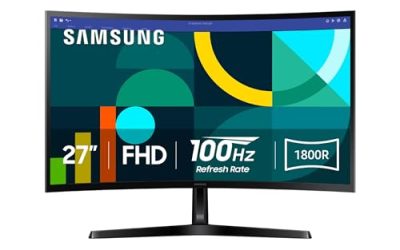
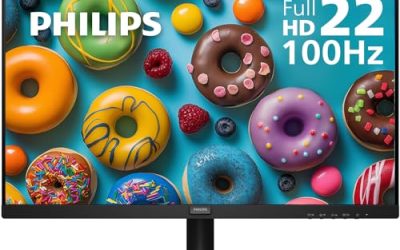
 Philips 22 Inch Computer Monitor FHD 100Hz VA22 inch 100Hz8.7 x 19.4 x 14.5 inches9.3 poundsCheck on Amazon
 Philips 24 Inch Computer Monitor FHD 100Hz VA24 inch 100Hz8.7 x 21.3 x 16.4 inches6.4 poundsCheck on Amazon
 ArcticPro 22 Inch Gaming Monitor 144Hz22" FHD 144Hz7.4 x 19.4 x 14.25 inches4.5 poundsCheck on Amazon


Top 3 picks at a glance
Quick Picks
As an Amazon Associate we earn from qualifying purchases at no extra cost to you.




| Product | Best for | Key spec from the title |
|---|---|---|
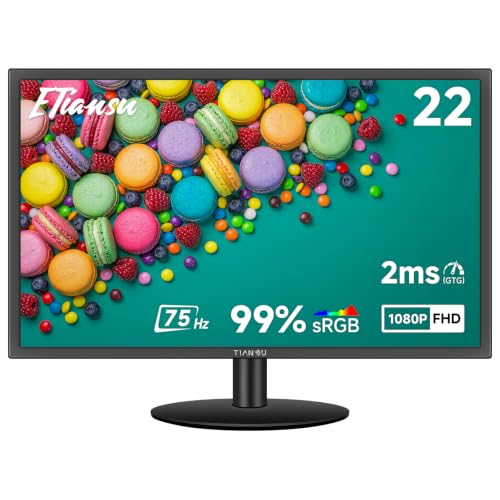
| ETiansu 22 Inch | Everyday IPS with wide viewing angles | FHD IPS, 75Hz, FreeSync, 2ms, HDMI and VGA |
| WGK 15.6 Portable | Travel and laptop second screen | 1080P, HDMI and USB-C compatible |
| Philips 22 (221V8LB) | Flicker-free office use | FHD 100Hz VA, 4ms GtG, Adaptive Sync |
| Philips 24 (241V8LB) | More desktop room for spreadsheets | 24 inch FHD 100Hz VA, HDMI 1.4 |
| ArcticPro 22 Gaming | Fast motion on a tight budget | 144Hz FHD, 105% sRGB, 4000:1 contrast |
| KOORUI 22 (E2212H) | Smooth 120Hz and low blue light | FHD 120Hz VA, Adaptive Sync, HDMI 1.4 and VGA |
| MSI PRO MP225 E12VL | Reliable brand with 120Hz | 22 inch FHD 120Hz, 1ms, Adaptive-Sync, VESA |
| Acer KB220Q H2bi | Color-aware office work | 21.5 inch FHD 100Hz, sRGB 99%, 1ms |
How to Choose
Size, resolution, and pixel density
At 22 to 24 inches, Full HD (1920×1080) looks sharp enough for documents and video. Stretch 1080p much beyond 27 inches and text looks soft, but you rarely meet that problem at this budget. A 15.6-inch portable panel at 1080P is very crisp, although small. Pick the size that suits your desk depth: a 24-inch screen needs roughly an arm’s length of space to be comfortable.
Panel type: IPS versus VA
IPS panels keep color steady from the side, which helps two people sharing a view. VA panels, used by the Philips and KOORUI models, deliver deeper blacks and higher contrast, such as the 4000:1 figure listed on some, but can smear dark scenes. For a reading-and-writing monitor either works; for movies in a dim room, VA often looks richer.
Refresh rate and response time
Sixty hertz is the baseline. Moving to 100Hz or 120Hz makes scrolling and cursor motion visibly smoother, and 144Hz suits fast games. Treat response claims like 1ms with caution: those figures often describe a best-case mode, so the practical difference between 1ms and 4ms is small for office use. Adaptive sync helps tearing if you plug in a game console or desktop GPU.
Ports and mounting, and where budget models cut corners
Check for HDMI, and note that HDMI 1.4 limits you to 60Hz at 1080p on some devices, so confirm the maximum refresh rate over that port. VGA is outdated but useful for older machines. VESA mounting lets you add an arm later, while tilt-only stands are the usual compromise at this tier. Built-in speakers, height adjustment, and USB hubs are rare. Ignore dynamic contrast numbers and “eye care” claims unless backed by a flicker-free spec.
The 8 Best Options
ETiansu 22 Inch
This 22-inch panel lists FHD 1080p IPS, 75Hz, 2ms response, AMD FreeSync, and HDMI plus VGA with VESA mounting. The IPS panel is the main draw: colors and brightness stay consistent when you sit off-center, which suits a shared workspace. The 75Hz refresh rate is a modest step up from standard 60Hz and works well for browsing and video. FreeSync support also helps if you connect a compatible graphics card, and the VGA input means an older office PC can still use it. It is a sensible all-purpose pick when you do not want to think about panel technology.
- Strength: An IPS panel at this size gives wide viewing angles.
- Strength: HDMI and VGA cover both new and older computers.
- Trade-off: 75Hz is lower than the 100Hz or 120Hz rivals.
Skip it if you play fast games and want a higher refresh rate.
WGK 15.6 Portable
The WGK is a 15.6-inch 1080P portable monitor with HDMI and USB-C compatibility, pitched for laptops, desktops, phones, PlayStation, Mac, Xbox, and Switch. It is the only travel-friendly option here, useful for a second screen at a coffee shop or hotel desk. USB-C support can simplify the cable situation when your device supports video output, so verify that your laptop or phone can send video over USB-C before relying on it. Console owners can also use it for handheld-style play in a small room, which a full-size monitor would not allow.
- Strength: Portability and broad device compatibility.
- Strength: Full HD resolution on a small panel looks sharp.
- Trade-off: The small screen is limiting as a primary desk monitor.
Skip it if you want a permanent desktop display with a stand and larger workspace.
Philips 22 (221V8LB)
The 221V8LB lists a 22-inch FHD VA panel at 100Hz with 4ms GtG response, Adaptive Sync, HDMI 1.4, tilt adjustment, flicker-free technology, and a low blue light mode. It appeals to buyers who spend hours reading or writing and want a name-brand monitor with eye comfort features. The VA panel gives stronger contrast than IPS. The 221V8LB model number is easy to search for manuals and stand parts, and Philips as a brand has a long record in office displays. It is the quiet, no-surprises choice for a home office or a student desk.
- Strength: Flicker-free backlight and low blue light mode for long sessions.
- Strength: 100Hz refresh rate keeps motion smooth.
- Trade-off: Tilt is the only listed stand adjustment.
Skip it if you need height adjustment or wide off-axis color.
Philips 24 (241V8LB)
The 241V8LB offers the same feature set as its 22-inch sibling on a larger 24-inch FHD VA panel: 100Hz, 4ms GtG, Adaptive Sync, HDMI 1.4, tilt, and flicker-free technology. The extra two inches provide more room for side-by-side windows. At 1080p, text is slightly less dense than on the 22-inch version, which some users prefer for readability. Because it shares the 100Hz refresh rate and HDMI 1.4 input with the smaller model, the decision is mostly about desk space and how many windows you tile. Bookkeepers and students with two documents open will appreciate the width.
- Strength: A larger canvas for spreadsheets and split-screen work.
- Strength: Same eye-comfort features as the smaller model.
- Trade-off: Pixel density is lower than on the 22-inch panel.
Skip it if your desk is shallow or you sit close to the screen.
ArcticPro 22 Gaming
This 22-inch gaming monitor lists 144Hz FHD, 105% sRGB, a 4000:1 contrast ratio, three-sided frameless design, VESA mounting, and eye care features. The 144Hz refresh rate is the fastest on this list, a real advantage for shooters and racing games. A frameless design suits dual-monitor setups where bezels interrupt the view. The 105% sRGB figure suggests vivid color, though it describes coverage and not accuracy, so treat it as a sign of saturation rather than proof of calibrated output. Pair it with a graphics card that actually drives 144Hz.
- Strength: 144Hz is the highest refresh rate in the group.
- Strength: Thin bezels make it suitable for multi-monitor desks.
- Trade-off: The title does not name a panel type or list ports.
Skip it if your PC or console cannot output 144Hz or you want a known brand.
KOORUI 22 (E2212H)
The E2212H lists a 22-inch FHD VA panel at 120Hz, Adaptive Sync, a 4000:1 contrast ratio, ultra-slim design, low blue light, HDMI 1.4 and VGA, and tilt. The 120Hz refresh rate makes everyday scrolling and light gaming feel smoother than 60Hz. It is a value-minded option for someone who wants a fast screen with basic ports. The VA panel and listed 4000:1 contrast ratio suit movie nights and dark game scenes, and the slim body keeps the footprint small on a crowded desk. Since the title names HDMI 1.4, confirm that your source can reach 120Hz over that port.
- Strength: 120Hz VA panel with strong listed contrast.
- Strength: HDMI plus VGA covers older and newer hardware.
- Trade-off: Tilt-only adjustment and HDMI 1.4 limit flexibility.
Skip it if you want a premium brand or an adjustable-height stand.
MSI PRO MP225 E12VL
This MSI lists a 22-inch 1920×1080 panel at 120Hz with Adaptive-Sync, HDMI, a video port, VESA mounting, tilt, and a 1ms response time. It comes from a brand known for gaming hardware, which gives some reassurance on support. The business-oriented PRO line suggests a plain, workmanlike design. A 120Hz refresh rate with Adaptive-Sync gives smoother scrolling than 60Hz models, and the VESA pattern means you can later move it onto an arm to free desk space. It is a practical fit for buyers who prefer a familiar manufacturer name over unfamiliar labels.
- Strength: A recognized brand with a 120Hz refresh rate.
- Strength: VESA mounting allows monitor arms.
- Trade-off: The title does not state the panel type.
Skip it if you need to know panel type before buying.
Acer KB220Q H2bi
The KB220Q H2bi lists a 21.5-inch FHD panel at 100Hz with 1ms response, AdaptiveSync, 99% sRGB, HDMI, VGA, VESA mounting, and BlueLight filtering. The sRGB figure is the most useful number: it suggests accurate color for photo viewing and light editing. It is an office monitor with a bit more color awareness than most at this tier. The VGA input also lets it serve an older office desktop, while HDMI handles current devices. Teachers, freelancers who review photos, and anyone building a quiet work setup will find the combination of sRGB coverage and a bluelight filter useful.
- Strength: Listed 99% sRGB coverage for color-aware work.
- Strength: Established brand with HDMI and VGA inputs.
- Trade-off: Slightly smaller than the 22-inch screens.
Skip it if you need a larger or faster gaming display.
Which One Fits Your Situation
You need a second screen for travel
The WGK 15.6 Portable is the only option built to travel and works with laptops, consoles, and phones.
You want the smoothest motion for games
The ArcticPro 22 at 144Hz leads the group for fast titles, with the KOORUI and MSI at 120Hz as brand-friendlier alternatives.
You read and write for hours
The Philips 22 or 24 pairs flicker-free tech with a low blue light mode, and the 24-inch model adds room for split windows.
You care about color for photos
The Acer KB220Q lists 99% sRGB, which makes it the most color-aware option here.
Common Mistakes
- Assuming a 144Hz label means 144Hz over every cable, when HDMI 1.4 can limit refresh rate.
- Trusting 1ms response claims as a major buying factor for office work.
- Ignoring VESA support, then discovering a tilt-only stand eats desk space.
- Choosing VA for off-center sharing, when IPS suits viewing angles better.
- Buying a monitor without checking that your computer has the right video output.
Related guides
- Gaming Chair Cushions And Lumbar Supports
- How To Use Camelcamelcamel For Amazon Deals
- Warranty Considerations When Buying On Sale
Frequently Asked Questions
Is 1080p fine for a 24-inch monitor?
Yes. At 24 inches, 1080p is sharp enough for documents, video, and games, with larger screens showing visible softness only beyond about 27 inches.
Do I need a high refresh rate?
Not for office work, but 100Hz or more makes scrolling smoother and helps games. Your computer must also output that refresh rate.
What is the difference between IPS and VA?
IPS holds color from side angles, while VA delivers deeper blacks and higher contrast. Choose by how and where you view the screen.
Can I use a portable monitor as my main screen?
You can, but the 15.6-inch size is small for long desk sessions. It works best as a travel screen or second display.
Related guides
More from Amazon
Programs that pair well with the guide above. Offers and eligibility are set by Amazon and may change.
Free shipping on eligible items, Prime Video and more. Eligible new members can start with a free trial.
Start a Prime free trialAd-free music streaming. Eligible new subscribers can start with a free trial.
Try Music Unlimited freeA Prime membership for ages 18-24 with a trial period. Eligibility is set by Amazon.
See Prime for Young AdultsAudiobooks and podcasts to listen to on the go. Eligible new members can start with a free trial.
Try Audible freeAs an Amazon Associate we earn from qualifying purchases.