
A business owner does not buy a laptop the way a student or a gamer does. The machine will hold customer files, accounting data, and a banking login, so the decisions that matter are the ones that protect the business: a Pro edition of Windows with device encryption, a real SSD, enough memory to keep a dozen browser tabs and a spreadsheet alive, and ports that connect to a dock, a projector, and a client’s conference room without adapters. Flashy graphics and thin-and-light marketing come second.
This guide is for founders, freelancers, shop owners, and consultants who need a dependable work machine for the next three to five years. In 2026 the options split into true business-class lines from Dell, HP, and Lenovo, and cheaper consumer-grade models that borrow business wording. The six laptops below cover both groups, so you can see exactly what the extra spending buys. All judgments rely on specs printed in the listing titles, so confirm warranty, port details, and storage types on the full page.
Our Top Picks
 Lenovo ThinkPad T16 Gen 4 Copilot+ Business LaptopCustomize Your Own14.2 x 10 x 1 inches4.2 PoundsCheck on Amazon


Top 3 picks at a glance
Quick Picks
As an Amazon Associate we earn from qualifying purchases at no extra cost to you.



| Product | Best for | Key spec from the title |
|---|---|---|
| Dell Pro 16 PC16250 | Owners who want a big, powerful workstation-style laptop | 16-inch FHD+, Core Ultra 7 255U, 32GB DDR5, 1TB SSD |
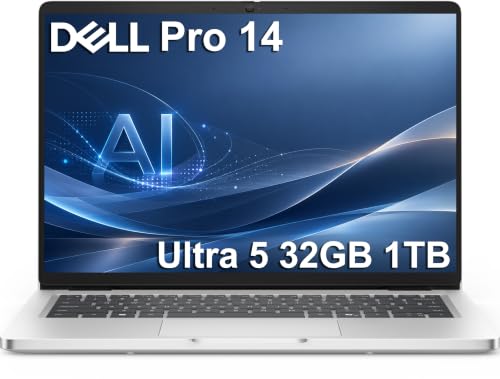
| Dell Pro 14 PC14250 | Frequent travelers with heavy workloads | 14-inch FHD+, Core Ultra 5 235U, 32GB DDR5, 1TB SSD |
| Lenovo ThinkPad T16 Gen 4 | Buyers who value ThinkPad reliability and configurability | 16-inch FHD+ IPS, Core Ultra 5 225U, up to 64GB DDR5 |
| HP EliteBook 6 G1i | Security-minded owners and managers | 16-inch, Core Ultra 7 255U, 16GB DDR5, 512GB SSD, Win 11 Pro |
| HP 17.3-inch Business Laptop | Desk-based owners who want a large screen | 10-core Core 5 120U, 12GB RAM, 768GB combined storage |
| Lenovo 15.6-inch FHD Business Laptop | A light-duty secondary machine | 8GB DDR5, 128GB storage, 1TB cloud, Office 365 |
How to Choose
Memory, storage, and processor thresholds
For a business laptop that will last five years, 16GB of RAM is the practical floor, and 32GB is wise if you run accounting software, a CRM, video calls, and dozens of browser tabs at once. An 8GB machine can handle email and documents but will feel slow as software grows. For storage, insist on a real SSD of at least 512GB; combined totals that include an SD card or cloud space are not the same thing as internal capacity. Core Ultra 5 and Ultra 7 chips from Intel give a good balance of speed and battery life for office work.
Operating system and security features
Windows 11 Pro matters more than it sounds. It brings BitLocker disk encryption, domain join, and remote desktop hosting, which Home editions lack. Look for a fingerprint reader or IR camera for fast, secure sign-in, and a TPM chip for encryption. Business lines such as Dell Pro, EliteBook, and ThinkPad typically offer vendor management tools and stronger warranty options than consumer models, which is where the added spending usually goes.
Screen size, ports, and docking
A 14-inch laptop suits a person who travels often; 16 inches suits an owner who works at a desk but still needs to move; 17.3 inches is for stationary use. Look for Thunderbolt 4 or USB-C with DisplayPort so one cable can drive a monitor, wired network, and charging. An HDMI port helps with client presentations, and a full-size Ethernet port can still rescue a call on a bad hotel network. FHD+ (a 16:10 screen) displays more rows of a spreadsheet than a standard 16:9 Full HD panel.
What to ignore, and where cheap models cut corners
Ignore Copilot or AI PC badges when comparing machines, because they mostly describe software features and a neural processor that most small-business apps do not yet use. Cheaper laptops cut corners on screen brightness, keyboard durability, port selection, and warranty length. Treat a one-year Office subscription as a trial, and remember that a large cloud allowance does not replace local storage when your Wi-Fi drops. Finally, ask what the warranty covers and how repairs are handled, because a week without a laptop costs a business far more than a few extra features ever save.
The 6 Best Options
Dell Pro 16 PC16250
A business laptop in Dell’s newer Pro line, positioned as the successor to the Latitude 5550, with a 16-inch anti-glare FHD+ display, an Intel Core Ultra 7 255U, 32GB of DDR5 RAM, a 1TB SSD, and Thunderbolt 4. It is for owners who need one machine for everything from spreadsheets to video meetings, such as a contractor who builds estimates in the office, presents bids on site, and keeps years of client files on the same drive without worrying about running out of room.
- Strength: 32GB of RAM and a 1TB SSD leave plenty of headroom for years of growth.
- Strength: the anti-glare FHD+ screen helps in bright offices and cafes.
- Trade-off: a 16-inch laptop is larger to carry than a 14-inch model.
Skip it if you travel weekly and carry the laptop in a small bag. An owner who works mostly from one desk will appreciate the size, and can dock it to a monitor and keyboard when the day starts.
Dell Pro 14 PC14250
The 14-inch sibling, successor to the Latitude 5450, with a Core Ultra 5 235U, 32GB of DDR5, a 1TB SSD, and an anti-glare FHD+ display. It targets business owners who need the same memory and storage in a more portable body, like a real-estate broker or a field consultant who moves between offices, airports, and client sites with a single bag and a charger.
- Strength: it keeps the 32GB and 1TB configuration in a smaller size.
- Strength: the 12-core processor listed in the title suits multitasking.
- Trade-off: the Core Ultra 5 chip sits a step below the Ultra 7 in the 16-inch model.
Skip it if you want a big screen for spreadsheets. A consultant who splits time between clients and an office will find it a balanced choice.
Lenovo ThinkPad T16 Gen 4
A 16-inch Copilot+ business laptop with an FHD+ IPS display and an Intel Core Ultra 5 225U, with memory options of 16GB, 32GB, or 64GB DDR5 and 512GB or larger storage. It suits owners who like the ThinkPad family and want to choose the configuration, including independent consultants who know exactly how much memory their analysis tools need and would rather not pay for capacity beyond that.
- Strength: the memory options reach 64GB for demanding workloads.
- Strength: the IPS display is a good fit for long work sessions.
- Trade-off: the exact memory and storage in the listing are customizable, so confirm the version before buying.
Skip it if you want a fixed, ready-to-ship configuration. Buyers who value keyboard reputation and business-class support tend to lean toward the ThinkPad line, though the keyboard feel itself is something to judge in person rather than from a spec sheet.
HP EliteBook 6 G1i
A 16-inch business laptop with a Core Ultra 7 255U, 16GB of DDR5, a 512GB SSD, Windows 11 Pro, long battery life, fast charging, and a fingerprint reader. It is for managers and owners who want business-class security features and a capable processor, particularly those who sign in many times a day and handle payroll, legal documents, or patient and client records that deserve a stricter login routine.
- Strength: the Ultra 7 processor and Windows 11 Pro cover performance and security.
- Strength: fast charging helps between meetings.
- Trade-off: 16GB of RAM and a 512GB SSD are less generous than the Dell Pro configurations.
Skip it if you plan to run heavy accounting or design software at once. A small-business owner who mostly handles email, documents, and calls will find it more than adequate.
HP 17.3-inch Business Laptop
A 17.3-inch laptop with AI Copilot features, a 10-core Intel Core 5 120U processor, 12GB of RAM, and 768GB of combined storage (256GB SSD plus a 512GB SD card). It suits owners who want a large screen at a modest level of spending, for example a shop or salon owner who handles scheduling, inventory sheets, and payroll at a back-office counter and rarely leaves the building.
- Strength: the large display is comfortable for spreadsheets and invoices.
- Strength: the 10-core processor handles everyday office tasks.
- Trade-off: much of the storage is an SD card, so internal space is only 256GB.
Skip it if you want a business-class warranty or a lightweight machine. It works best as a stationary desk laptop.
Lenovo 15.6-inch FHD Business Laptop
A slim 15.6-inch laptop with an Intel processor, 8GB of DDR5, 128GB of storage, 1TB of cloud storage, Copilot AI, and Office 365. It is a light-duty option for tasks like invoicing, email, and web research, the kind of work a part-time bookkeeper, a seasonal employee, or a new founder with a tight launch budget does before deciding what a long-term machine should look like.
- Strength: the Office 365 bundle and cloud space help get started quickly.
- Strength: the 15.6-inch Full HD screen is a familiar, comfortable size.
- Trade-off: 8GB of RAM and 128GB of storage will feel limited within a year or two.
Skip it if this will be your primary machine for the next five years. It fits better as a spare for a front desk or an employee.
Which One Fits Your Situation
You travel often and need power in a smaller frame
The Dell Pro 14 PC14250 packs 32GB and 1TB into a 14-inch body. If your trips are shorter and you mainly work from a hotel desk, the HP EliteBook 6 G1i is the other choice, with fast charging helping between meetings.
You work from a desk and want maximum capability
The Dell Pro 16 PC16250 offers the strongest processor and memory combination in the group. The ThinkPad T16 Gen 4 is the alternative for those who want to configure memory up to 64GB.
You manage sensitive client data
The HP EliteBook 6 G1i pairs Windows 11 Pro with a fingerprint reader, which supports a stronger sign-in routine.
You need an inexpensive extra machine for staff
The Lenovo 15.6-inch laptop covers basic tasks, and the HP 17.3-inch model adds screen size for a fixed workstation.
Common Mistakes
- Buying a Home edition of Windows and missing disk encryption and remote tools.
- Counting an SD card as if it were internal storage.
- Choosing 8GB of RAM for a laptop meant to last five years.
- Skipping a warranty review, then facing downtime without a fast repair option.
- Paying for AI badges instead of memory, storage, and a better display.
Related guides
- Gaming Chair Cushions And Lumbar Supports
- Warranty Considerations When Buying On Sale
- How To Use Camelcamelcamel For Amazon Deals
Frequently Asked Questions
How much RAM does a business laptop need?
Sixteen gigabytes is a safe minimum for most owners, and 32GB suits heavy multitasking. Eight gigabytes is acceptable only for light tasks.
Is a business-class laptop worth it over a consumer model?
Often yes. Business lines add stronger build quality, security features, ports, and warranty options, which reduce downtime and protect customer data.
Do I need Windows 11 Pro?
If you store client or financial data, yes. Pro adds BitLocker encryption and remote management features that Home does not include.
What size is best for travel?
Fourteen inches is the best balance of screen space and weight. Larger 16-inch and 17-inch models suit desk-based work.
Related guides
More from Amazon
Programs that pair well with the guide above. Offers and eligibility are set by Amazon and may change.
Free shipping on eligible items, Prime Video and more. Eligible new members can start with a free trial.
Start a Prime free trialAd-free music streaming. Eligible new subscribers can start with a free trial.
Try Music Unlimited freeA Prime membership for ages 18-24 with a trial period. Eligibility is set by Amazon.
See Prime for Young AdultsAudiobooks and podcasts to listen to on the go. Eligible new members can start with a free trial.
Try Audible freeAs an Amazon Associate we earn from qualifying purchases.









