
Lenovo sells business laptops under several names, and the keyword hides the real decision: do you want a value-focused V-Series machine, a mainstream 15.6-inch model with a bundled office suite, or a ThinkPad built for a managed fleet? The three groups look similar in a search grid, yet they differ in memory, ports, and the kind of buyer they serve. Spending a few minutes sorting them saves a lot of regret after the order is placed. It also helps to decide early whether the machine will be bought once for one person or repeated across a whole team, since that changes how much support and standardization matter.
This guide is for small-business owners, office managers, remote employees, and anyone equipping a team with Lenovo hardware in 2026. It covers five distinct models, from the V15 Gen 4 and a Ryzen 7 V-Series to a basic 15.6-inch Business model and two ThinkPads with 16-inch screens. Listings that repeat the same machine with only a cloud-storage bundle or a different memory kit were treated as one product. All judgments rest on the listed specs, not on performance claims.
Our Top Picks
 Lenovo V15 Gen 4 Business Laptop16GB RAM | 512GB SSD14.13 x 9.29 x 0.78 inches3.64 poundsCheck on Amazon
 Lenovo V-Series V15 Business Laptop40GB RAM | 1TB SSD14.13 x 9.29 x 0.78 inches3.59 poundsCheck on Amazon
Top 3 picks at a glance
Quick Picks
As an Amazon Associate we earn from qualifying purchases at no extra cost to you.



| Product | Best for | Key spec from the title |
|---|---|---|
| Lenovo V15 Gen 4 | Value office work with full ports | Core i5-13420H, HDMI, RJ45, Windows 11 Pro |
| Lenovo V-Series V15 (Ryzen 7) | Memory-hungry multitasking | AMD Ryzen 7, 24GB or 40GB RAM, 1TB SSD |
| Lenovo Business 15.6″ FHD | Light email and web use | 8GB DDR5, 128GB storage, Office 365, Wi-Fi 6 |
| Lenovo ThinkPad E16 Gen 3 | Touch-enabled big-screen work | 16″ FHD+ touch, Core 5 210H, 32GB DDR5, 1TB SSD |
| Lenovo ThinkPad L16 | Managed enterprise fleets | 16″ FHD+, Core Ultra 5 225U, 2x Thunderbolt 4 |
How to Choose
Match the line to the job
V-Series laptops focus on value and keep ports like HDMI and RJ45 Ethernet that thinner machines drop. ThinkPad E and L models target businesses that care about durability, manageability, and long support cycles. The plain Lenovo Business 15.6-inch model sits at the entry tier and suits tasks that rarely strain the hardware. Decide which of those three describes your workload before comparing processors. Mixing categories is the most common source of disappointment, because a value machine judged against a fleet laptop looks weak on support, and the reverse looks overpriced on features.
Memory and storage thresholds
Aim for at least 16GB of RAM and 512GB of storage if the laptop will run for several years. Eight gigabytes with 128GB, as in the entry model, is workable for a browser and a word processor but fills up fast with updates, attachments, and a few collaboration apps, and a nearly full drive slows down an otherwise capable processor. Larger configurations such as 24GB, 32GB, or 40GB suit spreadsheets, virtual meetings, and many open tabs at once.
Screen size, keyboard, and ports
A 15.6-inch FHD panel is the common baseline, and a 16-inch FHD+ screen adds vertical room, which helps with documents and spreadsheets. A numeric keypad matters for bookkeeping and data entry, and several models here include one. Check for Thunderbolt 4 or USB-C if you use docks, and for RJ45 Ethernet if your office wiring still matters. Touch is a convenience, not a requirement, and a plain matte panel often reads better in bright rooms than a glossy touchscreen.
What to ignore
Listing titles love comparisons to other processors, such as a claim to beat a particular i7. Treat those as marketing and look at the actual chip name, core count, and memory instead. Ignore bundled accessories, trial subscriptions, or cloud-storage add-ons when comparing value, since they do not change the machine. Budget models cut corners first on storage, memory, and port selection, so inspect those lines closely. Battery claims such as long battery life carry no number in these titles, so treat them as unverified until you see a rated figure.
The 5 Best Options
Lenovo V15 Gen 4
The V15 Gen 4 pairs a 15.6-inch FHD display with an Intel Core i5-13420H, Windows 11 Pro, and a port list that includes HDMI and RJ45. It fits small offices and home workers who want a no-nonsense machine with a numeric keypad and a professional operating system at a mid-range tier. The H-series processor in the title points toward stronger sustained performance than the low-power chips found on many thin office models, which helps when several apps stay open all day.
- Strength: Windows 11 Pro supports business features such as domain join and device encryption tools.
- Strength: HDMI, RJ45, a webcam, and a numeric keypad cover most office needs without adapters.
- Trade-off: the title leaves out memory and storage, so confirm both before buying.
Skip it if you want a touchscreen or a thinner, travel-focused design; the 15.6-inch chassis is built for desks and occasional moves between rooms rather than daily commuting.
Lenovo V-Series V15 (Ryzen 7)
This V15 swaps in an AMD Ryzen 7 processor with a generous amount of memory, offered at 24GB or 40GB, and a 1TB SSD. It keeps the numeric keypad, HDMI, RJ45, and webcam. It is for users who run spreadsheets, browser-heavy workflows, and several programs at once. The memory choice is the main variable, so pick 24GB for ordinary multitasking and the larger kit only if you routinely hold huge workbooks or many browser windows.
- Strength: 24GB to 40GB of RAM and a 1TB SSD give headroom well beyond typical entry laptops.
- Strength: the full port list means a docking station is optional.
- Trade-off: it is a value-line chassis, so it lacks the managed-fleet focus of the ThinkPads.
Skip it if you need a vPro-style fleet management story or Thunderbolt, neither of which the title mentions.
Lenovo Business 15.6″ FHD Laptop
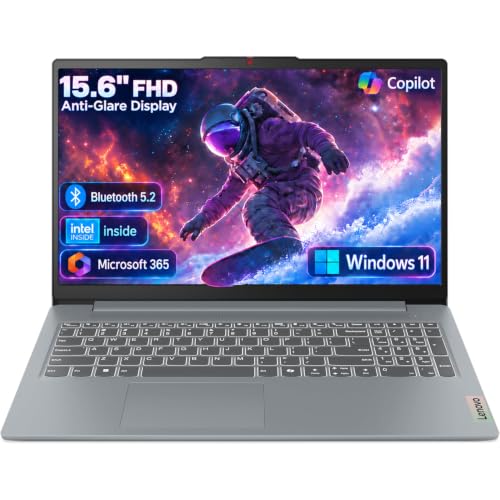
This entry model has a 15.6-inch FHD anti-glare screen, an Intel processor, 8GB of DDR5, and 128GB of storage, with Office 365, Wi-Fi 6, and USB-C. It suits light users such as retirees running a home office, students, or staff who mostly handle email and web apps. The included subscription and USB-C charging simplify setup, which counts for buyers who just want to open the lid and begin working.
- Strength: the bundled Office 365 and USB-C charging reduce extra purchases and cables.
- Strength: an anti-glare panel is easier to read near windows and under office lighting.
- Trade-off: 8GB of RAM and 128GB of storage limit how long it will stay comfortable.
Skip it if you plan to multitask heavily or keep large local files; the small drive is the first limit you would hit.
Lenovo ThinkPad E16 Gen 3
The ThinkPad E16 Gen 3 is a 16-inch FHD+ touchscreen with a Core 5 210H, 32GB of DDR5, a 1TB SSD, an IPS anti-glare display, and a numeric keypad. It is the strongest all-round pick for professionals who want a large, productive screen and ThinkPad-line credibility. Touch input is a nice extra for signing documents or scrolling long reports, and the numeric keypad suits anyone who enters figures all day.
- Strength: 32GB of DDR5 and a 1TB SSD make it comfortable for years of heavy office work.
- Strength: the 16-inch FHD+ IPS touchscreen offers extra vertical room for documents and sheets.
- Trade-off: a 16-inch laptop is bulkier to carry than a 14-inch ultraportable.
Skip it if you travel every week and want something that slips into a small bag, or if you prefer a non-touch panel for battery reasons.
Lenovo ThinkPad L16
The ThinkPad L16 combines a 16-inch FHD+ screen with a 12-core Intel Core Ultra 5 225U and two Thunderbolt 4 ports, and the listing is marketed as an enterprise AI PC. It targets IT departments and larger businesses that dock laptops at desks and value standardized fleet hardware. As a business-class 16-inch machine it also suits roles where one laptop must work both at a desk and in meeting rooms.
- Strength: two Thunderbolt 4 ports make docking and multi-monitor setups easy.
- Strength: the Core Ultra 5 platform is built around newer, efficiency-focused silicon.
- Trade-off: the title does not list memory or storage, so confirm the configuration first.
Skip it if you are an individual buyer who does not need enterprise features, because the fleet-oriented design adds little for a single user.
Which One Fits Your Situation
You run a small office on a sensible budget
Pick the Lenovo V15 Gen 4. Windows 11 Pro and a complete port set cover everyday business needs without stepping up to the ThinkPad tier. Check the memory line on the product page first, because the title does not state it.
You live in spreadsheets and dozens of browser tabs
The Lenovo V-Series V15 with the Ryzen 7 and its large RAM options is the value route, while the Lenovo ThinkPad E16 Gen 3 is the more polished choice with its 32GB of DDR5 and touchscreen.
You are equipping a managed team
Standardizing on one model simplifies imaging, spare parts, and training.
The Lenovo ThinkPad L16 fits best because of its two Thunderbolt 4 ports and fleet-oriented positioning, provided you confirm the memory and storage configuration. For a handful of seats, the E16 Gen 3 is a simpler alternative with known memory and storage.
You only need email and the web
Keep expectations modest here and spend the saved money on a backup drive or a headset for calls.
The Lenovo Business 15.6-inch model is enough, with Office 365 included. Treat it as a short-term machine rather than a long-term investment, and plan to replace it sooner than the others here.
Common Mistakes
- Assuming every Lenovo business laptop is a ThinkPad, when V-Series and entry models are different products.
- Buying 8GB of RAM and 128GB of storage for work that includes spreadsheets and video calls.
- Trusting processor comparisons in a title instead of the actual chip name.
- Skipping a check of the listed memory and storage when the title leaves them out.
- Counting the same machine twice because listings differ only by a cloud-storage bundle.
Frequently Asked Questions
Are V-Series laptops good for business?
They suit small offices that want full ports and a numeric keypad at a reasonable tier. They lack the fleet management focus of the ThinkPad line, and warranty and service terms vary by seller, so read them before ordering.
Do I need Windows 11 Pro?
Choose Pro if you join a company domain, use device encryption, or need remote management. Home editions are fine for solo use, though upgrading later costs extra and takes time.
Is 16 inches too big for a business laptop?
For desk work, no. It gives more room for spreadsheets and side-by-side windows. For frequent travel, a smaller chassis is easier to carry, so weigh how often the laptop leaves the building.
How much memory should I get?
Sixteen gigabytes is a good minimum for several years of use. Entry 8GB models are best kept for light tasks only, and they cannot be relied on if your software load grows.
Related guides
More from Amazon
Programs that pair well with the guide above. Offers and eligibility are set by Amazon and may change.
Free shipping on eligible items, Prime Video and more. Eligible new members can start with a free trial.
Start a Prime free trialAd-free music streaming. Eligible new subscribers can start with a free trial.
Try Music Unlimited freeA Prime membership for ages 18-24 with a trial period. Eligibility is set by Amazon.
See Prime for Young AdultsAudiobooks and podcasts to listen to on the go. Eligible new members can start with a free trial.
Try Audible freeAs an Amazon Associate we earn from qualifying purchases.









