An everyday laptop has one job: stay out of the way. It opens a dozen browser tabs, handles video calls, edits a spreadsheet, plays a streaming show on the couch, and does it all again tomorrow without a fuss. The real decision is not about peak speed. It is about which compromises you can live with, because every machine in this class cuts somewhere, whether that is memory, storage, screen brightness, or the operating system you prefer.
This guide is written for people who want one reliable machine for email, homework, household paperwork, light photo sorting, and entertainment, not for gamers or video editors. In 2026 the field splits into three camps: very light Intel N150 and similar entry chips, the Core 3 class with 512GB of storage, and one Apple option for those who would rather leave Windows behind. The seven laptops below cover all three, and the tips that follow show how to tell them apart from the spec line alone.
Our Top Picks
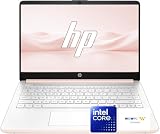
 HP Everyday Laptop • Microsoft Office 365 Included8GB RAM12.7 x 8.8 x 0.7 inches3.24 PoundsCheck on Amazon


Top 3 picks at a glance
Quick Picks
As an Amazon Associate we earn from qualifying purchases at no extra cost to you.



| Product | Best for | Key spec from the title |
|---|---|---|
| HP 14 Inch Everyday (N150) | Carrying to class or the office | Intel N150, 128GB SSD, Microsoft 365 included |
| HP Everyday Laptop (Intel, Office 365) | Light home use with cloud backup | 128GB storage, WiFi 6, fast charge |
| HP Everyday Slim (AMD) | Buyers who prefer an AMD chip | 4GB DDR5 RAM, 128GB SSD |
| Dell 15.6 (Core 3 100U, 300 nits) | Roomy storage and a brighter screen | 8GB RAM, DDR5, 512GB SSD |
| Apple MacBook Neo 13-inch | Leaving Windows behind | A18 Pro chip, 8GB unified memory |
| HP Everyday Slim (N150, DDR5) | Portable second computer | Intel N150, 4GB DDR5, 128GB SSD |
| Dell 15.6 (Core 3 100U, 250 nits) | Stretching storage on a tight plan | 8GB RAM, DDR4, 512GB SSD |
How to Choose
Memory decides how long the laptop stays pleasant
Eight gigabytes is the practical floor for a Windows machine you plan to keep for years. Four gigabytes can boot and browse, but a dozen tabs plus a video call will make it stall. Two listings below pair a low-power chip with only 4GB, so treat them as light-duty machines. If a listing does not state memory type, check whether it is DDR4 or DDR5, since the newer type is a small bonus rather than a deciding factor.
Storage: SSD size versus cloud promises
Several HP titles advertise 128GB of SSD plus 1TB of cloud storage. Cloud space helps with backups but does not store apps, and Windows itself plus updates will eat a large share of 128GB. If you keep photos, school files, or downloads locally, a 512GB SSD like the Dell listings is far more comfortable. Also check whether the cloud allotment is a time-limited subscription before counting on it. As a rule of thumb, leave at least a third of the drive free so Windows updates install without trouble.
Screen size, brightness, and finish
A 14-inch panel is easier to carry; a 15.6-inch panel is easier to read and usually adds a number pad. Brightness matters more than most buyers expect: the Dell listings state 300 nits and 250 nits with an anti-glare finish, which is the kind of detail that helps near a window. When a title does not state brightness, assume a basic panel and look at the full listing.
Processor class and what to ignore
Intel N150 chips are built for efficiency and basic tasks. Core 3 100U steps up for multitasking. Ignore phrases like “high performance” and “long battery” when no capacity or hours are given, since they cannot be compared. Focus on CPU model, RAM, storage, and Wi-Fi standard instead. Budget models cut corners on screen quality, storage, and memory, in that order. A useful habit is to write down the four numbers you will live with every day: RAM, SSD size, screen size, and brightness. Anything beyond that is secondary for an everyday machine.
The 7 Best Options
HP 14 Inch Everyday (N150)
This compact HP targets people who move around with their laptop: students, commuters, and anyone using it mainly for documents and streaming. The title lists an Intel N150 CPU, a 128GB SSD, Windows 11, Copilot AI features, and Microsoft 365 included, which means the office software question is settled on day one. For a first laptop or a replacement for an aging family computer, that kind of ready-to-use setup removes a lot of the guesswork.
- Strength: the 14-inch format keeps the footprint small for bags and cramped desks.
- Strength: bundled Microsoft 365 and cloud storage cover documents without extra software shopping.
- Trade-off: 128GB of local storage fills up quickly, so plan on external or cloud backups.
Skip it if you keep large photo libraries on the device or want a bigger display for long work sessions.
HP Everyday Laptop (Intel, Office 365)
This HP is aimed at households that need a simple computer for browsing, school forms, and video chat. The title lists an Intel CPU, 128GB storage, Windows 11, Copilot AI, Office 365, WiFi 6, fast charge, and 1TB of cloud storage.
- Strength: WiFi 6 helps on busy home networks with several devices online.
- Strength: fast charge support is useful when the laptop gets plugged in only between errands.
- Trade-off: the exact processor and memory are not clear from the shortened title, so confirm both on the listing before buying.
Skip it if you need to know the RAM amount at a glance or you plan to install large programs. Shoppers who like to compare every spec line side by side will find the other listings easier to judge.
HP Everyday Slim (AMD)
This is the only AMD-powered HP in the group, and the title highlights 4GB DDR5 RAM, a 128GB SSD, 1TB of cloud storage, and Windows 11. It suits someone who wants a thin machine for web pages, streaming, and basic office work without much multitasking. It is the option to look at when a particular preference for AMD silicon outweighs the usual Intel default in this price tier.
- Strength: DDR5 memory is the newer standard, which gives a small edge in efficiency.
- Strength: the slim design suits carrying around the house or to a coffee shop.
- Trade-off: only 4GB of RAM limits how many tabs and apps stay responsive together.
Skip it if your day regularly involves many browser tabs plus a video call at the same time, because the listed memory is the tightest limit in this roundup.
Dell 15.6 (Core 3 100U, 300 nits)
This Dell is the most balanced Windows pick here for a long-term main computer. The title lists a full HD 15.6-inch screen, Intel Core 3 100U, 8GB RAM, DDR5, a 512GB SSD, Wi-Fi 6, Bluetooth, and a 300 nits anti-glare WVA panel.
- Strength: 512GB of SSD storage leaves real room for files, photos, and installed programs.
- Strength: 300 nits with an anti-glare finish is a clear screen advantage over unspecified panels.
- Trade-off: a 15.6-inch body is less pocketable than the 14-inch HP models.
Skip it if you prioritize the smallest, lightest frame for daily commuting, or if you will rarely use the extra storage it offers.
Apple MacBook Neo 13-inch
For buyers open to macOS, this 13-inch Apple notebook brings an A18 Pro chip, a Liquid Retina display, and 8GB of unified memory, with Apple Intelligence features mentioned in the title. It suits people already using an iPhone who want files, messages, and photos to sync easily.
- Strength: the Liquid Retina display is described as part of the package, which matters for reading and video.
- Strength: Apple integration makes sense for existing iPhone and iPad households.
- Trade-off: it does not run Windows-only software, and the storage tier shown in the shortened title is modest.
Skip it if your workplace or school depends on Windows programs, and look closely at the full listing for the exact storage size before ordering.
HP Everyday Slim (N150, DDR5)
This slim HP pairs an Intel N150 processor with 4GB of DDR5 RAM and a 128GB SSD, plus 1TB of cloud storage, Windows 11, and Microsoft 365. It fits the role of a portable second computer for streaming, email, and quick tasks, sitting in the same lightweight tier as the other N150 model above.
- Strength: Microsoft 365 is listed, so documents and spreadsheets are covered.
- Strength: the portable, slim positioning suits light travel.
- Trade-off: 4GB of memory and 128GB of storage leave little headroom as software grows.
Skip it if this will be your only computer for several years, since software and browsers keep asking for more memory over time.
Dell 15.6 (Core 3 100U, 250 nits)
A close sibling of the other Dell, this version lists 8GB RAM, DDR4 memory, a 512GB SSD, an anti-glare IPS WVA panel at 250 nits, Intel UHD Graphics, and Wi-Fi 6 with Bluetooth. It targets buyers who want storage and a full-size screen more than the brightest display.
- Strength: the same 512GB SSD and 8GB RAM combination as its sibling.
- Strength: IPS panel wording suggests wider viewing angles for shared screens.
- Trade-off: 250 nits is dimmer than the other Dell, and DDR4 is the older memory type.
Skip it if you often work near bright windows or outdoors, where the extra brightness of the other Dell would help.
Which One Fits Your Situation
You carry it daily
Go with the HP 14 Inch Everyday (N150). The smaller screen and included Microsoft 365 suit class notes and commuting.
It is the only computer in the house
Pick the Dell 15.6 with 300 nits. The 512GB SSD and 8GB RAM give it room to age gracefully.
You already live in Apple’s ecosystem
The MacBook Neo 13-inch makes sense, since sync with an iPhone is smooth and the Liquid Retina display is part of the package.
You need a second laptop for streaming and email
The HP Everyday Slim (N150, DDR5) is enough for light duty and keeps the footprint small.
Common Mistakes
- Counting cloud storage as local space; cloud plans do not hold installed apps.
- Accepting 4GB of RAM for a machine that must last several years.
- Ignoring screen brightness and finish when the laptop is used near windows.
- Assuming “Office included” means a permanent license; check the term on the listing.
- Choosing by marketing phrases such as “long battery” without any stated capacity or hours.
Related guides
- Gaming Chair Cushions And Lumbar Supports
- Travel Backpack With Laptop Compartment
- Business Laptops With Long Battery Life
Frequently Asked Questions
Is 128GB enough for an everyday laptop?
It works for browsing, streaming, and documents, but fills quickly once updates and downloads accumulate. If you can, choose 512GB like the Dell listings.
Is 8GB of RAM enough?
For everyday use, yes. It handles many tabs, office apps, and video calls comfortably. Four gigabytes is workable only for very light use.
Should I pick a 14-inch or 15.6-inch laptop?
Choose 14 inches if you carry it often. Choose 15.6 inches if it mostly sits on a desk and you want an easier-to-read screen.
Is a MacBook better than a Windows laptop for daily use?
It depends on your software. If you rely on Windows-only programs, stay with Windows. If you mainly browse and use cloud tools, either route works.
Related guides
More from Amazon
Programs that pair well with the guide above. Offers and eligibility are set by Amazon and may change.
Free shipping on eligible items, Prime Video and more. Eligible new members can start with a free trial.
Start a Prime free trialAd-free music streaming. Eligible new subscribers can start with a free trial.
Try Music Unlimited freeA Prime membership for ages 18-24 with a trial period. Eligibility is set by Amazon.
See Prime for Young AdultsAudiobooks and podcasts to listen to on the go. Eligible new members can start with a free trial.
Try Audible freeAs an Amazon Associate we earn from qualifying purchases.