A laptop that has to serve both a job and a private life is a different shopping problem from a pure work machine. On Monday it runs spreadsheets, video meetings, and a shared drive. On Saturday it streams a film, stores family photos, and handles online banking. The same device has to look professional in a conference room and feel comfortable on the couch, which makes a few details matter more than raw speed: the Windows edition, the screen, the keyboard, and enough storage to keep both worlds apart.
This guide is for freelancers, small-business owners, remote employees, and anyone who carries one computer for everything. The seven laptops below range from a 15.6-inch entry model to two touchscreen Dell machines with 1TB of storage. As of 2026, a sensible plan is to pick a tier first, decide on screen size, and then confirm the Windows edition, because a locked-down version can block the business software you need. The checklist after the table shows how to read those details.
Our Top Picks
 Dell 15.6" FHD Touchscreen Business Laptop16GB RAM | 1TB SSD14.11 x 9.27 x 0.75 inches3.65 PoundsCheck on Amazon



Top 3 picks at a glance
Quick Picks
As an Amazon Associate we earn from qualifying purchases at no extra cost to you.




| Product | Best for | Key spec from the title |
|---|---|---|
| HP 17 Business Laptop (Ryzen 5) | Large-screen daily work | 16GB RAM, 512GB SSD, 17.3″ FHD, numeric keypad |
| Lenovo Business 15.6 FHD | Light office duty with USB-C | 8GB DDR5, 128GB storage, WiFi 6, anti-glare |
| HP 17 Business Student (Ryzen 5 7430U) | Copilot PC buyers on a large screen | Ryzen 5 7430U, Copilot PC |
| HP 15.6 (Intel N200) | Basic tasks on a tight plan | 4 cores, 4GB RAM, 128GB SSD, S Mode |
| Dell 16 Touchscreen (Core 7 150U) | Heavy multitasking with a tall screen | 32GB DDR5, 1TB SSD, 16:10 FHD+, 300 nits |
| Dell 15.6 Touchscreen (Ultra 7 255U) | Fast, storage-rich all-rounder | 12-core Ultra 7, 16GB DDR5, 1TB SSD |
| HP 15.6 Touchscreen (Ryzen 7 7730U) | Windows 11 Pro on a mid-size body | Ryzen 7, 16GB, 512GB SSD, FHD IPS |
How to Choose
Windows edition and S Mode
Business use often depends on features that only Windows 11 Pro provides, such as device encryption management and joining a company domain. A title that says “Win 11 Home S Mode,” like the HP N200 model, restricts installs to the Microsoft Store until you switch out of S Mode. That switch is free but one-way, so decide before you buy. If your employer mandates Pro, filter for it directly.
RAM and storage for two workloads
Plan on 16GB of RAM if you run a browser, a communications app, and an office suite together. Eight gigabytes works for lighter loads. For storage, split the drive mentally: 256GB for work files and apps and another 256GB for personal media means 512GB is the practical starting point. A 1TB SSD, as on the two Dells, removes the planning entirely.
Screen, keyboard, and ports
Full HD is the minimum. A 16:10 panel, such as the Dell 16, shows more rows of a document than a 16:9 screen of similar width. Touchscreens help with signing documents, flipping through PDFs, and casual use on the couch. A full-size keyboard with a number pad speeds up finance work, and a backlight helps in dim rooms. USB-C is useful for single-cable docking, so confirm port types on the full listing.
What to ignore and where budget models cut
Ignore “business” as a label by itself, since several listings use it for entry hardware. Cheap models cut RAM, storage, and screen quality first. Watch for totals that combine an SSD with an SD card or external drive. Marketing lines about battery life are not comparable without hours or capacity, so lean on the processor class instead. A good rule is to buy for the heaviest week of your year, not the average one, because a business laptop that struggles at deadline time costs more in frustration than any spec saving.
The 7 Best Options
HP 17 Business Laptop (Ryzen 5)
This HP is the most complete value in the group on paper. The title lists a Ryzen 5 processor, 16GB of RAM, a 512GB SSD, a 17.3-inch FHD display, and a numeric keypad. It suits an office worker who wants a big workspace at a desk and a comfortable keyboard for data entry, then streams video in the evening on the same screen. A bookkeeper who also manages the household budget on weekends is the kind of buyer it serves well.
- Strength: 16GB of RAM and 512GB of storage cover work and personal files together.
- Strength: the numeric keypad and big display suit accounting and spreadsheet jobs.
- Trade-off: a 17-inch body is less friendly for travel.
Skip it if you carry your laptop between sites every day or need a touchscreen, since neither is part of the listed specifications.
Lenovo Business 15.6 FHD
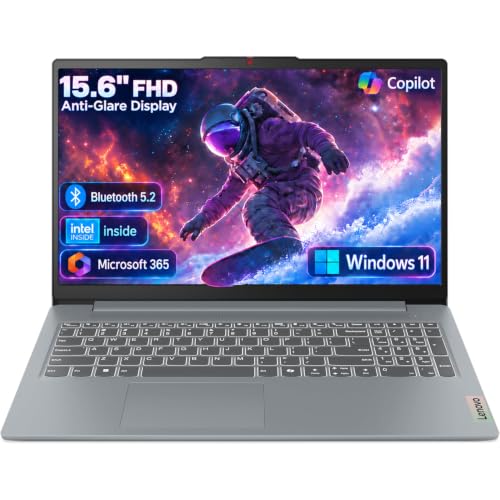
This Lenovo is built for basic office needs. The title lists a 15.6-inch FHD anti-glare screen, an Intel processor, 8GB of DDR5 memory, 128GB of storage, Office 365, Copilot AI, WiFi 6, and USB-C. It fits a light user who mostly emails, edits documents, and browses. A part-time consultant or a parent running a home office would use it as a straightforward everyday tool, with Office 365 listed in the title for documents.
- Strength: DDR5 memory and USB-C are modern touches at this level.
- Strength: the anti-glare finish helps in bright offices.
- Trade-off: 128GB of storage is tight for combined work and personal files.
Skip it if you store photo libraries or large project folders locally. Check the listing for the exact processor model before ordering.
HP 17 Business Student (Ryzen 5 7430U)
The short title for this HP names a Ryzen 5 7430U and a Copilot PC designation and positions it for both business and student users. That makes it a candidate for a family laptop that also does occasional work from home on a roomy 17-inch screen. The Copilot PC wording suggests newer AI-related features, though buyers should not rely on that label alone to judge speed.
- Strength: the Ryzen 5 7430U is a recognized mainstream mobile chip.
- Strength: the large format suits split-screen work.
- Trade-off: the title leaves out memory and storage, so those must be confirmed on the full listing.
Skip it if you cannot verify the RAM and SSD size before buying, or if you want a compact body.
HP 15.6 (Intel N200)
This HP is the entry point in the group: an Intel 4-core N200, 4GB of RAM, a 128GB SSD, Windows 11 Home in S Mode, and a long-battery claim. It suits a secondary machine for email, browsing, and simple document edits. Treat it as a travel spare or a laptop for a household member who only needs the basics, not as the main business computer.
- Strength: the portable 15.6-inch size keeps the overall package approachable.
- Strength: the efficient chip is aimed at light office work.
- Trade-off: 4GB of RAM and S Mode restrict how far it can grow as a business tool.
Skip it if you need desktop apps outside the Microsoft Store or any real multitasking.
Dell 16 Touchscreen (Core 7 150U)
This Dell is the memory leader in the group. It lists a Core 7 150U processor, 32GB of DDR5 RAM, a 1TB SSD, a 16:10 FHD+ touchscreen at 300 nits with IPS technology, and a full-size backlit keyboard with a number pad. It is built for someone who keeps dozens of tabs, large files, and communications apps open all day, such as an analyst, a project manager, or a freelancer handling client folders next to personal media.
- Strength: 32GB of RAM and 1TB of storage leave generous headroom for years.
- Strength: the 16:10 FHD+ display at 300 nits is easier to read for long sessions.
- Trade-off: a 16-inch body is larger than a standard laptop.
Skip it if you want a light carry or do not need that much memory.
Dell 15.6 Touchscreen (Ultra 7 255U)
This Dell pairs a 12-core Intel Ultra 7 255U, quoted up to 5.2GHz, with 16GB of DDR5 RAM, a 1TB SSD, a backlit keyboard, and a 15.6-inch FHD touchscreen. It suits professionals who want fast response and a lot of space without the bulk of a larger display. It makes sense for a consultant who splits time between client sites, a home desk, and the couch, and who wants one device for all three.
- Strength: the high-end Ultra 7 chip is the strongest processor in the group.
- Strength: 1TB of storage and a backlit keyboard suit long days.
- Trade-off: the shortened title does not show the display brightness.
Skip it if you only do light tasks and would not use the extra performance.
HP 15.6 Touchscreen (Ryzen 7 7730U)
The HP in this slot lists a Ryzen 7 7730U, 16GB of RAM, a 512GB SSD, an FHD IPS touchscreen, AMD Radeon graphics, Windows 11 Pro, Wi-Fi 6, a Copilot key, and a numeric keypad. It is a good fit when Windows 11 Pro matters for work, for instance when an IT team needs to manage the device or when you plan to join a company network from home.
- Strength: Windows 11 Pro is stated, which many employers require.
- Strength: Ryzen 7 and 16GB handle demanding office multitasking.
- Trade-off: 512GB is smaller than the 1TB Dell options.
Skip it if you store large media libraries on the laptop itself.
Which One Fits Your Situation
You work from a desk and need a big display
The HP 17 Business Laptop (Ryzen 5) provides a large FHD screen and a number pad at a sensible tier.
Your employer requires Windows Pro
Choose the HP 15.6 Touchscreen (Ryzen 7 7730U), where Windows 11 Pro is stated outright.
You run heavy multitasking and keep files for years
The Dell 16 Touchscreen with 32GB of RAM and a 1TB SSD is the most future-proof choice here.
You need a simple second laptop for light office tasks
The Lenovo Business 15.6 FHD covers email, documents, and USB-C connections at the lighter end.
Common Mistakes
- Overlooking S Mode on a laptop meant for installing desktop business software.
- Buying 128GB of storage for a machine that must hold both work and personal data.
- Assuming “business” in a title guarantees Windows Pro or better hardware.
- Choosing a 16-inch or 17-inch model without considering the weight of a daily commute.
- Counting an SD card or external drive as part of the internal storage.
Frequently Asked Questions
Do I need Windows 11 Pro for work?
Not always, but many companies require it for encryption and domain features. If your employer manages devices, ask before buying a Home edition.
Is a touchscreen worth it on a business laptop?
It is useful for signing and annotating documents, and it makes casual browsing easier. It is not essential for typing-heavy work.
How much RAM do I need for business and personal use?
Sixteen gigabytes is the comfortable target. Eight works for light tasks, while 32GB suits heavy multitasking or large data files.
Is 512GB of storage enough?
For most people, yes, if you use cloud backup for large media. If you keep local archives, a 1TB drive is safer.
Related guides
More from Amazon
Programs that pair well with the guide above. Offers and eligibility are set by Amazon and may change.
Free shipping on eligible items, Prime Video and more. Eligible new members can start with a free trial.
Start a Prime free trialAd-free music streaming. Eligible new subscribers can start with a free trial.
Try Music Unlimited freeA Prime membership for ages 18-24 with a trial period. Eligibility is set by Amazon.
See Prime for Young AdultsAudiobooks and podcasts to listen to on the go. Eligible new members can start with a free trial.
Try Audible freeAs an Amazon Associate we earn from qualifying purchases.