A fast gaming PC and a quick internet plan only get you so far if the router in the middle of your network is creating lag. The best gaming routers are built to keep ping low and connections stable when the whole household is online at once, prioritizing game traffic over downloads, streams, and video calls. They also bring stronger radios, faster processors, and ports that make a real difference for competitive play.
This guide rounds up five gaming routers: tri-band WiFi 6 flagships for busy homes, dual-band models that balance speed and value, a router built around gaming-focused software, and a WiFi 7 option for the newest standard. Every pick supports quality of service controls, modern security, and enough wired ports for a PC or console.
As an Amazon Associate, we earn from qualifying purchases.
Top 3 picks at a glance

What to look for in a gaming router
Start with the WiFi standard. WiFi 6 is the current sweet spot for most homes, offering better handling of many devices at once than older WiFi 5 hardware. WiFi 7 is newer and faster still, and it adds a wider channel and lower latency, but it only shines if your devices support it. Read speed classes with realistic expectations: an AX6000 rating describes combined theoretical throughput across all bands, not the speed any single device will see.
Band count matters for crowded homes. A tri-band router adds a second 5 GHz band that can be dedicated to gaming devices or used as a wireless backhaul for a mesh system, while dual-band models are fine for smaller households. Antennas and beamforming help push a cleaner signal to your gaming room.
For gaming specifically, QoS is the feature that protects your ping. Good gaming routers can prioritize a specific PC or console, or game traffic in general, so a big download elsewhere does not spike your latency mid-match. Gaming software suites go further with geo-filters that limit matchmaking to nearby servers and dashboards that show your ping in real time.
Wired ports still matter. A direct Ethernet connection remains the most stable way to play, so check that the router has enough gigabit LAN ports for your desk, and consider a 2.5 gigabit port if you have a fast fiber plan or a gaming PC with a matching network card. Also look for mesh support for adding nodes later, WPA3 security, free network protection, and a companion app that makes setup painless.
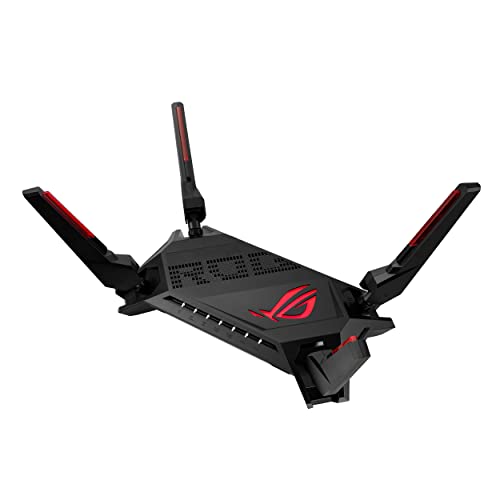
1. ASUS ROG Rapture GT-AX11000

The ROG Rapture GT-AX11000 is the flagship pick. It is a tri-band WiFi 6 router in the AX11000 speed class, with a 2.4 GHz band plus two 5 GHz bands. That second 5 GHz band is the important part for gamers, because it can be reserved for gaming devices while the rest of the home shares the other bands, or used as a dedicated backhaul if you later build an AiMesh system around it.
ASUS loads this router with gaming features. Its adaptive QoS prioritizes game packets, the interface includes port forwarding and a real-time monitoring dashboard, and a 2.5 gigabit port suits fast fiber connections and multi-gig wired PCs. Eight external antennas and a quad-core processor help it hold up when many devices are online at once.
Through AiMesh it can anchor a whole-home mesh network instead of being replaced when you move to a bigger house, and AiProtection Pro, powered by Trend Micro, adds network security and parental controls without a subscription. It is a large router that takes up real desk space, but for a busy gaming household it is the most complete package in this roundup.
Specs
| Detail | Value |
|---|---|
| WiFi standard | WiFi 6 (802.11ax), tri-band |
| Speed class | AX11000 |
| Bands | 2.4 GHz, 5 GHz, 5 GHz |
| Wired ports | Gigabit LAN ports plus one 2.5 gigabit port |
| Gaming features | Adaptive QoS, gaming dashboard, port forwarding |
| Mesh support | ASUS AiMesh |
| Security | AiProtection Pro, WPA3 |
2. ASUS ROG Rapture GT-AX6000
The ROG Rapture GT-AX6000 trims the flagship formula down to a dual-band design for most gaming homes. It delivers AX6000-class WiFi 6 speeds across 2.4 GHz and 5 GHz bands, which is plenty for several simultaneous players, 4K streaming in the next room, and a shelf of smart home devices. ASUS rates it for strong coverage in larger homes thanks to its high-gain antennas and RangeBoost Plus technology.
What sets the GT-AX6000 apart at its level is the pair of 2.5 gigabit ports. One can feed the router from a fast modem while the other gives a gaming PC or a network switch a multi-gig wired link, rare on dual-band routers. The ROG software suite includes game acceleration features, a mobile game mode through the ASUS Router app, and AiProtection Pro security.
The GT-AX6000 supports AiMesh, so it can start as a standalone router and later become the hub of a mesh system. It keeps the bold ROG styling in a noticeably smaller footprint than the GT-AX11000. For players who game over a wired connection or a strong 5 GHz signal, this is the balanced pick.
Specs
| Detail | Value |
|---|---|
| WiFi standard | WiFi 6 (802.11ax), dual-band |
| Speed class | AX6000 |
| Bands | 2.4 GHz, 5 GHz |
| Wired ports | Gigabit LAN ports plus two 2.5 gigabit ports |
| Gaming features | Game acceleration, mobile game mode, QoS |
| Mesh support | ASUS AiMesh |
| Security | AiProtection Pro, WPA3 |
3. NETGEAR Nighthawk XR1000
The Nighthawk XR1000 takes a different approach: instead of chasing the highest speed class, it focuses on software that manages your connection to game servers. It is a dual-band WiFi 6 router in the AX5400 class running DumaOS 3.0, a gaming operating system built by Netduma, a favorite among competitive players.
The headline DumaOS tools are the geo-filter, which lets you draw a radius on a map and only matchmake with servers and players inside it, and the ping heatmap, which shows server locations and their latency so you can see where your best games live. A traffic controller and QoS system let you guarantee bandwidth to your gaming device and throttle background devices, and the dashboard displays ping and bandwidth use in real time.
Hardware is straightforward: four antennas, gigabit ports for wired play, and WiFi 6 features such as OFDMA. The XR1000 suits players whose problem is not raw speed but inconsistent matches, spiky ping, and far-away servers. If your frustration is matchmaking quality rather than download speed, this is the router designed around that exact complaint.
Specs
| Detail | Value |
|---|---|
| WiFi standard | WiFi 6 (802.11ax), dual-band |
| Speed class | AX5400 |
| Bands | 2.4 GHz, 5 GHz |
| Wired ports | Gigabit WAN and LAN ports |
| Gaming features | DumaOS 3.0, geo-filter, ping heatmap, QoS |
| Mesh support | No, standalone router |
| Security | WPA3, NETGEAR Armor available |
4. ASUS RT-AX86U Pro
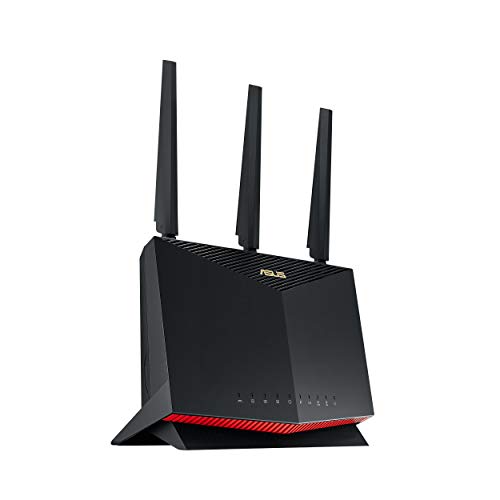
The RT-AX86U Pro is the understated all-rounder, a dual-band WiFi 6 router in the AX5700 class that skips the gaming costume and focuses on fast, stable performance. It has earned a reputation as a dependable recommendation for gaming homes, combining strong 5 GHz throughput, low latency under load, and mature ASUS firmware in a vertical design that fits easily on a shelf.
For gamers, the key detail is the 2.5 gigabit port, usable as a multi-gig WAN connection for fast fiber or as a high-speed LAN link to a gaming PC. Adaptive QoS includes a dedicated gaming profile, and the ASUS Router app offers a mobile game mode that prioritizes a phone game with one tap. AiProtection Pro provides free lifetime security and parental controls.
It also supports AiMesh, so two units can cover a large or multi-story home with a single network name. Its antennas deliver coverage that punches above its size, and the vertical chassis keeps the footprint small. Choose this model if you want gaming-grade performance without RGB styling or a flagship price tier.
Specs
| Detail | Value |
|---|---|
| WiFi standard | WiFi 6 (802.11ax), dual-band |
| Speed class | AX5700 |
| Bands | 2.4 GHz, 5 GHz |
| Wired ports | Gigabit LAN ports plus one 2.5 gigabit port |
| Gaming features | Adaptive QoS gaming profile, mobile game mode |
| Mesh support | ASUS AiMesh |
| Security | AiProtection Pro, WPA3 |
5. TP-Link Archer BE550

The Archer BE550 is the future-facing pick, a tri-band WiFi 7 router in the BE9300 class. WiFi 7 brings wider 320 MHz channels on the 6 GHz band, multi-link operation that combines bands for a single device, and lower latency under load. A WiFi 7 router also prepares your network for the next upgrade cycle of handhelds, laptops, and VR headsets.
The BE550 has a generous wired setup: a 2.5 gigabit WAN port for fast internet plans and 2.5 gigabit LAN ports for a gaming PC or NAS. Six antennas and beamforming cover medium and larger homes, and EasyMesh support lets compatible TP-Link gear expand coverage later.
The Tether app handles setup and management, and TP-Link HomeShield adds security scanning, QoS prioritization, and parental controls. For gaming, the practical benefits are the clean 6 GHz band, where there is far less interference from neighbors, and multi-gig wired ports for the main rig. If you are buying a router to keep for years, the BE550 is the forward-looking choice in this group.
Specs
| Detail | Value |
|---|---|
| WiFi standard | WiFi 7 (802.11be), tri-band |
| Speed class | BE9300 |
| Bands | 2.4 GHz, 5 GHz, 6 GHz |
| Wired ports | 2.5 gigabit WAN plus 2.5 gigabit LAN ports |
| Gaming features | QoS device prioritization, HomeShield |
| Mesh support | EasyMesh |
| Security | HomeShield, WPA3 |
FAQ
Is a gaming router better than a regular router for online play?
A gaming router uses the same basic WiFi technology as a regular router, but it adds a faster processor, stronger radios, and software built for latency. Features such as QoS prioritization, geo-filtering, and real-time ping dashboards help keep your connection stable when the network is busy. In a busy household, that adds up to noticeably fewer lag spikes.
Should I use WiFi or Ethernet for gaming?
Ethernet is still the most stable option, because a cable is immune to wireless interference and distance. If your PC or console sits near the router, plug it in. WiFi from a modern gaming router is a close second when the signal is strong, especially on the 5 GHz or 6 GHz bands, and it is the practical choice when running a cable is not possible. Many players wire the main rig and keep everything else wireless.
Do I need WiFi 7 for gaming right now?
Not yet. WiFi 6 routers already deliver low latency and handle busy homes well, and most gaming devices sold today use WiFi 6 or WiFi 6E. WiFi 7 makes sense if you are buying for the long term, own newer devices, or want the clean 6 GHz band and multi-link operation. Your internet plan and in-home signal quality matter more than the WiFi generation alone.
How can I lower my ping without replacing my router?
Move your gaming device closer to the router or switch to the 5 GHz band, and enable QoS if your router offers it. Close bandwidth-heavy apps on other devices during matches, and update the router firmware, since updates often improve stability. If your router is old or cannot cover your gaming room with a strong signal, those limits are exactly what the routers in this guide are built to fix.
Final verdict
For most gaming homes, the GT-AX6000 hits the sweet spot of WiFi 6 speed, dual 2.5 gigabit ports, and AiMesh expansion. The GT-AX11000 is the upgrade for large, busy households that want a tri-band flagship, while the NETGEAR Nighthawk XR1000 is the specialist pick for players who want DumaOS tools to control matchmaking and ping. The RT-AX86U Pro remains the proven, no-fuss all-rounder, and the TP-Link Archer BE550 is the WiFi 7 choice for buyers planning ahead.
Product and ASIN Reference
| Product | ASIN |
|---|---|
| ASUS ROG Rapture GT-AX11000 | B07MRD1LDZ |
| ASUS ROG Rapture GT-AX6000 | B09L8PCTPT |
| NETGEAR Nighthawk XR1000 | B08FWNNWTB |
| ASUS RT-AX86U Pro | B0BQ417K47 |
| TP-Link Archer BE550 | B0CJSNSVMR |
Related guides
More from Amazon
Programs that pair well with the guide above. Offers and eligibility are set by Amazon and may change.
Free shipping on eligible items, Prime Video and more. Eligible new members can start with a free trial.
Start a Prime free trialAd-free music streaming. Eligible new subscribers can start with a free trial.
Try Music Unlimited freeA Prime membership for ages 18-24 with a trial period. Eligibility is set by Amazon.
See Prime for Young AdultsAudiobooks and podcasts to listen to on the go. Eligible new members can start with a free trial.
Try Audible freeAs an Amazon Associate we earn from qualifying purchases.