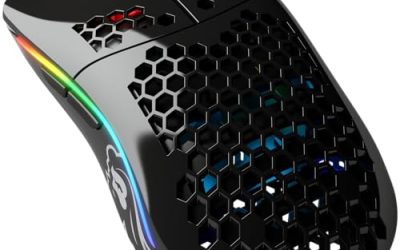
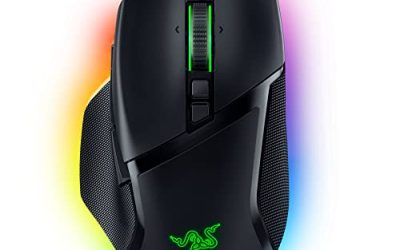
A gaming mouse might sound like an odd recommendation for someone who spends the day inside a code editor, but the overlap between what gamers and programmers need is larger than it first appears. Both groups keep a hand on the mouse for hours at a stretch. Both repeat the same small movements thousands of times a day. And both benefit from hardware that tracks precisely, clicks consistently, and stays comfortable long after the first hour has passed. The best gaming mouse for coding is not the one with the loudest lighting or the most aggressive styling. It is the one whose shape, scroll wheel, and programmable buttons quietly remove friction from everyday development work: jumping between files, scrolling through long modules, reviewing diffs, and triggering the shortcuts that structure a working day.
This guide explains what actually matters when a gaming mouse doubles as a coding tool, then walks through four well-matched options from Logitech G and Razer. Each pick is a genuine gaming mouse, chosen because its listed specifications translate directly into coding comfort: ergonomic shapes for long sessions, scroll wheels that can move through thousands of lines quickly, extra buttons that can carry editor commands, and sensors that behave predictably on an ordinary desk.
As an Amazon Associate we earn from qualifying purchases.
Our Top Picks
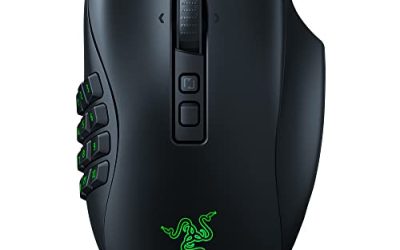
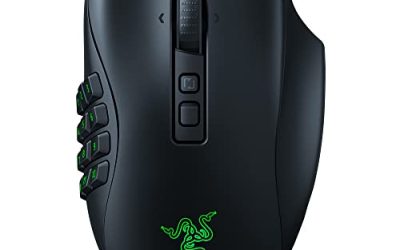
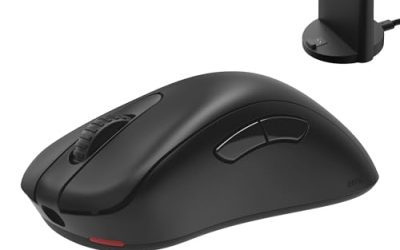
 Razer Basilisk V3 Customizable RGB Wired Ergonomic GamingMouse2.96 x 5.12 x 1.67 inches0.2 poundsCheck on Amazon


Top 3 picks at a glance
Why a Gaming Mouse Works Well for Programming
Office mice are usually designed for short, intermittent use: a bit of browsing, a spreadsheet, some email. Gaming mice are designed for sustained, repetitive, high-frequency input, which is much closer to how a developer actually works. Several gaming-grade traits matter more for coding than raw speed ever will.
Sensor precision at low speeds. Coding involves constant small movements: placing a cursor between two characters, selecting a variable name, dragging a breakpoint marker, resizing a panel. Gaming sensors are built to track those movements without acceleration, smoothing, or jitter, so the pointer lands where the hand intends. High maximum DPI figures are mostly irrelevant here; what matters is clean tracking at the modest sensitivity settings most programmers use, and every mouse in this guide lists a modern optical sensor with a wide, adjustable DPI range for exactly that kind of control.
Programmable buttons. A typical gaming mouse carries more buttons than a basic office mouse, and each one can be assigned a command through the maker’s software. For a programmer, those buttons can hold copy, paste, undo, find references, step over in a debugger, or a full macro that types a boilerplate block. Moving even two or three frequent commands off the keyboard and onto the thumb can noticeably smooth out an editing session.
Scroll wheel quality. Reading code is scrolling. Long files, log output, documentation pages, and review threads all pass under the wheel. Gaming mice at this level offer dual-mode wheels that switch between precise notched scrolling and a free-spinning mode that races through a long file, and some add side-to-side tilt scrolling for wide spreadsheets, timelines, and horizontally scrolled code.
Comfort over long sessions. Ergonomic gaming mice are sculpted for hands that stay in place for hours, with thumb rests, textured grips, and shapes that support a relaxed palm or claw grip. That design work matters just as much during a six-hour debugging session as it does during a game.
Durability ratings. Gaming switches are rated for tens of millions of clicks, far beyond what a basic mouse promises — a practical longevity feature for anyone who clicks all day.
What to Look for in a Gaming Mouse for Coding
Before the individual picks, it helps to know how to read the specifications with a programmer’s priorities in mind.
Shape and grip
Right-handed ergonomic shapes with a thumb rest suit palm-grip users who rest their whole hand on the mouse, and they tend to be the most forgiving choice for full workdays. Symmetrical, ambidextrous-style shapes suit fingertip and claw grips and are often lighter, which some people find easier on the wrist during constant small movements. Hand size matters: a large mouse under a small hand forces the fingers to stretch for the wheel and side buttons, which adds up over a week of work. Check the listed dimensions and weight of any mouse against the one currently on the desk.
The scroll wheel
For coding, the wheel is arguably the most important control on the mouse. A dual-mode wheel that can unlock into free-spin is the standout feature for navigating long files: one flick can travel hundreds of lines, and a tap stops it. Tilt wheels add horizontal scrolling, useful in wide data tables and design tools. If a mouse only offers a standard notched wheel, it can still be a fine coding mouse, but the free-spin options below have a real workflow advantage.
Buttons and software
Count the programmable buttons, then think about what they would actually do. Two thumb buttons are enough for back/forward or copy/paste. Mice with more buttons can carry debugger controls, window switching, or text expansion macros. The companion software is where those assignments live: Logitech uses G HUB, and Razer uses Synapse. Both allow per-application profiles, so the thumb buttons can run editor commands while coding and revert to game bindings later. On-board memory is worth noting because it stores profiles on the mouse itself, which helps on locked-down work machines where installing software is not an option.
Wired or wireless
Wired mice never need charging and never run out mid-session, and modern flexible cables drag far less than older stiff ones. Wireless gaming mice using a dedicated USB receiver now offer response times that match wired models, and they keep a desk clear, which matters for people who sketch, write, or move a laptop between rooms. Battery approach differs: some models use a replaceable AA cell with a very long rated life, while others recharge. For a coding desk, a mouse that runs for weeks or months between battery attention is the practical winner.
Weight
Weight is a comfort preference, not a performance score. Heavier mice with adjustable weights feel planted and suit slow, deliberate pointer work. Lightweight mice reduce the effort of constant small movements and suit fingertip grips. Two picks below sit at opposite ends of this range.
The Picks: Gaming Mice That Suit Long Coding Sessions
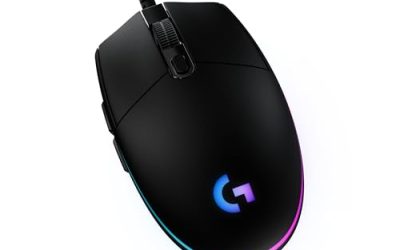
1. Logitech G502 HERO — The Button and Scroll Wheel Specialist

The Logitech G502 HERO is the most feature-dense mouse in this guide, and its feature set reads like it was specified by someone who lives in an editor. It carries 11 programmable buttons, more than any other pick here, arranged so the thumb and index finger can reach extra commands without shifting grip. Through G HUB, those buttons can hold macros and multi-key commands, and on-board memory stores profiles directly on the mouse.
The headline feature for programmers is the dual-mode hyper-fast scroll wheel. In its standard mode it clicks through lines with clear detents; unlocked, it free-spins, which makes moving through a long source file or a lengthy log a single flick rather than dozens of wheel strokes. Few peripherals change day-to-day coding feel as much as a free-spin wheel does.
The HERO 25K sensor tracks up to 25,600 DPI with, according to the listing, zero smoothing, filtering, or acceleration across the range, so low-sensitivity pointer placement stays exact. The shape is a right-handed ergonomic design with a thumb rest, and the adjustable weight system uses up to five removable 3.6 g weights so the balance can be tuned to taste. It is a wired mouse, so there is no battery to manage at all. Listed dimensions are 5.2 x 2.95 x 1.57 inches, and the listing gives an item weight of 4.3 ounces.
For coding, the G502 HERO suits developers who want maximum shortcut capacity and the best scrolling hardware in this roundup, and who are happy to stay wired.
- View it on Amazon: https://www.amazon.com/dp/B07GBZ4Q68
2. Razer Basilisk V3 — Ergonomic Comfort with a Smart Wheel
The Razer Basilisk V3 takes a similar formula — an ergonomic right-handed shape with a thumb rest and 11 programmable buttons — and adds Razer’s HyperScroll tilt wheel. The wheel free-spins for fast travel through long documents and switches back to a tactile mode for precise, line-by-line movement, and it also tilts left and right for horizontal scrolling. For developers who review wide tables, long lines of code, or sprawling diffs, that tilt input is a genuinely useful extra axis of navigation.
The listing highlights the Focus+ 26K DPI optical sensor, optical mouse switches rated up to 70 million clicks, and a button layout positioned for quick access while the hand stays supported. Through Razer Synapse, the 11 buttons accept macros and secondary functions, so a single thumb button can carry a two-layer set of editor commands. The Basilisk V3 is wired over USB, which keeps it permanently ready at a fixed desk with no charging routine to remember.
Where the G502 leans on weight tuning and Logitech’s software, the Basilisk V3 leans on its wheel: the combination of free-spin, tactile mode, and tilt in one wheel is the strongest scrolling package here for people who read as much code as they write. Its ergonomic shell with a defined thumb rest is built for the palm-grip, hand-resting posture common during long workdays.
- View it on Amazon: https://www.amazon.com/dp/B09C13PZX7
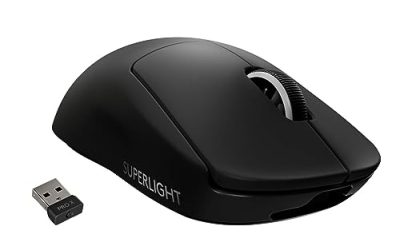
3. Logitech G305 LIGHTSPEED — Wireless Freedom and Months of Battery
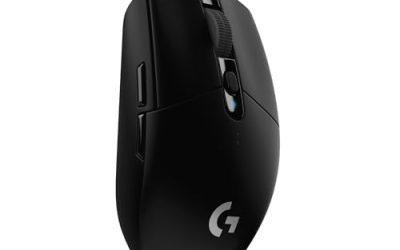
The Logitech G305 LIGHTSPEED answers the other half of the coding-desk question: what if the mouse needs to move between a desk, a laptop bag, and a meeting room without a cable and without battery anxiety? It uses Logitech’s LIGHTSPEED wireless connection through a small USB receiver, with a listed 1 ms report rate, so the wireless link behaves like a wired one for pointer work. The receiver stores inside the mouse body for travel.
Its battery arrangement is the standout specification for work use: a single AA battery is rated for up to 250 hours of continuous use, which translates into many weeks of ordinary workdays between battery changes. There is no charging cable to keep track of and no low-battery interruption in the middle of a session; a spare AA in a drawer is the entire maintenance plan.
The HERO sensor covers 200 to 12,000 DPI with a listed tracking speed above 400 IPS, which is far beyond what editor work demands, and there are 6 programmable buttons configurable in G HUB with on-board memory for profiles. At a listed 99 grams, the G305 is light without being extreme, and its symmetrical shape suits claw and fingertip grips as well as smaller hands that find the bigger ergonomic mice a stretch. For programmers who split time between coding and gaming on the same machine, it is the most portable and lowest-maintenance pick in this guide.
- View it on Amazon: https://www.amazon.com/dp/B07CMS5Q6P
4. Razer DeathAdder V3 — The Lightweight Ergonomic Option
The Razer DeathAdder line has one of the longest-running ergonomic shapes in gaming, and the DeathAdder V3 keeps that right-handed form while cutting the weight to a listed 59 grams. That combination — a full ergonomic shell that supports the palm, at a weight usually found in small esports mice — is exactly what a programmer with wrist fatigue should look at. The hand stays supported, but each small movement takes noticeably less effort than with a heavy mouse.
The listed specifications include the Focus Pro 30K optical sensor with up to 30,000 DPI, 750 IPS tracking, and Razer Optical Mouse Switches Gen-3 rated for up to 90 million clicks, the highest click rating in this guide. It offers 6 programmable buttons, an 8K Hz HyperPolling capability for extremely low-latency wired response, and a flexible Speedflex cable designed to reduce drag. Listed dimensions are 5.01 x 2.65 x 1.69 inches.
The DeathAdder V3 is the simplest mouse here in daily use: no battery, no weight system, fewer buttons than the G502 or Basilisk V3, and a standard scroll wheel rather than a free-spin design. What it offers instead is shape and lightness.
- View it on Amazon: https://www.amazon.com/dp/B0B6XTDJS1
Side-by-Side: Key Specifications from the Listings
| Mouse | Connection | Programmable buttons | Sensor (as listed) | Weight (as listed) | Coding highlight |
|---|---|---|---|---|---|
| Logitech G502 HERO | Wired | 11 | HERO 25K, up to 25,600 DPI | 4.3 ounces, adjustable weights | Dual-mode free-spin scroll wheel |
| Razer Basilisk V3 | Wired | 11 | Focus+ optical, 26K DPI | Not stated in listing summary | HyperScroll tilt wheel with free-spin mode |
| Logitech G305 LIGHTSPEED | Wireless (USB receiver) | 6 | HERO, 200–12,000 DPI | 99 grams | Up to 250 hours on one AA battery |
| Razer DeathAdder V3 | Wired | 6 | Focus Pro 30K optical, up to 30,000 DPI | 59 grams | Lightweight ergonomic shape, 90-million-click switches |
Specifications above are taken from the Amazon product listings for each model. Where a figure was not stated in the listing, the table says so rather than guessing.
How to Set Up a Gaming Mouse for Coding
Whichever mouse from this guide lands on the desk, a few setup choices make it work harder for programming:
Assign the thumb buttons deliberately. Start with two assignments — copy and paste, or back and forward in code navigation — and live with them for a week before adding more. Debugger controls (step over, step into, continue) are an excellent second layer for anyone who debugs daily.
Create an editor profile. Both G HUB and Synapse support per-application profiles. An editor profile can lower DPI for precise selection, map the extra buttons to development commands, and leave a separate gaming profile untouched.
Set a sensible DPI. Most programmers settle somewhere in the lower-middle of a sensor’s range, where one wrist sweep crosses the screen without overshooting small targets. The exact figure is personal; the point is to choose it deliberately rather than accepting a default, and to keep it consistent across machines where possible.
Use the free-spin wheel on purpose. On the G502 HERO and Basilisk V3, unlock the wheel when opening a long file or log, then return to tactile mode for careful reading. Building that small habit is where the scrolling hardware pays for itself.
Mind the basics around the mouse. A mouse cannot fix a desk setup on its own. Keep it at elbow height, use a pad large enough that the hand never runs off the edge mid-gesture, and take short breaks during coding marathons.
Frequently Asked Questions
Is a gaming mouse actually better than an office mouse for programming?
For long sessions, usually yes. Gaming mice bring cleaner sensors, higher-rated switches, more programmable buttons, and shapes designed for hours of continuous use. An office mouse is fine for light work, but its design brief is intermittent use.
How many programmable buttons does a programmer need?
Two thumb buttons already help. Four to six well-chosen assignments cover most editor and debugger workflows. Beyond that, returns diminish unless the work involves heavy macro use. The 11-button mice in this guide suit people who know they will use the extras.
Wired or wireless for a coding desk?
Both are sound. Wired models such as the G502 HERO, Basilisk V3, and DeathAdder V3 remove battery management entirely. A receiver-based wireless mouse such as the G305 LIGHTSPEED keeps the desk clear and travels easily, and its rated battery life is long enough that power is rarely a concern.
Does DPI matter for coding?
Only in the sense that the setting should suit the screen size and personal sensitivity preference. The very high maximum figures on gaming sensors are headroom, not a requirement. Clean tracking at moderate settings is what day-to-day editor work actually uses.
Can these mice store settings for a work computer?
Models with on-board memory, including the G502 HERO and G305 LIGHTSPEED as listed, can carry profiles on the mouse itself, which is useful where installing companion software is restricted. Check the listing details for the specific model before relying on this.
Final Verdict
The best gaming mouse for coding is the one that matches how the workday actually feels. For maximum shortcuts and the finest scrolling hardware, the Logitech G502 HERO is the natural first look, with the Razer Basilisk V3 close behind for anyone who wants tilt scrolling in an ergonomic shell. For a clean, portable, cable-free desk with battery life measured in weeks, the Logitech G305 LIGHTSPEED is the practical choice. And for a supported palm grip with the least possible weight under the hand, the Razer DeathAdder V3 stands apart. All four are genuine gaming mice with listed specifications that translate directly into coding comfort, and any of them is a meaningful step up from a basic mouse for someone who writes code all day.
Related guides
More from Amazon
Programs that pair well with the guide above. Offers and eligibility are set by Amazon and may change.
Free shipping on eligible items, Prime Video and more. Eligible new members can start with a free trial.
Start a Prime free trialAd-free music streaming. Eligible new subscribers can start with a free trial.
Try Music Unlimited freeA Prime membership for ages 18-24 with a trial period. Eligibility is set by Amazon.
See Prime for Young AdultsAudiobooks and podcasts to listen to on the go. Eligible new members can start with a free trial.
Try Audible freeAs an Amazon Associate we earn from qualifying purchases.