As an Amazon Associate we earn from qualifying purchases.
A travel gaming mouse has a harder job than a desk mouse. It has to disappear into a laptop bag without adding bulk, survive being tossed around with chargers and cables, connect to whatever machine is in front of you, and still track like a proper gaming mouse when you finally sit down to play in a hotel room, an airport lounge or a friend’s spare room. Desktop mice fail this test in predictable ways: they are big, their batteries die mid-trip, or their single wireless receiver stays plugged into the PC you left at home.
The four mice below were chosen for the road. All are compact or light, all connect wirelessly in more than one way or store their receiver inside the shell, and all carry real gaming sensors rather than the low-grade tracking found in generic travel mice. Two run for hundreds of hours on a single battery or charge, one is a magnesium mini built for fingertip control, and one is a current dual-wireless model from SteelSeries that pairs with a laptop over Bluetooth and a gaming rig over its receiver. Each is sold on Amazon US under the ASIN in its section.
Disclosure: This article contains affiliate links. If you buy through these links, we may earn a commission at no additional cost to you.
Our Top Picks
 Razer Orochi V2 Wireless Gaming Mouse4.26 x 1.52 inch (Pack of 1)4.26 x 1.52 x 2.47 inches0.13 poundsCheck on Amazon

Top 3 picks at a glance

How to Choose a Travel Gaming Mouse
Size and weight come first. A travel mouse should be compact enough to share a bag pocket with a charger and light enough that you forget it is there. The picks here range from a sub-60 g mini design to a 99 g compact shell. Smaller shells favour claw and fingertip grips; if you are a committed palm gripper, check the shape notes in each section before choosing the smallest option.
Dual wireless is the travel feature that matters most. A 2.4 GHz receiver gives the low-latency link you want for gaming, while Bluetooth pairs with a laptop, tablet or handheld without any dongle at all. Mice that carry both let you leave the receiver in your home setup and still connect on the road. If a mouse is receiver-only, built-in receiver storage inside the shell is the next best thing, because a loose dongle is the easiest part of a travel kit to lose.
Battery life is measured in trips, not hours. Look for figures in the hundreds of hours. AA-powered mice have a hidden travel advantage: a spare cell from any shop in the world gets you running again, and the battery doubles as a predictable weight. Rechargeable mice are lighter and sleeker but depend on you packing the right cable.
The sensor still has to be a gaming sensor. Travel is not a reason to accept poor tracking. Every pick here uses a named gaming sensor line — Razer 5G optical, Logitech HERO, PixArt 3395 or SteelSeries TrueMove Air — with maximum sensitivity from 12,000 to 26,000 DPI and the tracking speed fast games need.
Think about what else it must do. On a work trip the same mouse may drive presentations and spreadsheets all day. Programmable buttons, onboard memory for your settings, and a shape that stays comfortable for long sessions all count. A mouse that stores its profiles onboard keeps your DPI and binds when you plug into a machine without the brand software installed.
The Picks
1. Razer Orochi V2 (Black)
- Amazon US: https://www.amazon.com/dp/B0916N2LPZ
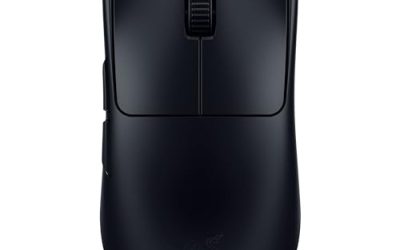
The Orochi V2 was designed from a blank page as a portable gaming mouse, and it shows in every decision. The shell is a compact symmetrical shape in the ultra-lightweight class, small enough for a jacket pocket, and it runs on a single AA or AAA cell, so a replacement battery is available anywhere. Razer’s listing puts battery life at up to 950 hours over Bluetooth and up to 425 hours on the HyperSpeed 2.4 GHz link, which translates to months of travel between battery swaps.
Performance is not the compromise it usually is in this size class. The 5G optical sensor reaches 18,000 DPI, the second-generation Razer mechanical switches handle the clicks, and HyperSpeed wireless is the same low-latency connection Razer uses on its full-size esports mice. The receiver stores inside the shell, under the top cover, next to the battery. There is no RGB draining the cell, which is the right call for a mouse built to run for months.
Who it suits: frequent travellers who game seriously on the road and want the smallest, longest-running package that still feels like a real esports mouse in fast titles.
Considerations: the small shell suits fingertip and claw grips; palm grippers with large hands will find it cramped for long sessions. It needs the Razer software for full button configuration, and there is no wired fallback mode if the battery dies and no spare is at hand.
2. Logitech G305 Lightspeed (Black)
- Amazon US: https://www.amazon.com/dp/B07CMS5Q6P
The G305 is the dependable classic of portable gaming mice. Logitech’s product page confirms the details that make it travel well: a compact, portable shell at 99 g, built-in storage for the USB receiver inside the mouse, and up to 250 hours of continuous play from a single AA battery. The HERO sensor tracks up to 12,000 DPI at over 400 IPS with a 1 ms report rate over the Lightspeed connection, so fast flicks in shooters stay accurate on a hotel desk or a kitchen table.
Six programmable buttons and onboard memory mean your DPI steps and binds travel with the mouse itself, not with a software install. The symmetrical shape is safe for claw and fingertip grips and works in either hand for basic pointing, though the side buttons sit on the left. Because it runs on AA cells, a dead battery on the road is a two-minute fix rather than a charging wait.
Who it suits: travellers who want a proven, simple setup: one receiver stored in the mouse, months of battery, and settings that live onboard. It is also an easy pick for a second mouse that lives permanently in a laptop bag.
Considerations: there is no Bluetooth, so connecting to a tablet or a laptop without a free USB port is not an option. The 99 g weight is light for a desk mouse but the heaviest here, and the shell is a touch small for palm grip with large hands.
3. Keychron M3 Mini Metal Edition Wireless Gaming Mouse
- Amazon US: https://www.amazon.com/dp/B0DF2LZNBW
The M3 Mini Metal Edition is the enthusiast option: a mini shell machined from magnesium alloy, weighing 64 g, built around the PixArt PAW3395 sensor with sensitivity up to 26,000 DPI. Keychron rates the wireless polling at up to 4,000 Hz over the 2.4 GHz link, which is esports-grade responsiveness in a mouse small enough to vanish into a carry-on. It connects three ways — 2.4 GHz receiver, Bluetooth 5.1 and wired — so it can pair with a work laptop in the morning and a gaming handheld at night.
The metal shell feels unlike the plastic minis: cool, dense and precise, and the mini shape is made for fingertip control, which suits the small surfaces travel often gives you, from tray tables to narrow hotel desks. Battery life is shorter than the AA-powered picks here, as expected from a small rechargeable cell driving a high polling rate, so the wired mode doubles as the safety net.
Who it suits: travellers who play fast, precise games on the road and want the strongest sensor and polling combination in the smallest shell, plus a metal build that shrugs off bag life.
Considerations: the mini shape is fingertip-first and will feel too small for palm grip. High polling rates drain the battery quickly, so plan to charge during a trip or drop the polling rate for everyday use.
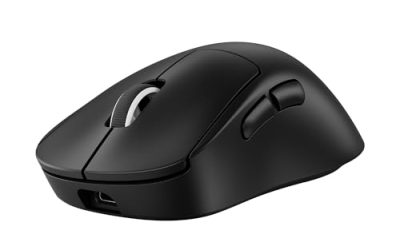
4. SteelSeries Rival 3 Wireless Gen 2 (Black)

- Amazon US: https://www.amazon.com/dp/B0F69R79PH
The second-generation Rival 3 Wireless updates SteelSeries’ travel-friendly formula with the TrueMove Air optical sensor at up to 18,000 DPI and a dual connection: gaming-grade 2.4 GHz wireless for play and Bluetooth for pairing with a laptop or tablet when the receiver is elsewhere. The listing highlights the lightweight build, PTFE feet for smooth glide on unfamiliar surfaces, and main switches rated for 60 million clicks, which is the kind of durability figure you want in a mouse that lives in a bag.
The shape is a safe symmetrical design that works for claw and fingertip grips and long mixed days of work and play. Where the Orochi V2 chases minimum size and the G305 chases simplicity, the Rival 3 Wireless Gen 2 is the balanced option: modern sensor, two radios, and a shell that feels familiar the moment you pick it up in a new place.
Who it suits: travellers who split time between a gaming setup and a work laptop and want one mouse that pairs to both without swapping receivers, with current-generation tracking.
Considerations: it is larger than the Orochi V2 and M3 Mini, so it takes more bag space. Full feature setup runs through SteelSeries software, and battery endurance, while strong for a rechargeable-class dual-wireless mouse, is not in the AA-powered league of the G305.
Comparison Table
| Model | ASIN | Connection | Sensor / Max DPI | Weight | Travel Strength |
|---|---|---|---|---|---|
| Razer Orochi V2 | B0916N2LPZ | 2.4 GHz, Bluetooth | Razer 5G optical / 18,000 DPI | Ultra-light class | Up to 950 h Bluetooth battery |
| Logitech G305 | B07CMS5Q6P | 2.4 GHz Lightspeed | HERO / 12,000 DPI | 99 g | Receiver stores inside shell |
| Keychron M3 Mini Metal | B0DF2LZNBW | 2.4 GHz, Bluetooth 5.1, wired | PixArt PAW3395 / 26,000 DPI | 64 g | Magnesium mini shell, 4,000 Hz |
| SteelSeries Rival 3 Wireless Gen 2 | B0F69R79PH | 2.4 GHz, Bluetooth | TrueMove Air / 18,000 DPI | Lightweight class | Dual wireless, 60M-click switches |
FAQ
Can a travel mouse really keep up in competitive games?
Yes. The Orochi V2 uses the same HyperSpeed wireless family as Razer’s esports line, the G305 reports at 1 ms, and the M3 Mini polls at up to 4,000 Hz. The limits of a travel mouse are size and grip comfort, not tracking or latency.
Which battery style is better for travel, AA or rechargeable?
AA power wins for long or unpredictable trips, because replacements are sold everywhere and there is no charging downtime. Rechargeable models like the M3 Mini are lighter and sleeker, but you must pack the cable and remember to charge.
Is Bluetooth good enough for gaming on the road?
For casual and slower-paced games, yes, and it is perfect for work. For fast shooters, switch to the 2.4 GHz receiver mode, which every pick here except the G305 pairs with Bluetooth in the same mouse — and the G305’s Lightspeed link is its 2.4 GHz mode.
How do I avoid losing the wireless receiver?
Choose a mouse that stores it internally. The G305 and Orochi V2 both carry the receiver inside the shell, which removes the loose-dongle problem entirely.
Conclusion
For pure travel, the Razer Orochi V2 is the standout: tiny, dual-wireless, and measured in months of battery. The Logitech G305 is the simple, proven alternative with onboard receiver storage and settings. The Keychron M3 Mini Metal Edition serves players who refuse to trade away sensor performance for size, and the SteelSeries Rival 3 Wireless Gen 2 balances both worlds with a modern sensor and two radios. Any of the four will game properly wherever you land — the choice is how small, how light and how long between batteries you want to go.
Related guides
More from Amazon
Programs that pair well with the guide above. Offers and eligibility are set by Amazon and may change.
Free shipping on eligible items, Prime Video and more. Eligible new members can start with a free trial.
Start a Prime free trialAd-free music streaming. Eligible new subscribers can start with a free trial.
Try Music Unlimited freeA Prime membership for ages 18-24 with a trial period. Eligibility is set by Amazon.
See Prime for Young AdultsAudiobooks and podcasts to listen to on the go. Eligible new members can start with a free trial.
Try Audible freeAs an Amazon Associate we earn from qualifying purchases.