Choosing a budget gaming mouse is really a decision about what you can safely give up. Entry-level models from established brands keep the parts that decide matches — a reliable optical sensor, switches rated for millions of clicks, and a shape that fits your hand — while trimming extras like wireless radios, swappable weights, and elaborate lighting. Pick the wrong shape or a sensor that spins out during fast swipes, though, and the savings stop feeling smart within a week.


This guide suits first-time PC builders, students upgrading from a bundled office mouse, and competitive players who want a dependable spare. Every pick below comes from the entry-level line of a known gaming brand, selected from the names and specifications stated on its Amazon listing, so the value story rests on hardware you can verify rather than on vague promises.
Our Top Picks
- Razer DeathAdder Essential Ergonomic Wired Gaming Mouse5.01 x 2.86 x 1.69 inches0.3 poundsCheck on Amazon
Top 3 picks at a glance
Quick Picks
As an Amazon Associate we earn from qualifying purchases.
| Product | Best for | Key spec from title |
|---|---|---|
| Logitech G203 LIGHTSYNC | Small to medium hands wanting RGB and onboard memory | 8,000 DPI |
| Razer DeathAdder Essential | Palm grippers with larger hands | 6400 DPI Optical Sensor |
| SteelSeries Rival 3 | Players wanting split-trigger clicks and bright RGB | 8,500 CPI TrueMove Core Optical Sensor |
| Corsair Harpoon RGB Pro | Claw grippers who play FPS and MOBA titles | 12,000 DPI |
How to Choose
Sensor Quality Over Headline DPI
A big maximum DPI number is the easiest figure to print on a box and the least useful one to shop by. What matters at this level is whether the sensor tracks fast flicks without spinning out or adding smoothing that delays your aim. The listings here range from 6,400 to 12,000 DPI, yet all four come from brands with established optical sensor lines. Set your sensitivity in game, test wide swipes on your pad, and value clean tracking at your actual settings over a headline figure you will never use.
Shape, Size and Grip Style
Fit decides comfort more than any electronic specification, especially during long sessions. The DeathAdder Essential uses a larger right-handed ergonomic shell that supports a relaxed palm grip, while the Harpoon RGB Pro is a compact contoured shape aimed at claw grippers with small to medium hands. Measure your hand from wrist to middle fingertip, compare it with the dimensions on the listing, and be honest about how you hold the mouse. A cheaper mouse that matches your grip beats a technically stronger one that cramps your fingers by the second match.
Switches, Buttons and What Durability Claims Mean
Click ratings are one place where value models still give you hard information. The Harpoon RGB Pro lists Omron switches rated for more than 20 million clicks, and the DeathAdder Essential lists mechanical switches with rubber side grips for control. Count the buttons you genuinely use: six programmable buttons suit most shooters and MOBA titles, while five is enough for simpler layouts. Check whether remapping needs brand software, whether settings save to onboard memory, and whether the scroll wheel steps feel defined enough for weapon switching.
Where Entry-Level Models Cut Corners
Knowing the usual trade-offs stops disappointment after delivery. Budget lines typically stay wired, which removes battery worries and keeps response direct, but the cable quality varies, so look for flexible or braided designs. Lighting is often limited to fewer zones, shells use plain matte plastic instead of coated finishes, and software may offer fewer profiles than flagship ranges. None of those cuts affect aim. What should worry you is a missing warranty detail, a seller listing with incomplete specifications, or a shape with no stated dimensions at all.
The 4 Best Options
Logitech G203 LIGHTSYNC
The G203 LIGHTSYNC is the safest first gaming mouse for small to medium hands because its compact symmetrical shell works with fingertip and claw grips and asks almost nothing of your setup. Six programmable buttons cover the essentials, onboard memory keeps your settings when you move between a desktop and a laptop, and LIGHTSYNC RGB adds a lighting strip and logo that react through Logitech software. For a student desk or a first build, it delivers the complete branded package without paying for wireless hardware or features a new player will not touch yet.
Specs
- 8,000 DPI sensor
- LIGHTSYNC RGB lighting
- 6 programmable buttons
- On-board memory
- Wired connection, PC and Mac compatible
- Black finish
Best for: New players with small to medium hands who want one mouse for gaming, study and everyday use.
Watch out for: Confirm the colour variant on the listing before ordering, because several finishes share the same product family and similar names.
ASIN: B07YN82X3B
Razer DeathAdder Essential
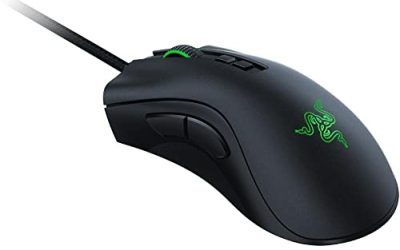
The DeathAdder Essential suits right-handed players with medium to large hands who rest their whole palm on the shell and want support through long sessions. Its curved ergonomic body fills the hand in a way compact ambidextrous mice cannot, the rubber side grips help during lifting and repositioning, and five programmable buttons keep the layout simple for shooters and action games. Mechanical switches give the main clicks a deliberate feel. If comfort across evening-long play matters more to you than a featherweight shell or rainbow lighting, this is the value pick shaped around your hand rather than around a spec sheet.
Specs
- 6400 DPI optical sensor
- 5 programmable buttons
- Mechanical switches
- Rubber side grips
- Classic black ergonomic shape
- Wired connection
Best for: Palm grippers with larger hands who play for long stretches and prefer a supportive right-handed shape.
Watch out for: The shell is sized for medium to large hands, so smaller-handed players should check the listed dimensions carefully before choosing it.
ASIN: B094PS5RZQ
SteelSeries Rival 3
The Rival 3 fits players who want a balanced, symmetrical mouse with a mechanical feel to its clicks and lighting that is visible rather than token. Its TrueMove Core optical sensor is built for one-to-one tracking, the split-trigger button design separates the main clicks from the shell for a crisper response, and six programmable buttons handle game commands plus everyday shortcuts. Brilliant Prism RGB adds illumination that shows around the base, which desk setups with a visible theme will appreciate. For mixed gaming across shooters, strategy titles and school or office work, it is the middle path in this group.
Specs
- 8,500 CPI TrueMove Core optical sensor
- 6 programmable buttons
- Split trigger buttons
- Brilliant Prism RGB lighting
- Ergonomic shape
- Black finish, wired connection
Best for: Players who switch between several game genres and want crisp split-trigger clicks with strong RGB.
Watch out for: Check the listing carefully to make sure you are ordering the wired Rival 3 and not the separate wireless version, which is a different product.
ASIN: B08176SM7C
Corsair Harpoon RGB Pro
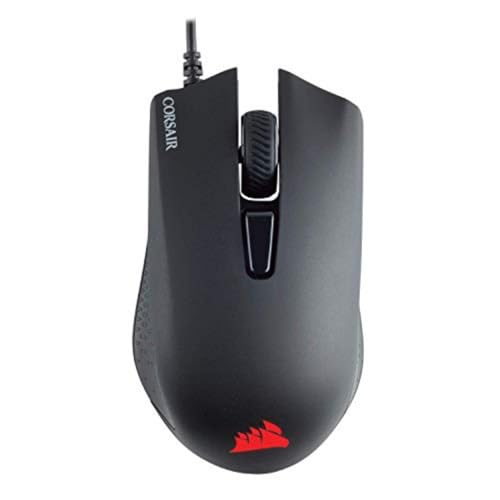
The Harpoon RGB Pro is aimed squarely at claw grippers with small to medium hands who play fast titles and reposition the mouse constantly. Its contoured shape carries rubber side grips, the listing weight of 85g keeps it light without a perforated shell, and six programmable buttons can be managed through Corsair iCUE alongside other Corsair gear you may already own. A 12,000 DPI optical sensor gives wide sensitivity headroom, while Omron switches rated beyond 20 million clicks speak to longevity. For a compact battlestation built around one brand’s software, it ties the room together neatly.
Specs
- 12,000 DPI optical sensor
- 6 programmable buttons
- Lightweight 85g design
- Omron switches rated for more than 20 million clicks
- Rubber side grips and contoured shape
- iCUE compatible, wired connection
Best for: Claw grippers with small to medium hands who play FPS and MOBA games and already use Corsair software.
Watch out for: Its compact shell can feel cramped for palm grippers with large hands, so compare its size against your current mouse first.
ASIN: B07QVB51L9
Which One Fits Your Situation
You Are Building Your First Gaming PC
Start with the Logitech G203 LIGHTSYNC. It connects by cable, stores settings in onboard memory, and its six buttons and compact shape forgive an undecided grip style while you learn what suits you. The LIGHTSYNC lighting also gives a first build a finished look, and Logitech’s software is a gentle introduction to DPI stages and button assignments without overwhelming a new owner.
Your Hands Are Large and Your Sessions Run Long
Choose the Razer DeathAdder Essential. The tall, curved right-handed shell supports a full palm grip so your hand rests instead of hovering, and the rubber side grips keep control when you lift and reset during longer matches. You give up extra buttons and multi-zone lighting, but for evening-long comfort at the value end of a famous ergonomic line, that trade is exactly the right one.
You Play Fast Shooters With a Claw Grip
Take the Corsair Harpoon RGB Pro if your fingers stay arched and your hand is small to medium, because its compact contoured body, side grips and 85g weight reward quick lifts and short flicks. Pick the SteelSeries Rival 3 instead if your grip sits between claw and fingertip and you prefer a symmetrical shell, since its split-trigger clicks and TrueMove Core sensor suit repeated precise shots.
Your Desk Doubles as a Study or Work Space
The Rival 3 and the G203 both earn their place here. Either one handles spreadsheets and documents all day, then switches to game settings through its brand software in the evening. The G203’s onboard memory is handy if you carry a laptop between rooms, while the Rival 3’s brighter Prism lighting suits a desk that stays set up in one place.
Common Mistakes
- Shopping by maximum DPI alone, when tracking quality at your real sensitivity and the shell’s fit matter far more.
- Ignoring hand size and grip style, then blaming the mouse for wrist or finger fatigue that a different shape would have avoided.
- Ordering the wrong variant, such as a wireless namesake or a different colour, because listings group related models closely together.
- Skipping the software check, then discovering your button remaps or lighting settings need an account or a download you did not expect.
- Buying from a listing with missing specifications or an unclear seller instead of the complete branded listing used for comparison.
Frequently Asked Questions
Is a wired mouse still fine for competitive gaming?
Yes. Every pick here is wired, which removes battery management and charging breaks entirely and keeps the connection direct and consistent. Modern flexible cables drag far less than older stiff ones, and a simple cable bungee removes most of the remaining pull. For the genres most budget players compete in, a wired value mouse gives up nothing that decides results.
How much DPI do I actually need?
Far less than the box maximums suggest. Most players settle between 400 and 3,200 DPI and then fine-tune sensitivity inside each game, so even the 6,400 DPI sensor in the DeathAdder Essential leaves comfortable headroom. What matters is that tracking stays accurate during fast swipes at your chosen setting, not whether the sensor can reach a number you will never select.
Can I use one of these mice for work and study too?
Absolutely. Programmable side buttons double as browser back and forward keys or presentation controls, DPI switching helps when you move between a laptop screen and a larger monitor, and the matte shells here look restrained enough for a shared desk. Just keep the lighting subtle through the brand software if the mouse travels to a classroom or office.
How long should a budget gaming mouse last?
A reasonable expectation is several years of regular play when the switches carry a stated click rating, as the Harpoon RGB Pro does with its Omron switches rated beyond 20 million clicks. Longevity also depends on the cable, so avoid wrapping it tightly or letting it rub a desk edge, and keep the sensor lens and mouse feet clean.
Related guides
More from Amazon
Programs that pair well with the guide above. Offers and eligibility are set by Amazon and may change.
Free shipping on eligible items, Prime Video and more. Eligible new members can start with a free trial.
Start a Prime free trialAd-free music streaming. Eligible new subscribers can start with a free trial.
Try Music Unlimited freeA Prime membership for ages 18-24 with a trial period. Eligibility is set by Amazon.
See Prime for Young AdultsAudiobooks and podcasts to listen to on the go. Eligible new members can start with a free trial.
Try Audible freeAs an Amazon Associate we earn from qualifying purchases.