A 4K monitor is a bigger commitment than most screens, because 3840 x 2160 pixels only pay off when the panel, the ports, and your graphics output all keep up. The real decision is not “4K or not” but how much sharpness you want versus how much motion smoothness: some models in this group run at 120Hz, while others stay at 60Hz or 70Hz. That single number changes whether the monitor feels like a spreadsheet tool or a do-everything display.
This guide is for buyers who already know they want 4K and need to sort eight real options by size, panel type, refresh rate, and connections. Writers, editors, spreadsheet-heavy workers, and anyone who sits close to a 27-inch or 32-inch screen will care most about pixel density. Everything below is judged from the listed specs, so treat it as a shortlist to check against your own desk, cables, and computer in 2026.
Our Top Picks
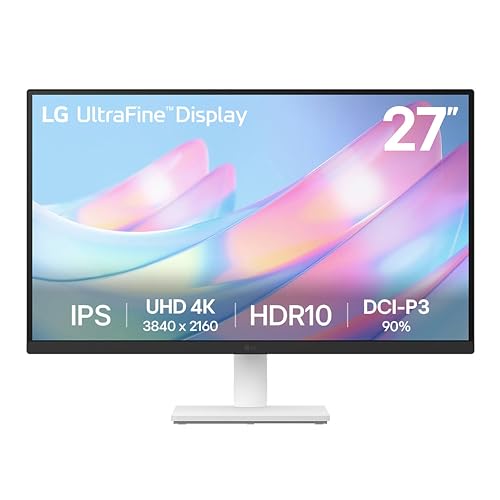 LG 27US500-W 27-inch UltraFine IPS 4K UHD 60Hz8.46 x 24.15 x 17.87 inches12.13 poundsCheck on Amazon


Top 3 picks at a glance
Quick Picks
As an Amazon Associate we earn from qualifying purchases at no extra cost to you.



| Product | Best for | Key spec from the listing |
|---|---|---|
| Samsung ViewFinity S7 (S71H) | Everyday 27-inch 4K work | 27 in, 4K UHD, IPS, HDR10 |
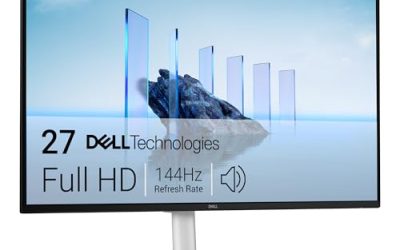
| Dell S2725QS | Smooth 4K on a 27-inch desk | 4K IPS, 120Hz, 99% sRGB |
| Dell S3225QS | Large 32-inch canvas, strong contrast | 31.5 in VA, 120Hz, 3,000:1 contrast |
| Dell S2725QC | One-cable laptop setups | 4K IPS, 120Hz, USB-C, 163 PPI |
| LG 27US500-W | Reading-heavy study or office use | 27 in 4K IPS, Reader Mode, Flicker Safe |
| LG 32U701B-B | Large 4K at 60Hz | 32 in 4K, 60Hz, 99% sRGB (typ.) |
| MSI PRO MP273U | Straightforward 27-inch 4K IPS | 4K IPS, 60Hz, Adaptive-Sync |
| Sceptre 32-inch 4K | Multi-device desks with built-in speakers | 4K, 70Hz, 2 HDMI + 2 DisplayPort |
How to Choose
Match screen size to pixel density
At 27 inches, 3840 x 2160 works out to roughly 163 pixels per inch, a figure the Dell S2725QC listing states directly. That density makes text crisp but small, so many buyers run the operating system at 125 or 150 percent scaling. At 32 inches the same pixel count spreads out to a lower density, which means less scaling and bigger text but slightly softer fine detail. If you sit closer than about 30 inches from the screen, 27 inches is easier to take in at a glance; if you want side-by-side windows, 32 inches gives them more room.
Decide what refresh rate you actually need
Office and reading work is fine at 60Hz. The 120Hz models here (the three Dell monitors) make scrolling and cursor movement noticeably smoother, and they matter if you also play games or edit video. Keep in mind that 4K at 120Hz needs a source that can deliver it: a recent graphics card or console and a cable and port that support the bandwidth. A 70Hz panel like the Sceptre is a small step above 60Hz but is not a gaming-class refresh rate.
Panel type and color coverage
IPS panels hold color and contrast across wide viewing angles, which suits shared screens and photo work. VA panels, like the Dell S3225QS, trade some viewing-angle consistency for higher contrast; its listing shows 3,000:1 compared with the 1,500:1 shown for the IPS Dell S2725QS. If color accuracy matters, look for sRGB coverage of 99 percent or higher, which several of these list. HDR10 on a basic panel is mostly a compatibility label; do not pay extra just for the badge.
Also think about brightness and finish. The Dell listings show 300 to 350 cd/m2 with an anti-glare coating, which is workable in a normal room but not a substitute for blinds if the desk faces a window. Curved or glossy screens can reflect lamps, so matte finishes are the safer choice for long document sessions.
Ports and connectivity
Count what you need to plug in. A single USB-C port that carries video, as listed on the Dell S2725QC, lets a laptop connect with one cable. If you run a desktop, DisplayPort usually delivers the best refresh rate at 4K. Budget models tend to cut corners on stands (often tilt-only) and speakers, so check whether height adjustment or VESA mounting matters for your desk before you commit.
One more filter is budget tier. In this group the 60Hz and 70Hz models sit at the budget to mid-range end, while the 120Hz Dell units and the USB-C model move toward the mid-range and upper mid-range. Paying more makes sense only if you will use the extra refresh rate, the extra port, or the larger panel every day.
The 8 Best Options
Samsung ViewFinity S7 (S71H)
This 27-inch 4K UHD IPS monitor is a general-purpose pick for buyers who want a sharp, familiar screen size without chasing high refresh rates. The title lists HDR10 support alongside the IPS panel, which suggests wide viewing angles for shared screens.
- Strength: 27-inch 4K IPS gives dense text and consistent color from the sides.
- Strength: HDR10 support is listed for compatible video sources.
- Trade-off: the title does not list a refresh rate above standard, so motion-focused buyers should look elsewhere.
Skip it if you want 120Hz or a USB-C connection, since neither is shown in the listing.
Dell S2725QS
The S2725QS pairs a 27-inch 4K IPS panel with 120Hz and FreeSync Premium, which is the combination most buyers want if one screen has to cover work, video, and games. The listing also shows 350 cd/m2 brightness, 1,500:1 contrast, 99% sRGB, and an anti-glare finish.
- Strength: 120Hz at 4K makes desktop motion smoother than 60Hz models.
- Strength: 99% sRGB and 350 cd/m2 suit bright rooms and color-sensitive work.
- Trade-off: the listing shows a 5ms response, slower than some gaming panels.
Skip it if you need a USB-C port for single-cable laptop use.
Dell S3225QS
At 31.5 inches with a VA panel, this is the roomy option for people who split a screen between several windows. The 3,000:1 contrast and 4ms response are both listed, along with 120Hz, FreeSync Premium, and an Eye Comfort feature.
- Strength: 3,000:1 contrast gives deeper blacks for movies and dim rooms.
- Strength: the 32-inch size reduces display scaling needs.
- Trade-off: VA panels usually show more color shift at the edges than IPS, and the brightness is listed at 300 cd/m2.
Skip it if your desk is shallow or if you prefer the density of a 27-inch screen.
Dell S2725QC
The only Dell here with USB-C listed, the S2725QC suits a laptop that doubles as a desktop. It adds 4K IPS, 120Hz, 99% sRGB, a 4ms response, FreeSync Premium, and the 163 PPI density mentioned in the title.
- Strength: USB-C plus HDMI and DisplayPort covers laptops, consoles, and desktops.
- Strength: 120Hz IPS combines smooth motion and good viewing angles.
- Trade-off: the listing does not spell out how much power the USB-C port delivers, so check it against your laptop.
Skip it if you only use a desktop tower and have no use for USB-C.
LG 27US500-W
This white 27-inch 4K IPS monitor leans toward reading and study sessions. The title highlights Reader Mode, a Flicker Safe design, HDR10, a borderless look, and the LG Switch App for window management.
- Strength: Reader Mode and flicker-safe features target long sessions with text.
- Strength: HDMI and DisplayPort cover standard connections.
- Trade-off: no high refresh rate is listed, so it is aimed at office use rather than fast motion.
Skip it if you want a dark chassis or a refresh rate beyond standard.
LG 32U701B-B
A 32-inch 4K UHD panel at 60Hz with HDR10 and 99% sRGB (typical), this LG appeals to people who want screen area for documents, timelines, or spreadsheets. LG Switch, Reader Mode, and Flicker Safe are also listed.
- Strength: large 32-inch canvas with listed 99% sRGB coverage.
- Strength: HDMI and DisplayPort connections cover common sources.
- Trade-off: 60Hz is the lowest refresh rate in this group alongside the MSI.
Skip it if you play fast games or value smooth scrolling.
MSI PRO MP273U
The PRO MP273U is a no-frills 27-inch IPS monitor at 3840 x 2160, with a 60Hz refresh rate, Adaptive-Sync, and a 4ms GTG response. HDMI and DisplayPort are both listed.
- Strength: IPS panel with clear 4K sharpness at a typical desk size.
- Strength: Adaptive-Sync support helps reduce screen tearing on compatible graphics cards.
- Trade-off: the title offers little beyond basics, with no USB-C or HDR label shown.
Skip it if you want extra features, such as high refresh or a laptop-friendly port.
Sceptre 32-inch 4K UHD (U325W-UPT)
This 32-inch 4K monitor stands out for its connection count: two DisplayPort and two HDMI inputs, plus built-in speakers and 100% sRGB. The refresh rate is listed at 70Hz.
- Strength: four video inputs suit desks shared between a PC, console, and laptop.
- Strength: 100% sRGB coverage and built-in speakers reduce extra purchases.
- Trade-off: 70Hz is a minor bump over 60Hz, and the panel type is not stated in the title.
Skip it if you need USB-C or a verified IPS panel.
Which One Fits Your Situation
You work from a laptop
The Dell S2725QC is the clearest match because its listing includes USB-C along with HDMI and DisplayPort. One cable can handle video, which keeps a desk tidy.
You split time between work and games
The Dell S2725QS gives you 120Hz, FreeSync Premium, and 99% sRGB on an IPS panel at 27 inches. It keeps desktop work sharp and gaming smoother than 60Hz models.
You want maximum screen space
Choose the Dell S3225QS if you like contrast and 120Hz, or the LG 32U701B-B if 60Hz is enough and you prefer LG’s reading and flicker-safe features.
You connect several devices
The Sceptre 32-inch has the most inputs listed, with two HDMI and two DisplayPort connections, so a PC, console, and second computer can share one monitor.
You want a dependable 27-inch screen without extras
The MSI PRO MP273U or the Samsung ViewFinity S7 fit here. Both list IPS 4K at 27 inches, and neither asks you to pay for a refresh rate or port you may never use.
Common Mistakes
- Buying 4K without confirming that your computer or graphics card can output it at the refresh rate you want.
- Assuming HDR10 means strong HDR performance; a listed badge says little about peak brightness.
- Ignoring display scaling, then finding text too small on a 27-inch panel at native settings.
- Forgetting cable standards, since an older HDMI cable can cap the refresh rate at 4K.
- Overlooking stand adjustability, because many monitors in this group list only basic tilt or do not mention height adjustment.
Related guides
- Gaming Chair Cushions And Lumbar Supports
- Warranty Considerations When Buying On Sale
- How To Use Camelcamelcamel For Amazon Deals
Frequently Asked Questions
Is 4K worth it on a 27-inch monitor?
Yes for text and photos, because the pixel density is high and edges look clean. Most buyers use scaling at 125 to 150 percent to keep text comfortable.
Do I need 120Hz for office work?
No. A 60Hz panel handles documents, email, and video fine. The extra smoothness helps with scrolling, games, and fast cursor movement, but it is optional for desk work.
Is IPS or VA better at 4K?
IPS offers more consistent color from the sides, while VA, like the Dell S3225QS, lists higher contrast. Pick IPS for shared or color-sensitive screens and VA for dark-room viewing.
What cable do I need for 4K at 120Hz?
Use DisplayPort or an HDMI cable and port that support the required bandwidth, and confirm that your source device can output the signal. The monitor alone cannot guarantee the refresh rate.
Related guides
More from Amazon
Programs that pair well with the guide above. Offers and eligibility are set by Amazon and may change.
Free shipping on eligible items, Prime Video and more. Eligible new members can start with a free trial.
Start a Prime free trialAd-free music streaming. Eligible new subscribers can start with a free trial.
Try Music Unlimited freeA Prime membership for ages 18-24 with a trial period. Eligibility is set by Amazon.
See Prime for Young AdultsAudiobooks and podcasts to listen to on the go. Eligible new members can start with a free trial.
Try Audible freeAs an Amazon Associate we earn from qualifying purchases.