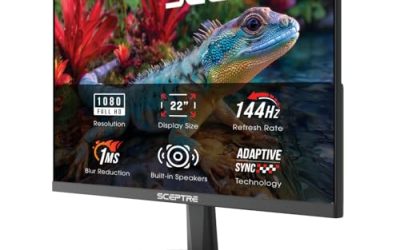
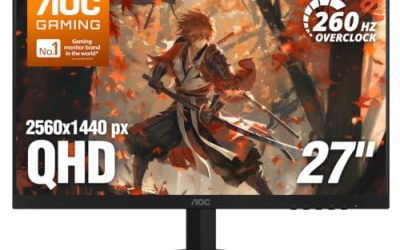
A monitor for a home office is judged on a different scorecard than one for gaming. Nobody working through spreadsheets, video calls, and email cares about a one-millisecond response time as much as they care about how their eyes feel at 5 p.m., whether the panel fits a shared desk, and whether the stand allows a comfortable height. The word business in the keyword points to flicker-free backlights, low blue light modes, anti-glare coatings, and clean mounting options rather than flashy extras.
This guide is for remote workers, freelancers, and students setting up a full-HD workspace in 2026 without paying for resolution they do not need. It compares six monitors from their listed panel type, refresh rate, size, and inputs, and it explains why the 24-inch and 27-inch classes sit at the center of most home office desks. Where a listing leans toward gaming language, the notes say so plainly. A 32-inch curved gaming monitor in the same category was left out because its design targets play rather than paperwork, and it would dominate a typical desk.
Our Top Picks
 Philips 24 Inch Computer Monitor FHD 100Hz VA24 inch 100Hz8.7 x 21.3 x 16.4 inches6.4 poundsCheck on Amazon
 Acer 27in FHD 1920x1080 IPS 120Hz Gaming Monitor27-inch8.27 x 24.07 x 17.44 inches11 poundsCheck on Amazon
 Acer 23.8in FHD 1920x1080 IPS 120Hz Office Monitor23.8-inch4.53 x 21.21 x 16.7 inches7.7 poundsCheck on Amazon
Top 3 picks at a glance
Quick Picks
As an Amazon Associate we earn from qualifying purchases at no extra cost to you.


| Product | Best for | Key spec from the title |
|---|---|---|
| HP Series 3 Pro 324pf | Business-first comfort | 24-inch FHD IPS, 100Hz, low blue light, anti-glare |
| Philips 241V8LB | Simple desk setups | 24-inch FHD VA, 100Hz, tilt adjust, VESA |
| DJiEX 27-inch Curved | Wrap-around work views | VA, 1800R curve, 99% sRGB, HDMI and DisplayPort |
| Acer KB272 G0bi | Larger IPS with older inputs | 27-inch IPS, 120Hz, HDMI and VGA |
| Acer KB242Y G0bi | Compact IPS for small desks | 23.8-inch IPS, 120Hz, VGA, VESA |
| Basics 27-inch | Plain 27-inch office screen | IPS, 120Hz, HDMI and DisplayPort, VESA |
How to Choose
Size and resolution at full HD
Full HD at 1920×1080 looks crisp at 24 inches and starts to look slightly soft at 27 inches, because the same pixels stretch across a larger area, much like enlarging a photo past its natural size. If you read small text all day, a 24-inch full-HD screen is the sharper choice, while 27 inches gives more room for side-by-side windows at the cost of pixel density. Anything beyond 27 inches at this resolution is a poor fit for close desk work. Sit about an arm’s length from the screen and the top edge should sit at or just below eye level; a monitor that forces you to look up will cost you more in neck strain than any spec can save.
Panel type and eye comfort
IPS panels give wider viewing angles and more consistent color, which helps when you share the screen or sit off-center. VA panels offer deeper contrast and are common in budget curved models, but their viewing angles are narrower. For long days, look for flicker-free backlights, low blue light modes, and an anti-glare finish, which are all stated on several of these listings. Glossy coatings look vivid in a dark room but reflect a window or desk lamp, so a home office near a bright window benefits from the matte anti-glare finish more than from extra color saturation.
Ports and mounting
HDMI covers most modern laptops, and DisplayPort adds support for daisy-chaining and higher refresh in some setups. VGA is still found on the Acer models and matters only if you connect an old desktop or docking station. Check for VESA mounting, usually 100x100mm, so you can swap the stand for an arm. A tilt-only stand limits ergonomics, so an arm often pays off. If your laptop has only USB-C, plan for a small adapter or dock, since none of the six monitors here lists a USB-C input in its title.
Refresh rate: what office buyers can skip
A 100Hz or 120Hz panel feels smoother when scrolling and dragging windows, but anything above that is for gaming. Do not pay extra for 1ms claims or adaptive sync if your work is documents and calls. Budget monitors typically cut corners on stands, speakers, and color accuracy, so plan on external audio, and expect little height adjustment from entry-level models. Mid-range business models add better stands and sturdier plastics, and premium ones add USB-C docking and pivoting arms, so decide which of those you would use every day before paying for them.
The 6 Best Options
HP Series 3 Pro 324pf
HP markets this 24-inch full-HD IPS monitor squarely at business and home office use, with a 100Hz refresh rate, 5ms response time, low blue light, flicker-free operation, and an anti-glare coating. It is the most office-oriented listing in the group.
- Strength: IPS panel plus flicker-free, low-blue-light and anti-glare features reduce eye strain over long sessions.
- Strength: 24-inch size suits a shared or compact desk.
- Trade-off: 5ms response is slower than the Acer models, which does not matter for documents.
Skip it if you want a 27-inch canvas. It fits accountants, writers, and anyone who spends eight hours a day reading text on screen, and the business branding usually signals a more conservative design that blends into a professional backdrop on video calls. Its IPS panel also means colleagues can lean in beside you during a review without the picture washing out.
Philips 241V8LB
A 24-inch full-HD VA monitor with 100Hz, 4ms GtG response, adaptive sync, flicker-free backlight, low blue light, and HDMI 1.4. The stand offers tilt adjustment and the screen is VESA compatible.
- Strength: flicker-free and low blue light modes are listed.
- Strength: VESA support lets you move it onto an arm.
- Trade-off: the VA panel has narrower viewing angles than IPS, and HDMI 1.4 limits refresh at higher resolutions.
Skip it if you share the screen with colleagues from different seats. It is a practical pick for a plain, no-frills workstation where the monitor sits directly in front of you. It also appeals to buyers who want the deeper contrast VA panels are known for, which makes dark-mode editors and email clients look rich.
DJiEX 27-inch Curved
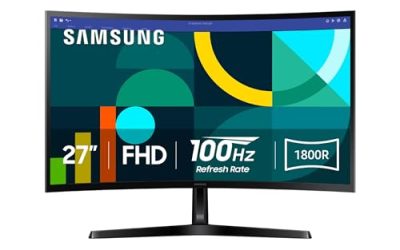
This 27-inch curved VA monitor lists 100Hz, a 1800R curve, 4000:1 contrast, 99% sRGB, HDR10, FreeSync, HDMI and DisplayPort, and a 100x100mm VESA mount. It is aimed at buyers who like a gentle wrap-around feel.
- Strength: both HDMI and DisplayPort inputs add connection flexibility.
- Strength: 99% sRGB suits light photo or design work alongside office tasks.
- Trade-off: a curved VA panel can distort straight lines in spreadsheets and layouts.
Skip it if precise alignment matters, such as drafting. It works for anyone who prefers the immersive curve when working with documents side by side, and a 27-inch width gives room for two windows. The HDR10 mention is mostly marketing at this tier, so treat it as a bonus for video rather than a reason to buy.
Acer KB272 G0bi
A 27-inch full-HD IPS monitor with a 120Hz refresh rate, 1ms response, adaptive sync, 99% sRGB, HDMI, VGA, VESA mounting, and a blue light filter. Though the listing mentions gaming, the title also positions it as an office model.
- Strength: IPS panel and 120Hz make scrolling and window movement smooth.
- Strength: VGA input supports older equipment.
- Trade-off: no DisplayPort is listed, so you rely on HDMI for modern devices.
Skip it if you want a docked, multi-input setup with DisplayPort. It suits buyers who need an older computer and a laptop to share the same screen. Because the stand specifics are not in the title, check whether it adjusts for height before buying, or plan to use the VESA holes with an arm.
Acer KB242Y G0bi
The smaller sibling at 23.8 inches, with the same IPS panel type, 120Hz refresh, 1ms response, 99% sRGB, HDMI and VGA, VESA mounting, and a blue light filter. It fits small desks where a 27-inch screen would feel crowded.
- Strength: compact footprint and sharper pixel density than the 27-inch version.
- Strength: IPS panel keeps colors steady from different angles.
- Trade-off: no DisplayPort is listed, matching its larger sibling.
Skip it if you plan to run two windows side by side in comfort. It is a neat fit for a bedroom desk or a corner workstation where space is tight. Students who study and game on the same desk will also like the 120Hz smoothness without needing a large footprint.
Basics 27-inch 120Hz
A plain 27-inch full-HD IPS monitor with a 120Hz refresh rate, HDMI, DisplayPort, and VESA compatibility, positioned for office and home use. It stays simple on purpose.
- Strength: 27-inch IPS with both HDMI and DisplayPort.
- Strength: 120Hz is smooth for everyday scrolling.
- Trade-off: the title mentions no low blue light mode, so eye-comfort features are not stated.
Skip it if you want listed eye-care features or built-in extras. It suits someone who wants a bigger screen at a modest tier without ornamental features. Pair it with a monitor arm and you get a flexible workstation at a lower tier than most of the branded business models.
Which One Fits Your Situation
Eight hours of text and spreadsheets
The HP Series 3 Pro 324pf is the closest to a purpose-built business monitor, with eye-care features stated up front. Pair it with a bias light or a lamp behind the screen to reduce contrast strain in an evening session.
A cramped desk in a spare room
Go for the Acer KB242Y G0bi or the Philips 241V8LB. Both are compact, and the Acer adds the IPS panel.
Working across two windows at once
The Basics 27-inch or the Acer KB272 G0bi give more width for side-by-side documents, with DisplayPort on the former and VGA on the latter.
Mixed office and photo work
Treat this as a light-duty scenario only, since none of these monitors targets professional color editing.
The DJiEX 27-inch lists 99% sRGB and both digital inputs, though the curve may bother precise layout work. If you edit photos only occasionally, that sRGB figure is enough; serious color work needs a calibrated, wider-gamut display.
Common Mistakes
- Choosing a 27-inch full-HD screen and then complaining that text looks soft.
- Paying extra for a high-speed gaming panel when the work is documents and calls.
- Skipping VESA mounting and living with a stand that is too low for your neck.
- Forgetting to match ports; an old VGA dock needs an input the monitor actually has.
- Judging eye comfort by blue light mode alone instead of looking for flicker-free backlights too.
Related guides
- Gaming Chair Cushions And Lumbar Supports
- Travel Backpack With Laptop Compartment
- Business Laptops With Long Battery Life
Frequently Asked Questions
Is 24 inches or 27 inches better for a home office?
At full HD, 24 inches is sharper and fits smaller desks, while 27 inches provides more workspace. If you can afford a higher-resolution panel, 27 inches becomes more comfortable.
Do I need a high refresh rate for office work?
No. A 100Hz or 120Hz panel feels smoother, but 60Hz is perfectly usable for documents and calls. If the price difference is small, the higher rate is a pleasant extra, but it should never outrank panel type or eye-comfort features.
Is a curved monitor good for work?
It can feel immersive on larger screens, but straight lines can look bent in spreadsheets and layouts. Many people prefer flat panels for precise tasks. Try a mild curve such as 1800R if you want the effect without extreme bending.
What does flicker-free mean?
It means the backlight does not pulse at visible rates when brightness is lowered, which is aimed at reducing eye fatigue during long sessions.
Related guides
More from Amazon
Programs that pair well with the guide above. Offers and eligibility are set by Amazon and may change.
Free shipping on eligible items, Prime Video and more. Eligible new members can start with a free trial.
Start a Prime free trialAd-free music streaming. Eligible new subscribers can start with a free trial.
Try Music Unlimited freeA Prime membership for ages 18-24 with a trial period. Eligibility is set by Amazon.
See Prime for Young AdultsAudiobooks and podcasts to listen to on the go. Eligible new members can start with a free trial.
Try Audible freeAs an Amazon Associate we earn from qualifying purchases.