A business monitor does not need to win a color contest or chase the highest refresh rate. It needs to be comfortable for eight hours of spreadsheets, email threads and video calls, fit a shared desk, and connect to whatever laptop IT hands out next quarter. Shared offices add another wrinkle, because one model has to suit several people with different habits and chairs. That is the real decision behind the keyword “business monitors”: how much screen area, how much resolution and how many ergonomic and connectivity extras are worth paying for when the work is mostly text and documents.
This guide is for office managers equipping a team, freelancers building a proper desk, and employees who got a laptop and no second display. The seven monitors below span a 24-inch basic panel, a handful of 27-inch screens, a 34-inch ultrawide and a 49-inch dual-QHD monster. Every comment is based on the listed specs in each title, and you should verify ports and stand adjustments on the product page before buying in 2026.
Our Top Picks
 Samsung 49” Business Curved Ultrawide Dual QHD Computer49 inch22.38 x 45.18 x 16.56 inches32.19 poundsCheck on Amazon


Top 3 picks at a glance
Quick Picks
As an Amazon Associate we earn from qualifying purchases at no extra cost to you.


| Product | Best for | Key spec from the title |
|---|---|---|
| Samsung 27″ S40GD | Everyday office desks | 27-inch IPS, 100Hz, Eye Saver Mode |
| Samsung 49″ Dual QHD Curved | Replacing two monitors | USB-C, DisplayPort, HDMI, 120Hz, DisplayHDR 400 |
| Dell 27 Plus S2725DSM | Sharper text at 27 inches | QHD 2560×1440, 144Hz, height/tilt/pivot |
| LG 34WR55QK-B | Wide spreadsheets and timelines | 34-inch WQHD 3440×1440, USB Type-C |
| LG 27U411A-B | Long reading sessions | Full HD IPS, Reader Mode, Flicker Safe |
| Philips 241V8LB | Tight desks and shared stations | 24-inch FHD VA, 100Hz, flicker-free |
| Dell SE2726H | Dual-source office setups | 27-inch FHD IPS, 144Hz, 2x HDMI |
How to Choose
Size and resolution first
For document work, pixel density matters more than raw size. A 27-inch Full HD panel is workable but shows softer text than a 27-inch QHD panel at 2560×1440. A 24-inch Full HD screen is sharper per inch than either, though it shows less at once. Many buyers overshoot on size; a 27-inch screen is the common sweet spot for a standard desk about 30 inches deep, and anything larger benefits from a monitor arm. Ultrawide monitors such as a 34-inch at 3440×1440 give two documents side by side, while a 49-inch dual-QHD model effectively replaces a pair of 27-inch displays.
Connectivity decides how tidy the desk is
A USB-C port listed in the title can carry video and sometimes power to a laptop through one cable, which is a major tidy-desk win for hot-desking staff. Look for HDMI and DisplayPort too, and note the HDMI version where listed: an older HDMI 1.4 input caps what you can run, though it is plenty for office work. If two computers share one screen, count the inputs, because a single HDMI port forces cable swapping. Cable quality counts too, so use the cable in the box and replace it only if the image flickers.
Ergonomics and eye comfort
Height adjustment, tilt and pivot are not luxuries when a monitor is used all day, so confirm which movements the stand allows. Eye-care wording such as flicker-free, flicker safe, Eye Saver Mode, Reader Mode and low blue light describes comfort features. They are worth having, but they do not replace taking breaks. A VESA mount option lets you move the screen to an arm if the stand is too limited.
What to ignore, and where budgets cut corners
Do not chase response times such as 1ms or 4ms for office tasks; they matter for fast games, not documents. HDR labels like HDR10 on a basic office panel offer limited visible benefit. Budget monitors usually save money on stand adjustment, speakers and port variety, so a cheap tilt-only stand can leave you hunching. Mid-range tiers add taller stands and sharper panels, and premium tiers add USB-C docking and multi-source tools.
The 7 Best Options
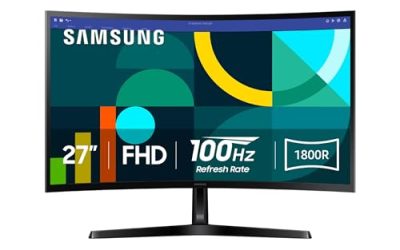
Samsung 27″ S40GD
The S40GD is a borderless 27-inch business monitor with an IPS panel, 100Hz refresh rate, Eye Saver Mode, an ergonomic design and a game picture mode. For a general office or a home workspace, that combination covers wide viewing angles for shared screens and a modest refresh bump over plain 60Hz office panels. Borderless edges also look cleaner when two of these sit side by side, which is how many small teams build a dual-screen desk without paying for an ultrawide. The game picture mode is an extra for lunch-break play, not the reason to buy.
- Strength: IPS panel and borderless design suit side-by-side window layouts.
- Strength: 100Hz refresh rate and Eye Saver Mode are named.
- Trade-off: the visible title does not list USB-C, so a single-cable laptop setup is not promised.
Skip it if you need USB-C docking.
Samsung 49″ Dual QHD Curved
Samsung’s 49-inch business ultrawide is curved with a dual QHD resolution, USB-C, DisplayPort and HDMI inputs, a 120Hz refresh rate, VESA DisplayHDR 400 and built-in speakers. It is the choice for analysts, traders and editors who would otherwise run two or three monitors and fight bezels. Built-in speakers are listed, which helps in a shared office where a separate speaker bar would crowd the desk, though a headset is still better for calls. Because it is so wide, it rewards a monitor arm or a deep desk.
- Strength: USB-C plus DisplayPort and HDMI inputs for multiple devices.
- Strength: dual QHD canvas replaces a pair of monitors with no center bezel.
- Trade-off: a 49-inch curved panel needs a deep, wide desk.
Skip it if your desk is small or shared.
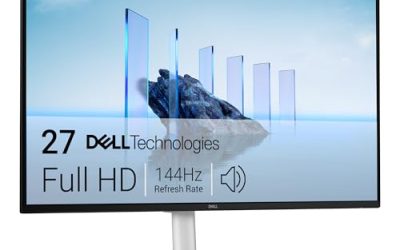
Dell 27 Plus S2725DSM
The Dell 27 Plus uses a 27-inch QHD 2560×1440 display at 144Hz with 1ms, two 3W speakers, HDMI and DisplayPort 1.4, plus height, tilt and pivot adjustment. For text-heavy work it gives sharper letters than a 27-inch Full HD screen, and pivot makes coding or document review easier in portrait. The refresh rate and 1ms figure are more than an office needs, but they do no harm and may please a hybrid buyer who also plays games after hours.
- Strength: QHD resolution gives crisp text at 27 inches.
- Strength: height, tilt and pivot adjustment in the stand.
- Trade-off: the visible title lists HDMI and DisplayPort but no USB-C.
Skip it if you want one-cable laptop charging.
LG 34WR55QK-B
This LG is a 34-inch curved UltraWide WQHD monitor at 3440×1440 with 100Hz, 5ms, HDR10, Reader Mode, HDMI, DisplayPort and USB Type-C, plus tilt and height adjustment. It targets users who want a wide workspace for timelines, spreadsheets or two documents side by side, with a Type-C connection for laptops. A project manager juggling a Gantt chart and a chat window will see the benefit right away, and the curve helps keep both edges of the screen within comfortable eye reach.
- Strength: ultrawide WQHD resolution fits two documents side by side.
- Strength: USB Type-C input plus Reader Mode for lengthy reading.
- Trade-off: curved ultrawide screens can feel unusual for flat design review.
Skip it if you need accurate straight lines on a flat canvas.
LG 27U411A-B
The LG 27U411A-B is a 27-inch Full HD IPS monitor at 1920×1080 with 120Hz, HDR10, Reader Mode and flicker-safe backlighting, HDMI input and a slim stand base. It keeps the desk uncluttered and puts eye-comfort features front and center. A bookkeeper or an editor who reads long documents all day gets the most from those features, while the slim base leaves room for a keyboard and notebook.
- Strength: flicker-safe design and Reader Mode support long reading.
- Strength: IPS panel with 120Hz refresh rate.
- Trade-off: the title lists HDMI only and a slim stand, not height adjustment.
Skip it if you need a height-adjustable stand or multiple inputs.
Philips 241V8LB
The Philips 241V8LB is a 24-inch Full HD VA monitor with 100Hz, flicker-free tech, 4ms GtG, adaptive sync, HDMI 1.4 and tilt adjustment. It is a compact, no-nonsense screen for reception desks, call centers and cramped shared stations. A VA panel generally offers deeper contrast than IPS but narrower viewing angles, which is fine when one person sits directly in front of the screen.
- Strength: 24-inch size fits tight desks and gives sharp text for the size.
- Strength: flicker-free backlighting and adaptive sync are named.
- Trade-off: tilt is the only stand movement listed.
Skip it if you need a larger canvas.
Dell SE2726H
The SE2726H is a 27-inch Full HD IPS monitor at 144Hz with 1ms response, AMD FreeSync, TUV 3-Star eye comfort certification and two HDMI inputs. The two HDMI ports let you toggle between a work laptop and a personal device without swapping cables. For a desk where a docking laptop and a small desktop both appear every day, that convenience adds up, and the adaptive sync label is a bonus rather than a reason to choose it.
- Strength: two HDMI inputs for shared setups.
- Strength: IPS panel, 144Hz and an eye comfort certification.
- Trade-off: Full HD at 27 inches is less sharp than QHD.
Skip it if text sharpness is your first priority.
Which One Fits Your Situation
You are replacing a two-monitor setup
The Samsung 49-inch dual QHD is the straightforward pick, since it combines USB-C, DisplayPort and HDMI in one wide canvas. Finance and operations roles that keep a dashboard, a chat window and a spreadsheet open at once get the clearest payoff.
You live in spreadsheets and PDFs
Choose the Dell 27 Plus S2725DSM for QHD text sharpness and a pivot stand, or the LG 34-inch if you prefer width. The pivot option is a quiet advantage for reading long PDFs and code in portrait mode, where far more lines fit on screen.
You hot-desk with a laptop
The LG 34WR55QK-B with USB Type-C is the best fit among these for a simple cable-based setup. Walk in, plug one cable into the laptop, and the screen is ready, which is the whole point of a hot desk.
You furnish a call-center or front desk
The Philips 241V8LB keeps the footprint small, and the Dell SE2726H works where a second HDMI device shares the screen. For a small team, standardizing on one of the 27-inch models keeps colors consistent across desks and simplifies spare-part handling.
Common Mistakes
- Buying on refresh rate when the work is documents and email.
- Assuming every monitor charges a laptop through USB-C.
- Ignoring stand adjustments and hunching over a tilt-only screen.
- Choosing a large Full HD screen and wondering why text looks soft.
- Forgetting to check the desk depth before ordering an ultrawide.
Related guides
- Gaming Chair Cushions And Lumbar Supports
- Travel Backpack With Laptop Compartment
- Business Laptops With Long Battery Life
Frequently Asked Questions
Is a 24-inch monitor enough for office work?
For single-window tasks, yes. Multitaskers usually do better with 27 inches at QHD or an ultrawide.
Do I need QHD for spreadsheets?
No, but QHD at 27 inches gives sharper text and room for more columns. Full HD is acceptable at 24 inches.
Are eye-care modes worth anything?
Flicker-free backlighting is a useful baseline. Blue light filters are largely a preference, and regular breaks matter more.
Should I buy a curved monitor?
Curves suit ultrawide widths and close viewing. On a normal 24 or 27-inch screen, a flat panel is generally easier to share.
Related guides
More from Amazon
Programs that pair well with the guide above. Offers and eligibility are set by Amazon and may change.
Free shipping on eligible items, Prime Video and more. Eligible new members can start with a free trial.
Start a Prime free trialAd-free music streaming. Eligible new subscribers can start with a free trial.
Try Music Unlimited freeA Prime membership for ages 18-24 with a trial period. Eligibility is set by Amazon.
See Prime for Young AdultsAudiobooks and podcasts to listen to on the go. Eligible new members can start with a free trial.
Try Audible freeAs an Amazon Associate we earn from qualifying purchases.