A dorm room imposes constraints that a house does not: a desk shared with a laptop and a lamp, a closet where anything oversized will not fit, a roommate who may not want to hear a loud machine at midnight, and a campus network that sometimes refuses to let a printer join at all. The best dorm printer is the one that fits the space, connects in a building full of restrictions, and does not turn a few pages of homework into an ink budget problem.
Seven options are covered here, from a pocket-sized portable Canon to HP all-in-ones with duplex printing and a document-feeding OfficeJet. In 2026, students are printing less than they used to, but the moments they do print, such as lab reports, forms, boarding passes, and group projects, tend to be urgent. The goal is a machine that works on the first try and has a size and cost that suits a student budget.
Our Top Picks
 HP Envy 6155 Wireless All-in-One Color Inkjet Printer17.05 x 14.21 x 5.3517.05 x 5.35 x 14.21 inches11.2 poundsCheck on Amazon
 HP OfficeJet Pro 8125 Wireless All-in-One Color Inkjetone size13.29 x 18.11 x 9.17 inches17.6 poundsCheck on Amazon
 Canon PIXMA TR160 Color Wireless Portable PrinterSmall12.7 x 7.3 x 2.6 inches4.5 poundsCheck on Amazon
 HP Envy 6555 Wireless All-in-One Color Inkjet Printerone size14.21 x 17.05 x 6.73 inches13.5 poundsCheck on Amazon


Top 3 picks at a glance
Quick Picks
As an Amazon Associate we earn from qualifying purchases at no extra cost to you.


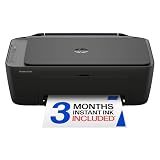


| Product | Best for | Key spec from the title |
|---|---|---|
| HP DeskJet 2923 | Basic dorm printing | Wireless all-in-one, print, scan, copy |
| Canon PIXMA TS4320 | Projects and photos | Wireless inkjet, print, copy, scan |
| HP Envy 6155 | Lab reports, double-sided | Duplex printing, 3-month Instant Ink trial |
| HP DeskJet 2955 | Lightest feature set | Wireless, mobile compatibility |
| HP OfficeJet Pro 8125 | Shared suite or heavy use | ADF, duplex printing |
| Canon PIXMA TR160 | Tiny desks, move-in day | Portable, 50-sheet tray, 1.44″ display |
| HP Envy 6555 | Step-up duplex all-in-one | Duplex, 3-month Instant Ink trial |
How to Choose
Measure your desk and your closet first
Most all-in-one inkjets are about the footprint of a large toaster and need room above for a lid or scanner. Count on at least a square foot of desk or a shelf near an outlet. A portable printer shrinks that footprint dramatically and can be stored under a bed, though portable models usually print slower and skip scanning.
Confirm how it will connect to campus Wi-Fi
Dorm networks often block devices from discovering each other, which stops wireless printing from working. Check whether the printer supports a direct wireless connection to your laptop, a USB cable, or an app that does not rely on the local network. Ask your school’s IT office before move-in, since this is the most common reason printers go unused.
Think about volume, cost per page, and sharing
A student who prints 20 pages a month can use a basic inkjet; one who prints dozens of pages a week needs a model with lower ink costs or a subscription. Splitting the printer with a roommate halves the up-front cost but needs a plan for who buys ink. Duplex printing saves paper on long reports.
Look for noise, size, and where budget models cut corners
Entry printers are small but slow, with small paper trays and starter cartridges. They rarely include a document feeder. A large, loud printer is a poor fit for a shared room, so prefer compact designs, and keep in mind that some models require an account to unlock all features.
The 7 Best Options
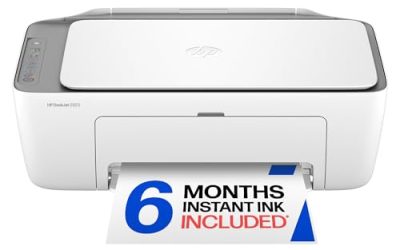
HP DeskJet 2923
A wireless all-in-one color inkjet that prints, scans, and copies, with mobile compatibility and easy home printing. It suits the dorm resident who needs a simple machine for occasional printing, such as syllabi, forms, and the odd assignment, without a big footprint or a complicated setup on a campus network.
- Strength: Print, scan, and copy in one compact device.
- Strength: Mobile compatibility for printing from a phone.
- Trade-off: No duplex or feeder in the title.
Skip it if you print long reports or scan stacks of pages. For light use it is a sensible, low-commitment starting point, and the basic design keeps move-in simple. Before you commit, confirm that your phone or laptop can reach it through the maker’s app, because a printer that cannot see your device is just an expensive paperweight in a shared room.
Canon PIXMA TS4320
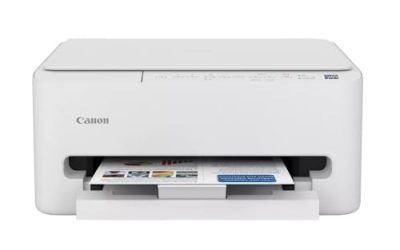
This wireless inkjet prints, copies, and scans, and is described as cost efficient for home use with a photo-friendly bent. It suits students in art, design, or education programs who print projects and pictures, and who want a recognized brand without a premium tier.
- Strength: Photo-oriented listing for visual projects.
- Strength: Wireless print, copy, and scan in one machine.
- Trade-off: No document feeder or duplex mentioned in the title.
Skip it if you want automatic double-sided printing for lab reports. It is a good middle step between the basic HP and the duplex models in this list. Students who print posters for club events, class presentations, or portfolio pieces get the most from its photo emphasis, though paper type and ink use will drive the real running cost.
HP Envy 6155
A wireless color inkjet all-in-one with print, scan, copy, duplex printing, and a three-month ink trial, marketed as best for home. It suits students who write many papers and want to print on both sides of the sheet automatically to save paper, ink, and time before a deadline.
- Strength: Duplex printing for paper savings.
- Strength: Print, scan, and copy with wireless setup.
- Trade-off: The title lists no document feeder.
Skip it if you hate subscriptions or never print on both sides. The ink trial is optional, so read the terms and decide before the trial runs out. If you pick it, set a calendar reminder so you are not surprised by a charge after you have forgotten about it in the rush of midterms, and keep a spare pack of paper nearby.
HP DeskJet 2955
This DeskJet carries the same basic title as the 2923: wireless all-in-one, color documents, mobile compatibility, and print, scan, and copy. It suits a student who wants the cheapest reasonable printer and already knows the dorm network will allow it to connect, perhaps because the school supports wireless printing.
- Strength: Simple and compact HP all-in-one.
- Strength: Mobile printing support.
- Trade-off: No duplex or feeder in the listing.
Skip it if you want a visibly different feature list from the 2923. Pick between them on availability and the cartridge options you can find near campus. If you can borrow a roommate’s cartridge once in a pinch, that convenience alone makes sticking with a common model worthwhile, so ask around the floor before ordering.
HP OfficeJet Pro 8125
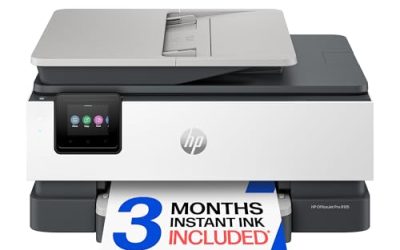
A wireless all-in-one color inkjet with an automatic document feeder, duplex printing, and a three-month ink trial, aimed at the home office. It suits students running a side business, a campus organization, or a shared suite, where multi-page scanning and double-sided printing matter more than size.
- Strength: Document feeder and duplex printing.
- Strength: Capable of heavier use than the basic models.
- Trade-off: Bigger and likely costlier than the entry options.
Skip it if your desk is tiny or you print a few pages a month. The extras take space and money that a typical dorm resident will not use. It makes more sense for a shared suite, a student organization office, or an off-campus apartment where several people print and scan paperwork, and where a bigger machine has the space it needs.
Canon PIXMA TR160
A color wireless portable printer with a 50-sheet paper tray, a 1.44 inch display, and a lightweight, compact body marketed for printing on the go. It suits students with tiny desks who want a printer that tucks under a bed after use, or who move between a dorm and an apartment.
- Strength: Portable and compact, ideal for small rooms.
- Strength: A 50-sheet tray and a small display for setup.
- Trade-off: The title lists printing only, with no scanner or copier.
Skip it if you need to scan or copy documents. Pair it with a phone scanning app if you only need occasional scans. The small display is handy for setting up the connection without hunting for a computer, and the compact body means a dorm room closet shelf is enough to store it between uses.
HP Envy 6555
A wireless color inkjet all-in-one with print, scan, copy, duplex printing, and a three-month ink trial included, marketed as best for home. It sits alongside the Envy 6155 in the listings and suits students who prefer a newer-numbered model with the same double-sided convenience.
- Strength: Duplex printing and print, scan, copy features.
- Strength: Wireless setup and a trial ink program.
- Trade-off: Listing details are nearly identical to the 6155, so differences are hard to see.
Skip it if you do not want a subscription program. Compare availability, and confirm which ink cartridges each uses before you buy. When two listings look this alike, the sensible tiebreakers are return terms, shipping time before move-in, and whether a roommate or a friend already owns a model with compatible supplies.
Which One Fits Your Situation
Tiny desk and frequent moves
The Canon PIXMA TR160 is portable and compact, with a 50-sheet tray. It slides under a bed or into a closet, which matters when you share a small room and move out every spring.
Lots of papers and lab reports
The HP Envy 6155 or Envy 6555 prints double-sided automatically, which saves paper and keeps long reports from becoming a thick stack on your desk.
Student on the tightest budget
The HP DeskJet 2923 covers basic printing, scanning, and copying at the entry tier, and a student who prints a handful of pages a month gets everything they need from it.
Shared suite with heavy use
The HP OfficeJet Pro 8125 adds a document feeder and duplex printing for multi-page jobs, which suits housemates who all print and scan at different times of the week.
Common Mistakes
- Assuming a wireless printer will work on campus Wi-Fi without checking.
- Buying a large printer for a small shared room.
- Forgetting that ink and paper are recurring costs that can outrun a low entry cost within a semester.
- Skipping duplex when writing long reports, then burning through paper on drafts.
- Failing to agree with a roommate on who buys ink and who keeps the printer at the end of the year.
Related guides
- Warranty Considerations When Buying On Sale
- How To Use Camelcamelcamel For Amazon Deals
- Browser Extensions For Finding Deals
Frequently Asked Questions
Will a wireless printer work on dorm Wi-Fi?
Sometimes not. Many campus networks block device discovery, so look for a direct connection option or USB. Ask the IT help desk which setups are allowed, and try the connection the day you arrive so you can return the printer if it will not work.
Is a portable printer enough for school?
For printing assignments, yes. If you also need scanning and copying, an all-in-one is more practical.
Should I split a printer with a roommate?
It cuts the cost, but agree on ink and paper costs in advance. Keep ownership clear for move-out.
Does the campus offer printing instead?
Many schools have print labs. Compare their per-page cost with owning a printer before buying. If you print only before finals, a lab or library kiosk may be cheaper and more convenient than a machine that sits idle most of the semester.
Related guides
More from Amazon
Programs that pair well with the guide above. Offers and eligibility are set by Amazon and may change.
Free shipping on eligible items, Prime Video and more. Eligible new members can start with a free trial.
Start a Prime free trialAd-free music streaming. Eligible new subscribers can start with a free trial.
Try Music Unlimited freeA Prime membership for ages 18-24 with a trial period. Eligibility is set by Amazon.
See Prime for Young AdultsAudiobooks and podcasts to listen to on the go. Eligible new members can start with a free trial.
Try Audible freeAs an Amazon Associate we earn from qualifying purchases.