A portable printer solves a narrow but real problem: you need paper in your hand when there is no desk, no outlet-adjacent printer, or no office nearby. Think of a contractor printing a signed estimate on site, a teacher marking worksheets between classrooms, a traveler who needs a customs form at a hotel, or a student who prints assignments in a shared dorm. The decision is not just “small versus large.” It is whether you want a compact inkjet that behaves like a full printer, or an inkless thermal unit that trades output quality for simplicity.
This guide is for shoppers choosing between those two paths in 2026. The seven models below include a compact Canon inkjet, two mobile HP OfficeJet printers, and four Bluetooth thermal machines that use special paper instead of ink. We rely only on what each listing states, so some details, such as battery runtime or print speed, are left for you to confirm on the spec sheet before buying.
Our Top Picks
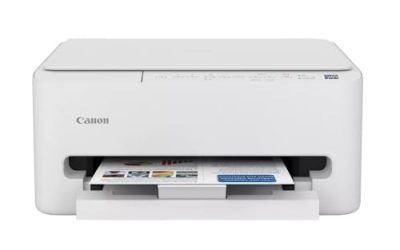
 Canon PIXMA TR160 Color Wireless Portable PrinterSmall12.7 x 7.3 x 2.6 inches4.5 poundsCheck on Amazon


Top 3 picks at a glance
Quick Picks
As an Amazon Associate we earn from qualifying purchases at no extra cost to you.


| Product | Best for | Key spec from the title |
|---|---|---|
| Canon PIXMA TR160 | Color prints on the go | Wireless, 50-sheet tray, 1.44-inch display |
| Gloryang Inkless Printer | Travel with a carry case | Wireless thermal, 8.5 x 11 thermal paper, Bluetooth |
| HP OfficeJet 250 | Mobile all-in-one work | Wireless, print, scan, and copy |
| A285M Inkless Printer | Letter or A4 documents | Bluetooth thermal, US Letter and A4 support |
| HP OfficeJet 200 | Print-only mobile color | Wireless mobile inkjet, print only |
| Rongta Thermal Printer (school/office) | Students and home use | Bluetooth, inkless, Android compatibility |
| Rongta Bluetooth Thermal Printer | Travel documents | 8.5 x 11 thermal paper, inkless, Bluetooth |
How to Choose
Thermal or inkjet
Thermal printers heat special paper, so there are no ink cartridges to dry out, spill, or run low mid-trip. Their output is usually monochrome and the paper is a consumable you must stock. Inkjet portables such as the Canon and HP units print color on regular paper, but they use cartridges and are bulkier. If your jobs are boarding passes, forms, and black-and-white worksheets, thermal is simpler; if you need color charts or brochures, inkjet is the safer path.
Paper size and connectivity
Check the page size first. Several thermal listings here support 8.5 x 11 inch paper, and one lists A4 as well, which is what most documents need. Then check how the printer connects. Bluetooth works for direct phone printing without a network, while Wi-Fi suits shared offices. Confirm that your phone’s operating system is named in the title, because some listings mention Android explicitly and leave other platforms to the spec sheet.
Capacity, display, and extras
A small printer that holds only a few sheets forces constant reloading, so look at the tray capacity. The Canon lists a 50-sheet tray and a 1.44-inch display, which help with on-device settings. Some thermal models bundle a carry case or paper rolls, which saves a separate purchase. For all-in-one needs, only the HP OfficeJet 250 lists scan and copy functions, so decide whether you will ever need to digitize a page while traveling.
Think about the situation in which you will actually print. A hotel room, a client’s office, a classroom, and a car trunk each present different constraints: some have Wi-Fi that blocks device-to-device connections, some have no outlet within reach, and some demand a printer that can be set up in under a minute. Direct Bluetooth pairing is often the least fussy option in those places, while a wireless inkjet is more comfortable at a fixed workspace you visit regularly.
What to ignore and where budget models cut corners
Ignore marketing adjectives like “mini” or “compact” without dimensions; compare the spec sheet for weight. Budget thermal models can limit print resolution and paper choices, so check which paper types are supported and how much the replacement paper costs. Cheap inkjets may include modest starter cartridges. Also remember that thermal paper fades over time with heat and light, so do not rely on it for documents you must archive for years.
The 7 Best Options
Canon PIXMA TR160
The PIXMA TR160 is a color wireless portable printer with a 50-sheet paper tray and a 1.44-inch display, and the listing describes it as lightweight and compact. It is aimed at people who want an actual inkjet that can slip into a bag and print on regular paper while away from the desk.
- Strength: A 50-sheet tray reduces reloading compared with tiny thermal units.
- Strength: Color printing on regular paper covers more document types than thermal models.
- Trade-off: As an inkjet, it relies on cartridges, which need replacing and can dry out between uses.
Skip it if you want a truly ink-free printer or need a scanner for copies on the road. It is also not the right match for someone who prints so rarely that cartridges would sit unused for months, since inkjet nozzles can clog when idle.
Gloryang Inkless Portable Printer
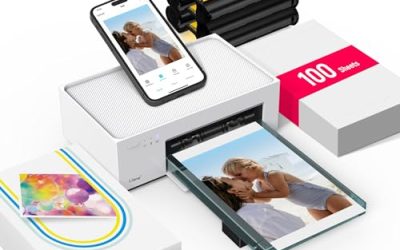
This thermal printer supports 8.5 x 11 inch paper and connects by Bluetooth, with a carry case included. It is aimed at travelers who want something that avoids ink entirely and arrives with basic accessories.
- Strength: Inkless printing removes cartridges from the packing list.
- Strength: Included carry case helps protect the printer in a bag.
- Trade-off: Thermal paper is a recurring purchase, and output is not a replacement for color inkjet work.
Skip it if you need color documents or plan to print on plain office paper. Buyers should also confirm which phones and apps the printer works with, because the title mentions Bluetooth but the visible text does not spell out every supported platform.
HP OfficeJet 250
The OfficeJet 250 is a mobile inkjet all-in-one that prints, scans, and copies, with wireless connectivity and color document printing. It suits field professionals, such as agents or contractors, who need a scanner as well as a printer while away from the office.
- Strength: Scanning and copying make it a mobile all-in-one rather than a print-only box.
- Strength: Wireless and mobile compatibility support printing from phones and laptops.
- Trade-off: As a mobile inkjet with an all-in-one layout, it is larger than a thermal pocket printer.
Skip it if your only need is to print a few pages and your bag is already full. A pocket thermal unit will weigh less, and the extra scanning hardware here only pays off for people who regularly digitize paper while traveling.
A285M Inkless Thermal Printer
The A285M is a small inkless thermal printer with Bluetooth that supports 8.5 x 11 inch US Letter and A4 paper. It targets travelers and students who work with both American and international paper sizes.
- Strength: Support for both Letter and A4 helps with international documents.
- Strength: Bluetooth connection avoids needing a Wi-Fi network.
- Trade-off: The title is truncated on device compatibility, so verify supported phones and apps before buying.
Skip it if you want color output or plan to print archive-quality documents. Because thermal paper is specific to this type of machine, check that replacement rolls or sheets are easy to find before you rely on it for a recurring task such as weekly worksheets.
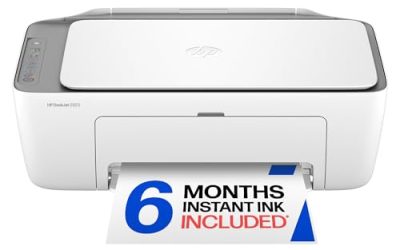
HP OfficeJet 200
The OfficeJet 200 is a wireless mobile inkjet that prints color documents. The listing says print only, so it lacks the scanning and copying of its OfficeJet 250 sibling. It suits users who already own a scanner or phone app and simply need mobile color printing.
- Strength: Color printing on regular paper in a mobile format.
- Strength: Wireless and mobile compatibility support phone printing.
- Trade-off: Print-only operation means no copy or scan functions.
Skip it if you need to digitize paperwork on the road; the OfficeJet 250 handles that. It also makes less sense for anyone who wants a pocketable device, since a mobile inkjet is a bag-sized item rather than something that disappears into a jacket.
Rongta Thermal Portable Printer (School/Office/Home)
This Rongta model is a wireless Bluetooth thermal printer described as inkless and suitable for school, office, or home use, with Android compatibility listed. It is aimed at students and light office users who want an affordable ink-free option.
- Strength: Inkless design simplifies upkeep for occasional printing.
- Strength: Positioned for school, office, and home, so it suits shared use.
- Trade-off: The truncated title leaves other device compatibility to be confirmed.
Skip it if you are not on Android or if color output is important to you. Since the visible title stops mid-word on the platform list, buyers on other phones should read the full spec sheet to confirm support before they commit.
Rongta Bluetooth Thermal Portable Printer
This second Rongta unit is a Bluetooth thermal printer supporting 8.5 x 11 inch thermal paper, described as inkless and built for travel. It pairs well with a phone for printing documents, tickets, and forms away from a desk.
- Strength: Letter-size thermal support covers standard documents.
- Strength: Inkless operation cuts cartridge care.
- Trade-off: Thermal-only output means no color and a recurring paper purchase.
Skip it if you need to print on plain paper or require scanning. Anyone planning to hand over printed pages as long-term records should also reconsider, because thermal output tends to age faster than ink on regular paper.
Which One Fits Your Situation
A frequent traveler printing documents
The Gloryang or the second Rongta suits boarding passes and forms. The Gloryang adds a carry case, while the Rongta lists Letter-size thermal paper support.
A professional who needs scanning in the field
The HP OfficeJet 250 is the only listing here with scan and copy, making it the logical pick for agents, adjusters, and contractors handling signed paperwork.
Someone who wants color on regular paper
Choose between the Canon PIXMA TR160 and HP OfficeJet 200. The Canon lists a 50-sheet tray and display, while the HP is a print-only mobile inkjet.
A student working across paper sizes
The A285M supports both US Letter and A4, which helps if you share files with schools or collaborators abroad. The Rongta school and office model is a simpler alternative if you use Android.
One more way to decide: picture the worst moment you will need a page. If it is a rushed hotel lobby, the thermal Bluetooth units win on speed of setup. If it is a client meeting where the document must look professional in color, an inkjet portable is the more credible choice. Matching the tool to that single moment usually settles the debate faster than comparing every line of the spec sheet.
Common Mistakes
- Buying a thermal printer when you need color, then finding output limited to monochrome.
- Ignoring recurring costs, such as thermal paper or replacement cartridges.
- Skipping a check on phone compatibility, since some titles list only Android.
- Assuming a portable printer includes a scanner; only one model here lists scanning.
- Expecting archival quality from thermal paper, which can fade with heat and light.
Related guides
- Gaming Chair Cushions And Lumbar Supports
- How To Use Camelcamelcamel For Amazon Deals
- Warranty Considerations When Buying On Sale
Frequently Asked Questions
Do portable printers need ink?
Thermal models do not; they use special paper that reacts to heat. Inkjet portables, such as the Canon and HP models, use ink cartridges.
Can I print directly from my phone?
Many listings mention Bluetooth or wireless connectivity. Confirm that your phone’s operating system and the printer’s app are compatible before purchasing.
Is a portable printer good enough for home use?
For occasional printing, yes. Heavy printing is better served by a full-size printer with larger paper trays and cheaper consumables.
Which paper sizes should I look for?
US Letter, 8.5 x 11 inches, covers most American documents. If you work internationally, look for A4 support as well, as listed on the A285M.
Related guides
More from Amazon
Programs that pair well with the guide above. Offers and eligibility are set by Amazon and may change.
Free shipping on eligible items, Prime Video and more. Eligible new members can start with a free trial.
Start a Prime free trialAd-free music streaming. Eligible new subscribers can start with a free trial.
Try Music Unlimited freeA Prime membership for ages 18-24 with a trial period. Eligibility is set by Amazon.
See Prime for Young AdultsAudiobooks and podcasts to listen to on the go. Eligible new members can start with a free trial.
Try Audible freeAs an Amazon Associate we earn from qualifying purchases.