Resin printers answer a question that filament machines cannot: how do you reproduce a face, a chess piece or a dental-style model with detail so fine it looks molded rather than printed? The catch is that choosing among resin printers is less about build volume and more about the screen, the light source and how much of the setup the machine automates. A confusing spread of 4K, 9K, 10K, 14K and 16K labels does not help, because those figures describe pixel counts on a monochrome LCD, not the quality of the finished part.
This roundup is for hobbyists who paint miniatures, makers who produce jewelry masters or prototypes, and anyone leaving filament behind for sharper results. It covers six models that run from a compact 4K starter to a large 16K machine with a heated resin tank, drawn from the product listings. As of 2026, auto-leveling and built-in sensors have become the features that separate a pleasant first print from an afternoon of frustration, so those get as much attention as resolution.
Our Top Picks
 ELEGOO Saturn 4 Ultra 16K Resin 3D PrinterSaturn 4 Ultra 16K12.8 x 12.9 x 21.5 inches35.5 poundsCheck on Amazon
 HeyGears Reflex RS Turbo Resin 3D Printer withReflex RS Turbo15 x 23 x 15 inches50.7 poundsCheck on Amazon
 ANYCUBIC Photon P1 14K Resin 3D Printer withPhoton P116.93 x 24.41 x 16.54 inches29.8 poundsCheck on Amazon

Top 3 picks at a glance
Quick Picks
As an Amazon Associate we earn from qualifying purchases at no extra cost to you.

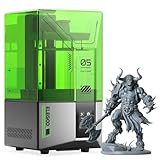


| Product | Best for | Key spec from the listing |
|---|---|---|
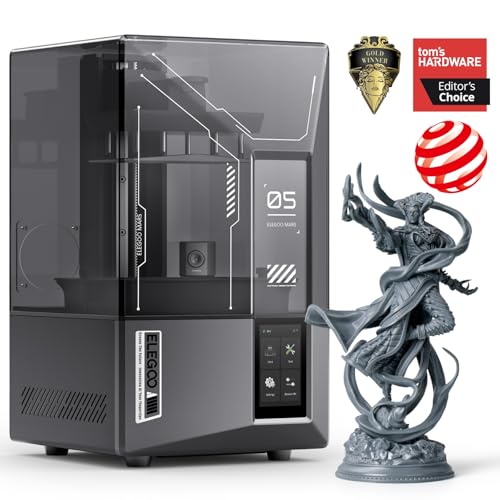
| ELEGOO Mars 5 Ultra | Detailed miniatures with easy setup | 7″ 9K Mono LCD, automatic leveling, Wi-Fi transfer |
| ANYCUBIC Photon Mono 4 | Fast, fine-detail desktop prints | 7″ 10K Mono LCD, LighTurbo light source, 70mm/h |
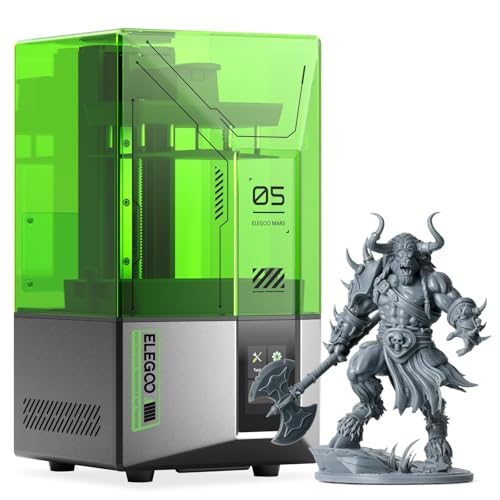
| ELEGOO Mars 5 | First resin printer | 4K Mono LCD, automatic leveling, 5.65 x 3.53 x 5.91 inch print size |
| ELEGOO Saturn 4 Ultra 16K | Large builds and top resolution | 10″ 16K Mono LCD, heated resin tank, auto-leveling |
| HeyGears Reflex RS Turbo | Plug-and-play workflow | Amber screen, precision Z-axis, pre-tuned profiles |
| ANYCUBIC Photon P1 | Thicker resins and stable prints | 14K precision, ball screw, LighTurbo 4.0, 8000cps resin compatible |
How to Choose
Resolution labels and the LCD
The K number refers to the horizontal pixel count of the monochrome LCD. A 4K screen is perfectly capable of crisp results for tabletop minis, while 9K to 16K screens pack more pixels into each layer for smoother curves on very small details. Bigger screens (10 inches) spread pixels across a larger area, which helps with big builds but does not automatically improve fine detail. Prioritize screen size to match the models you print, and treat resolution as a refinement.
Automation: leveling, sensors and cameras
Manual bed leveling with a sheet of paper is the main source of failed first prints. Auto-leveling, listed on every printer here, cuts that step. Sensors that detect resin level, a failed layer or a loose platform reduce waste. Wi-Fi transfer and pre-tuned resin profiles speed up the process too, particularly for people who print daily and do not want to tune exposure times.
Build volume, light source and resin compatibility
Check the print size: about 5.65 x 3.53 x 5.91 inches on the Mars 5 is plenty for miniatures, while the Saturn 4 Ultra’s 8.33-inch-wide footprint lets you batch or print larger items. The light source influences print speed and uniformity; the Photon lines highlight LighTurbo. If you plan to use thicker engineering or tough resins, look for a heated tank or explicit support for high-viscosity resin such as the 8000cps rating on the Photon P1.
What to ignore, and safety
Ignore speed claims in isolation, since cure time per layer depends on the resin, and ignore flashy app features if you will use a computer anyway. Budget models cut corners on automation and tank design. Every resin printer needs gloves, ventilation, isopropyl alcohol for washing and a UV station for curing. Budget for those supplies and a dedicated table before you worry about which screen is sharper.
The 6 Best Options
ELEGOO Mars 5 Ultra
The Mars 5 Ultra pairs a 7-inch 9K mono LCD with smart automatic leveling, intelligent detection and Wi-Fi file transfer. The listing gives a footprint of 6.04 by 3.06 inches, which is the right scale for busts, miniatures and jewelry masters. It leans on automation, so a first-time user can get started quickly. Wi-Fi transfer matters more than it sounds: sending a sliced file from the laptop to the printer without a USB stick saves steps across dozens of prints. Pair it with a small wash-and-cure station and you have a complete miniature workflow on one desk.
- Strength: 9K resolution captures fine detail on small models.
- Strength: Automatic leveling and detection features reduce setup mistakes.
- Trade-off: The 7-inch screen limits plate area for batch printing.
Skip it if you regularly print large parts or need a wide plate for batch runs.
ANYCUBIC Photon Mono 4
The Photon Mono 4 combines a 7-inch 10K mono LCD with the LighTurbo light source and a listed 70mm/h print speed. It is aimed at hobbyists who want sharp results without waiting all night. A faster listed speed pays off when you print several small figures for a game night or a run of identical prototypes. Because it uses the same compact 7-inch class of screen as its neighbors, it fits easily on a shelf or a shared table.
- Strength: 10K screen resolves very fine detail.
- Strength: Fast printing speed helps with repeat runs.
- Trade-off: The listing does not highlight automatic leveling, so setup may take more attention.
Skip it if you want the most automated setup possible.
ELEGOO Mars 5
The Mars 5 is the entry point, with a 4K mono LCD, automatic leveling and a 5.65 x 3.53 x 5.91 inch print size. It is a sensible way to learn resin handling without spending on the highest resolution. Many hobbyists never outgrow it for tabletop gaming figures. Resin printing has real consumables and cleanup costs, so a lower-resolution starter lets you absorb the learning curve on cheaper, simpler jobs. Once you know what you print most, you can move up with a clearer idea of what you actually need.
- Strength: Auto-leveling keeps the learning curve gentle.
- Strength: Generous height of 5.91 inches handles taller models.
- Trade-off: 4K resolution shows more visible layers than the 9K and higher models.
Skip it if you plan to print very small detail for jewelry.
ELEGOO Saturn 4 Ultra 16K
The Saturn 4 Ultra is the flagship here: a 10-inch 16K mono LCD, a smart mechanical sensor, a heated resin tank and auto-leveling, with a footprint of 8.33 by 4.66 inches. The heated tank keeps resin at working temperature in cool rooms. It suits studios that print large builds or batches. The smart mechanical sensor adds a layer of reassurance on long jobs, and the larger screen lets you arrange several parts on the plate at once. Expect longer cleanup sessions as well, since bigger prints mean more resin to wash off.
- Strength: 16K resolution on a 10-inch screen blends large size with fine detail.
- Strength: Heated resin tank supports consistent printing in cold workshops.
- Trade-off: It needs more desk space and more resin per print.
Skip it if your prints are small, your workspace is tight, or you rarely need a heated tank.
HeyGears Reflex RS Turbo
HeyGears emphasizes workflow: a high contrast amber screen, a precision Z-axis, pre-tuned profiles, plug-and-play setup and automatic leveling. The pre-tuned profiles remove much of the exposure guesswork for compatible resins, a real advantage for people who just want to press print. The amber screen is described as high contrast, which points to a design focused on crisp edges, and the plug-and-play wording signals a machine aimed at people who dislike fiddling. It is a calm fit for a small studio or a classroom.
- Strength: Pre-tuned profiles reduce trial and error.
- Strength: Precision Z-axis supports consistent layer quality.
- Trade-off: The brand has fewer community profiles than the larger names.
Skip it if you prefer to tune every exposure setting yourself.
ANYCUBIC Photon P1
The Photon P1 combines 14K precision, a stability ball screw, LighTurbo 4.0 and auto-leveling. The listing states compatibility with 8000cps resin, a thick formulation that many standard printers struggle with. That suits makers who experiment with tougher materials. Experienced users like thick-resin support because it opens the door to tougher or more specialized materials, and a ball screw design is the kind of mechanical detail that helps keep layers consistent. It rewards patience and good cleaning habits, and it makes the most sense for makers who already know which resins they want to try.
- Strength: Ball screw design supports stable Z-axis movement.
- Strength: Explicit 8000cps resin compatibility opens material choices.
- Trade-off: Thicker resins demand careful handling and cleanup.
Skip it if you only print small, standard resin figures.
Which One Fits Your Situation
You are a first-time resin user
Start with the ELEGOO Mars 5. Its automatic leveling and straightforward 4K screen reduce the cost of mistakes while you learn washing and curing.
You paint tabletop miniatures
The ELEGOO Mars 5 Ultra and the ANYCUBIC Photon Mono 4 both list 7-inch screens at 9K or 10K, which capture sculpted faces and armor edges well.
You print large pieces or batches
The ELEGOO Saturn 4 Ultra 16K offers the biggest screen and a heated resin tank for cool workshops.
You want little tuning
The HeyGears Reflex RS Turbo’s pre-tuned profiles and plug-and-play workflow suit anyone who would rather print than adjust settings, while the ANYCUBIC Photon P1 suits experimenters who want thick resins.
A final tip: whichever machine you pick, set aside a dedicated shelf for resin bottles, a labeled bin for used gloves and paper towels, and a plan for curing leftover liquid in sunlight or a UV chamber before disposal. These habits matter more to long-term enjoyment than the difference between a 9K and a 14K screen, and they keep a shared home or classroom pleasant for everyone.
Common Mistakes
- Chasing the highest K number when the models you print are large and simple.
- Skipping gloves, ventilation and a proper washing area.
- Forgetting to budget for isopropyl alcohol, extra resin, and a UV curing station.
- Placing the printer in a cold garage and wondering about failed prints.
- Assuming every resin works with every printer without checking the listed profiles or viscosity limits.
Related guides
- Gaming Chair Cushions And Lumbar Supports
- Warranty Considerations When Buying On Sale
- Business Laptops For Graphic Designers
Frequently Asked Questions
Is a 4K resin printer good enough?
For tabletop miniatures and general hobby use, yes, because layer lines on a well-tuned print are already hard to spot after priming and paint. Higher resolution matters more for tiny jewelry or dental-style detail.
What does auto-leveling do?
It sets the build plate height for you, removing a manual step that often causes first-layer failures.
Do I need a heated resin tank?
Only if you print in a cool room or use thick resins. The Saturn 4 Ultra lists one, which helps with consistency.
Is resin printing safe at home?
It can be, with gloves, ventilation and careful disposal of leftover resin and cleaning liquid. Uncured resin is a skin irritant and should never go down a drain. Follow the resin maker’s safety guidance, keep the work area away from food, and keep pets and children out of the room while prints are washing and curing.
Related guides
More from Amazon
Programs that pair well with the guide above. Offers and eligibility are set by Amazon and may change.
Free shipping on eligible items, Prime Video and more. Eligible new members can start with a free trial.
Start a Prime free trialAd-free music streaming. Eligible new subscribers can start with a free trial.
Try Music Unlimited freeA Prime membership for ages 18-24 with a trial period. Eligibility is set by Amazon.
See Prime for Young AdultsAudiobooks and podcasts to listen to on the go. Eligible new members can start with a free trial.
Try Audible freeAs an Amazon Associate we earn from qualifying purchases.