
Acer sells business-ready laptops at a range of tiers, and the labeling can be confusing. Names like Aspire Lite, Aspire 3, and Aspire Go sit near each other on the shelf, yet they pair very different processors, memory, and storage. For a small business, a contractor, or an office worker, the practical decision is which spec combination handles email, video calls, spreadsheets, and a dozen browser tabs without slowing down, and which one saves money by stopping short of what the work needs. A laptop that is underpowered turns every meeting into a lag test, while one that is overbuilt leaves money on the table that could have gone to a dock, a monitor, or a decent chair.
This guide is for buyers picking an Acer 15.6 inch laptop for office or remote work in 2026, from entry-level units with 8GB of memory to a touchscreen model with 32GB. We compare five distinct Acer laptops based on their listed specs. Duplicates and storage-only variants of the same laptop are left out, and the guidance leans on memory, storage, and processor class rather than brand claims. Confirm warranty and software terms on the product page, and remember that Aspire is a consumer line, so features such as business-class support or fingerprint security should be checked in the full listing rather than assumed.
Our Top Picks
 Acer Aspire Lite Business Laptop 15.6" FHD ComfyView8GB RAM | 128GB SSD9.3 x 14.1 x 0.78 inches3.31 poundsCheck on Amazon
 acer Aspire 3 A315-24P-R7VH Slim Laptop15.6-inch14.29 x 0.74 x 9.35 inches3.92 poundsCheck on Amazon
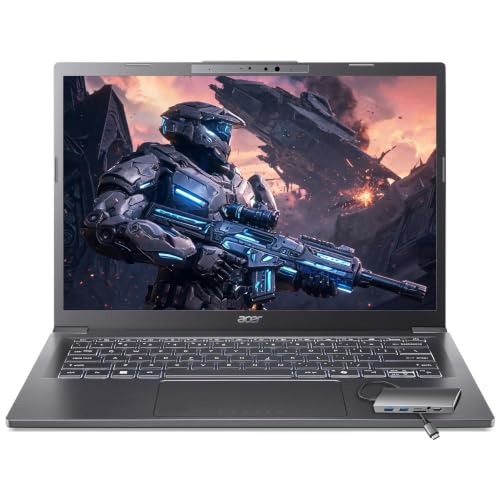 Acer Aspire Laptop 202632GB LPDDR5X RAM, 1TB PCIe SSD12.6 x 8.9 x 0.67 inches1 PoundsCheck on Amazon

Top 3 picks at a glance
Quick Picks
As an Amazon Associate we earn from qualifying purchases at no extra cost to you.



| Product | Best for | Key spec from the listing |
|---|---|---|
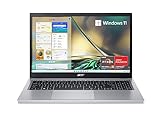
| Acer Aspire Lite 15.6 inch | Light office tasks on a tight budget | Intel Core 3 N350, 8GB RAM, 128GB SSD |
| Acer Aspire 3 A315-24P | Everyday documents and calls | Ryzen 3 7320U, 8GB LPDDR5, 128GB NVMe SSD |
| Acer Aspire Go 15 AG15-42P | Multitasking on a mid-range laptop | Ryzen 7 7730U, 16GB RAM, 512GB SSD |
| Acer Aspire 3 Touchscreen | Touch input with ample storage | Ryzen 5 7520U, 16GB LPDDR5, 1TB SSD |
| Acer Aspire Intel Core Ultra 7 258V | Heavy multitasking and long days | Ultra 7 258V, 32GB RAM, 1TB SSD, touchscreen |
How to Choose
Start with memory
8GB of RAM is the floor for business use, and it becomes tight once you run a browser with many tabs, a video call, and an office suite together. 16GB is the comfortable level for most office workers, and 32GB suits those running large spreadsheets, virtual machines, or editing work. RAM is usually soldered on laptops of this class, so you cannot add it later. That makes memory the one spec worth paying a little more for at the start, because every other part can be worked around with a cloud drive or an external SSD, but memory cannot.
Match storage to your files
A 128GB SSD fills quickly once Windows updates and a few programs are installed. 256GB is workable for cloud-first workers, while 512GB to 1TB suits those who store local files, large presentations, or client records. Look for NVMe in the listing, which signals faster drive speeds than older SATA drives. Fast storage shortens boot times and file opens, which you notice dozens of times a day. If you must buy a small drive, plan on a cloud service or an external drive for older projects.
Judge the processor class
Intel Core 3 N350 and Ryzen 3 chips handle web and office apps, but they slow down on heavy multitasking. Ryzen 5 and Ryzen 7 parts, such as the 7520U and 7730U, offer more cores and headroom for video calls with screen sharing. The Core Ultra 7 sits at the top of this list and is the part to look at if you spend long days in demanding applications. Remember that a faster processor does little for a worker who mostly lives in a browser, so match the chip to the actual workload.
Check display, ports, and extras
A Full HD 15.6 inch screen is the standard for office work, and a ComfyView or anti-glare coating helps under office lights. A touchscreen adds convenience but may cost battery life. Look for USB-C, Wi-Fi 6, and a webcam. Ignore bundled software promises, such as lifetime Office offers on third-party listings, until you verify the license terms. Budget models cut corners on keyboard backlighting, metal construction, and webcam quality. If you take video calls all day, a better webcam and microphone are worth more than a faster processor, so read the camera line in the listing and consider a separate webcam if it is weak.
The 5 Best Options
Acer Aspire Lite 15.6 Inch
This Aspire Lite is the entry point, built around the Intel Core 3 N350 with 8GB of RAM and a 128GB SSD. It has a 15.6 inch Full HD ComfyView screen, a Type-C port, and Windows 11. It targets simple office work, such as a front-desk station, a point-of-sale terminal, or a spare machine for visiting staff. The long-lasting battery wording in the listing is a general claim, so look for a stated hour figure before relying on it away from a plug.
- Strength: Full HD ComfyView display for long reading sessions.
- Strength: a low-cost way to equip a front-desk or light-duty worker.
- Trade-off: 128GB of storage fills quickly.
Skip it if you juggle many browser tabs, large files, or video calls with screen sharing, since 8GB and 128GB leave little room.
Acer Aspire 3 A315-24P
A slim 15.6 inch Full HD laptop with a Ryzen 3 7320U quad-core, AMD Radeon graphics, 8GB LPDDR5 memory, a 128GB NVMe SSD, and Wi-Fi 6. It suits workers who stay inside documents, email, and video calls. The slim body and fast NVMe drive make it comfortable to carry between a desk and a meeting room, and it is a sensible choice for a staff member whose work lives mostly in web apps.
- Strength: LPDDR5 memory and NVMe storage are modern, faster parts.
- Strength: Wi-Fi 6 helps in busy office networks.
- Trade-off: only 8GB of RAM and 128GB of storage limit growth.
Skip it if you plan to keep the laptop for many years of growing workloads, since memory cannot be expanded later.
Acer Aspire Go 15 AG15-42P
The Aspire Go 15 steps up to a Ryzen 7 7730U, 16GB of RAM, and a 512GB PCIe SSD, with Wi-Fi 6, an HD webcam, and a Pure Silver finish. For many small-business users, this is the balanced middle of the list. It has enough memory to keep a browser, a spreadsheet, and a chat app open together, and enough storage to hold working files locally without constant cleanup. The Ryzen 7 listed is an eight-core, sixteen-thread part according to a sister listing, which suits multitasking.
- Strength: 16GB of RAM and a Ryzen 7 handle multitasking.
- Strength: 512GB of storage gives room for local files.
- Trade-off: the webcam is listed as HD, not Full HD.
Skip it if video-call quality is a top priority, since an HD webcam is the weakest part of the package for frequent meetings.
Acer Aspire 3 Touchscreen
This Aspire 3 variant pairs a 15.6 inch Full HD touchscreen with a 4-core Ryzen 5 7520U, 16GB LPDDR5 RAM, a 1TB SSD, and Wi-Fi 6. It targets business and home office use with generous storage. The extra storage helps if you keep local copies of client files, scanned documents, or presentations, and the touch input lets you sign or annotate documents directly on the screen.
- Strength: 1TB of storage and 16GB of RAM at the Ryzen 5 level.
- Strength: a touchscreen helps with signing and marking up documents.
- Trade-off: the Ryzen 5 7520U has four cores, which is less than the Ryzen 7.
Skip it if you want the most processing power, or if you never touch a screen and prefer a lighter, longer-lasting setup.
Acer Aspire Intel Core Ultra 7 258V
The top-end option lists an Intel Core Ultra 7 258V, 32GB of RAM, a 1TB SSD, a touchscreen, a backlit keyboard, a USB-C hub, and long battery life. It fits power users and managers who run many applications at once, such as a browser with dozens of tabs, a video call, and large spreadsheets at the same time. The USB-C hub and backlit keyboard are practical extras for someone who moves between a desk and a conference room.
- Strength: 32GB of RAM and a Core Ultra processor lead this list.
- Strength: backlit keyboard and USB-C hub support travel and desk use.
- Trade-off: it sits in the premium tier here, and bundled software terms should be verified.
Skip it if you only need email and documents, because the extra memory and processor would go largely unused.
Which One Fits Your Situation
You manage a small front desk
The Acer Aspire Lite 15.6 Inch covers email, web apps, and point-of-contact tasks, and it keeps the spend low for a workstation that does not need much power. Pair it with a cloud drive to make up for the small SSD.
You work from home in video meetings all day
The Acer Aspire Go 15 AG15-42P gives 16GB of memory and a Ryzen 7 for multitasking, so a long day of calls, shared documents, and browser tabs should run without stutter. Add an external webcam if picture quality matters in client meetings.
You store lots of local files and sign documents by touch
The Acer Aspire 3 Touchscreen offers 1TB of storage with touch input, a good pairing for someone who stores scanned records locally and signs paperwork on screen. If you want less to carry and a lower tier, the Aspire 3 A315-24P is the simpler pick.
You run heavy workloads and travel
The Acer Aspire Intel Core Ultra 7 258V has the memory and processor to match, plus a USB-C hub and backlit keyboard for working in different spaces. It is the choice for a manager who wants one machine to last through changing workloads.
Common Mistakes
- Buying a 128GB laptop for a user who stores local files.
- Choosing 8GB of RAM for someone who keeps many browser tabs open.
- Assuming all Aspire models share the same performance level.
- Overlooking Windows edition and license terms for business use.
- Paying for a touchscreen when you never use touch input, then finding it adds weight and drains the battery.
Frequently Asked Questions
Are Acer Aspire laptops suitable for business?
For standard office tasks, yes, especially at 16GB of RAM and above. Check warranty terms and business features, since Aspire is a consumer line. If you need remote management, advanced security, or on-site service, a dedicated business line may be a better fit.
How much RAM does a business laptop need?
16GB is a sensible target for most office users. 8GB works for light tasks, and 32GB suits heavy multitasking. Since memory is usually not upgradable on these models, buy slightly more than you think you need.
Is a touchscreen worth it?
It helps for signing documents and tablet-style use, but it can reduce battery life. Skip it if you rely on a keyboard and mouse.
Do these laptops include Microsoft Office?
One listing mentions an Office offer, but terms vary. Verify the license type before relying on it for business use.
Related guides
More from Amazon
Programs that pair well with the guide above. Offers and eligibility are set by Amazon and may change.
Free shipping on eligible items, Prime Video and more. Eligible new members can start with a free trial.
Start a Prime free trialAd-free music streaming. Eligible new subscribers can start with a free trial.
Try Music Unlimited freeA Prime membership for ages 18-24 with a trial period. Eligibility is set by Amazon.
See Prime for Young AdultsAudiobooks and podcasts to listen to on the go. Eligible new members can start with a free trial.
Try Audible freeAs an Amazon Associate we earn from qualifying purchases.









