A white wireless mouse changes the look of a whole setup. On a light desk, next to a white keyboard and a bright monitor, a white mouse looks clean and deliberate, while a black mouse can look like an afterthought. But looks are only half the job: a white gaming mouse still has to aim well, stay connected, and feel right in the hand for hours at a time.
This guide compares four white wireless gaming mice that combine a clean white finish with serious hardware: fast sensors, low-latency wireless, and shapes that suit different grips. Each one is a white version of a proven model, not a separate design, so the performance is the same as the standard version — only the color changes.
Top 3 picks at a glance


How to Choose a White Wireless Gaming Mouse
Finish and upkeep
A white mouse shows dirt, sweat, and wear more clearly than a black one. Look for a matte white finish, which hides fingerprints better than a glossy one, and check whether the coating is described as stain-resistant or easy to clean. A white mouse that is used daily will need a wipe with a dry cloth now and then to stay bright. Avoid eating over the desk with a white mouse in hand, since food and drink stains show up fast on a light surface.
Sensor and polling rate
The sensor decides how accurately the mouse tracks. Modern flagship sensors track cleanly at high speeds, with no acceleration or angle snapping that would change the feel of a flick. Polling rate is how often the mouse reports its position to the PC. A 1000 Hz polling rate is the standard for gaming, and some newer mice report at up to 8000 Hz over wireless. A higher polling rate can make tracking feel smoother, but a clean sensor at 1000 Hz matters more than a high number on the box.
Battery life and charging
A wireless mouse needs a battery plan. The mice in this guide range from around 90 hours to around 250 hours of battery life, depending on the model and the sensor. A mouse with a long battery life can run for weeks between charges, while a mouse with a shorter battery life needs charging more often but usually weighs less. USB-C charging is the modern standard, and some mice also support wireless charging pads. Check the battery life in the listing and think about how often the mouse will be charged.
Shape and grip
White does not change the shape, so the same grip rules apply as for any gaming mouse. A symmetrical mouse suits claw and fingertip grips, while a right-handed ergonomic mouse suits palm and claw grips. The hand size matters too: a small mouse suits small hands, and a full-size mouse suits medium and large hands. Pick the shape first, and let the color be the tie-breaker between two mice that fit equally well.
Top Picks
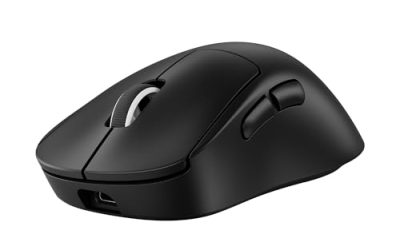
Logitech G PRO X Superlight 2 Wireless Gaming Mouse, White
The white Logitech G PRO X Superlight 2 is the same 60 gram mouse as the black version, in a clean white finish. It uses the HERO 2 sensor with up to 44,000 DPI and reports at up to 8 kHz over its LIGHTSPEED wireless connection. The low, symmetrical shape suits claw and fingertip grips, and the five programmable buttons keep the layout simple. The white finish looks sharp on a light desk, and the matte surface resists fingerprints better than a glossy shell.
- 60 gram lightweight design in white
- HERO 2 sensor with up to 44,000 DPI
- Up to 8 kHz report rate over LIGHTSPEED wireless
- Five programmable buttons
- USB-C charging
Best for: Competitive players who want a light, white, symmetrical mouse with a top-tier sensor.
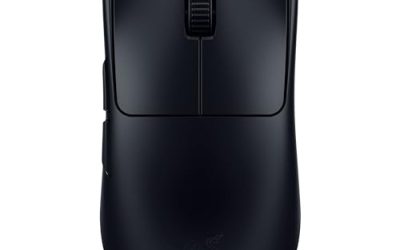
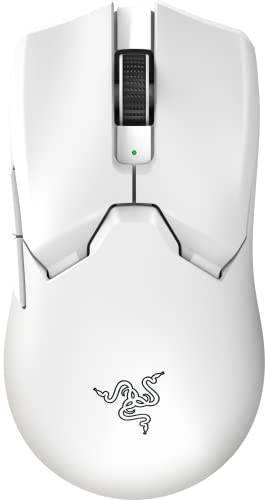
Razer Viper V2 Pro HyperSpeed Wireless Gaming Mouse, White
The white Razer Viper V2 Pro is a 58 gram symmetrical mouse with a bright white finish. Its Focus Pro 30K optical sensor tracks precisely, and its Gen-3 optical switches actuate without the metal contact bounce that can cause double clicks. The HyperSpeed wireless connection keeps latency low, and the battery lasts up to 90 hours. On-mouse DPI controls let the player change sensitivity without opening software, and the white shell pairs well with a light keyboard and desk.
- 58 gram ultra-lightweight design in white
- Focus Pro 30K optical sensor
- Gen-3 optical switches
- Up to 90 hour battery life
- HyperSpeed wireless with USB-C cable included
- On-mouse DPI controls
Best for: Players who want the lightest white mouse in this guide with long battery life.
Logitech G305 LIGHTSPEED Wireless Gaming Mouse, White
The white Logitech G305 LIGHTSPEED is the compact, long-battery option in this guide. Its HERO 12K sensor reaches 12,000 DPI, and its battery lasts up to 250 hours, so the mouse can run for weeks of play between battery changes. Six programmable buttons cover the basics, and the lightweight, compact shape suits smaller hands and claw grips. The white finish is clean and simple, and the mouse is a good fit for a bright setup that does not need a flagship sensor.
- HERO 12K sensor with up to 12,000 DPI
- Up to 250 hour battery life
- Six programmable buttons
- Lightweight, compact shape
- LIGHTSPEED wireless
Best for: Players who want a white wireless mouse with very long battery life and a compact shape.
Logitech G502 X LIGHTSPEED Wireless Gaming Mouse, White

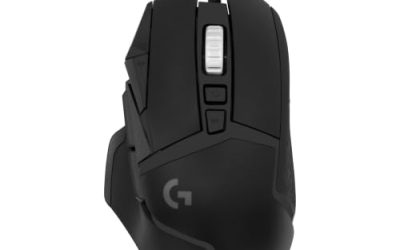
The white Logitech G502 X LIGHTSPEED is the button-rich white mouse in this guide. It uses LIGHTFORCE hybrid optical-mechanical switches and the HERO 25K sensor, and it carries 13 buttons, including a dual-mode scroll wheel that switches between a notched scroll and a free-spinning scroll. The battery lasts under 140 hours, and the mouse charges over USB-C and supports PowerPlay wireless charging. The ergonomic shape with a thumb rest suits palm and claw grips, and the white finish gives the familiar G502 shape a clean, bright look.
- LIGHTFORCE hybrid optical-mechanical switches
- HERO 25K gaming sensor
- 13 buttons with infinite scroll toggle
- Under 140 hour battery life
- USB-C charging and PowerPlay wireless charging capable
Best for: Players who want a white mouse with many buttons and an ergonomic shape.
Comparison
| Product | Key Feature | Best For |
|---|---|---|
| Logitech G PRO X Superlight 2, White | 60 g, HERO 2, up to 8 kHz | Light, white, symmetrical competitive play |
| Razer Viper V2 Pro, White | 58 g, Focus Pro 30K, 90 hour battery | The lightest white mouse here |
| Logitech G305, White | 12,000 DPI, 250 hour battery | Long battery life, compact shape |
| Logitech G502 X LIGHTSPEED, White | 13 buttons, HERO 25K, PowerPlay | Many buttons, ergonomic shape |
Buying Guide
Match the white to the rest of the setup
White mice look best when the rest of the setup is light too: a white or silver keyboard, a light desk mat, and a bright monitor stand. A single white mouse on a dark desk can look out of place, while a white mouse in a white setup looks deliberate. Check the exact shade before buying: some white mice are a bright, pure white, while others are a warmer off-white. A mismatch in shade between the mouse and the keyboard is noticeable on a light desk.
Keep the white clean
A white mouse needs more cleaning than a black one. Wipe it with a dry, soft cloth once a week to remove dust and skin oils before they stain the surface. For stubborn marks, a slightly damp cloth works, but keep water away from the sensor and the charging port. Avoid harsh cleaners, which can yellow the plastic over time. A mouse pad in a light color also helps, since a dark pad can leave marks on the palm rest over time.
Weight and shape still come first
Color is a tie-breaker, not a deciding factor. A white mouse that does not fit the hand will still feel wrong, no matter how good it looks. Check the shape and weight first: a light symmetrical mouse for claw and fingertip grips, an ergonomic mouse for palm and claw grips. If two mice fit equally well, pick the white one. If only one fits, pick the one that fits, whatever its color.
Wireless range and dongle placement
The mice in this guide use a 2.4 GHz dongle, and the dongle works best when it sits close to the mouse with a clear line of sight. Plug it into a front USB port or use the included adapter cable to bring it onto the desk, away from the back of the PC where metal and other wireless devices can interfere. A clean connection keeps the polling rate steady and the clicks responsive, whatever the color of the shell.
Frequently Asked Questions
Do white gaming mice get dirty fast?
A white mouse shows dirt and wear more clearly than a black one, but a matte finish hides fingerprints well. A quick wipe with a dry cloth once a week keeps a white mouse looking bright. Avoid eating over the desk and keep harsh cleaners away from the shell.
Is a white mouse the same as the black version?
Yes, for the mice in this guide. The white version is the same model with a different shell color, so the sensor, switches, weight, and battery life are the same as the standard version. The only difference is the finish.
Which white wireless mouse is best for FPS games?
The Logitech G PRO X Superlight 2 in white and the Razer Viper V2 Pro in white are the lightest options here, with top-tier sensors and low-latency wireless. Both suit fast aim in shooters. The G502 X LIGHTSPEED in white suits players who want more buttons, and the G305 in white suits players who want long battery life.
How long does the battery last on a white wireless mouse?
It depends on the model. The G305 lasts up to 250 hours, the Viper V2 Pro up to 90 hours, and the G502 X LIGHTSPEED under 140 hours. Battery life also depends on the polling rate and whether lighting is used, so the listing figure is a guide rather than a fixed number.
Conclusion
The best white wireless gaming mouse is the one that fits the hand and the setup at the same time. The Logitech G PRO X Superlight 2 in white suits competitive players who want a light, symmetrical mouse. The Razer Viper V2 Pro in white is the lightest option here, with long battery life. The Logitech G305 in white suits players who want very long battery life and a compact shape. The Logitech G502 X LIGHTSPEED in white suits players who want many buttons and an ergonomic shape. Pick the shape that fits the grip, keep the white clean, and the setup will look as good as it plays.
Disclosure: As an Amazon Associate, we earn from qualifying purchases.
Related guides
More from Amazon
Programs that pair well with the guide above. Offers and eligibility are set by Amazon and may change.
Free shipping on eligible items, Prime Video and more. Eligible new members can start with a free trial.
Start a Prime free trialAd-free music streaming. Eligible new subscribers can start with a free trial.
Try Music Unlimited freeA Prime membership for ages 18-24 with a trial period. Eligibility is set by Amazon.
See Prime for Young AdultsAudiobooks and podcasts to listen to on the go. Eligible new members can start with a free trial.
Try Audible freeAs an Amazon Associate we earn from qualifying purchases.