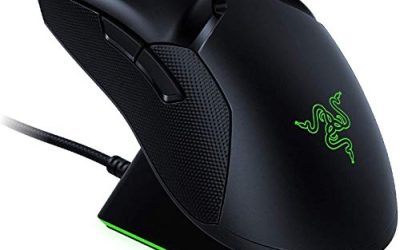
On paper, the Razer DeathAdder Essential is a short-rating, long-simplicity mouse: its main buttons carry a 10 million click rating, far below the 70 million figure attached to the DeathAdder V2, yet its permanently wired layout removes battery aging from the equation entirely. For a buyer who clicks moderately and keeps the cable protected, the published rating and the two-year warranty period frame a realistic ownership window, while heavier players will likely want an upgrade for features long before ordinary wear becomes the deciding factor.


As an Amazon Associate we earn from qualifying purchases
Key Facts About How It Ages
The Click Rating Sits at the Entry End
Razer puts the two primary buttons on a mechanical design and assigns them a ceiling of ten million actuations. That number is a laboratory rating for the switch itself, not a promise covering the whole product, and it should be read as a ceiling rather than a countdown that applies equally to every owner. Someone who plays shooters nightly and fires constantly will work through actuations far quicker than someone who uses the same mouse for strategy titles, browsing, and office tasks between shorter sessions.
Context matters here. Mechanical contacts physically meet each time a button is pressed, which is the traditional approach used across generations of gaming mice. The rating tells you where Razer positions this model within its own range: it is the starting tier. Nothing in the published figures suggests the shell, sensor, or wheel shares that exact limit, so the click rating is best treated as the headline wear figure for the parts that receive the most repeated stress, rather than as an expiry date for everything under the plastic.
A Cord Instead of a Cell
Plenty of peripherals die slowly because a rechargeable cell loses capacity until runtime becomes annoying. That failure mode simply does not exist here. Power arrives through the USB lead, so there is nothing inside the body that gradually holds less charge, nothing to swell with age, and no charging routine interrupting play. Plug it in years later and, assuming the electronics remain sound, it should wake up exactly as it did on day one.
The trade is obvious. You accept a tether on the desk in exchange for removing an entire category of degradation. For a fixed setup where the mouse rarely travels, that bargain favours longevity. For a laptop bag or a couch arrangement, the same cord becomes the reason to look elsewhere, regardless of how durable the internals might be.
Cable and Feet Take the Daily Friction
If the switches handle the clicking, the underside and the lead handle the movement. Razer lists a lead measuring roughly 2.1 metres, which gives enough slack for routing behind a monitor or down the back of a desk without pulling tight at full arm extension. A lead kept loose, away from sharp desk edges and chair wheels, is far less likely to develop internal breaks than one yanked taut every session. How you route it will influence its lifespan more than the raw length figure does.
Underneath, the glides are the sacrificial surface. They absorb contact with the pad so the base itself does not have to. Expect glide feel to change gradually as those pads polish, thin, or pick up grit, especially on hard or dusty surfaces. A fabric pad, a quick wipe of the underside now and then, and avoiding rough desktops will all slow that process. The listing gives no separate rating for the feet, so treat them as a consumable surface rather than a permanent component, in the same way you would treat the outer sole of a shoe rather than the shoe itself.
Cover Runs for Two Years
The manual that ships with this model describes a limited warranty lasting two years. That period is worth noting because it is longer than the token cover offered on many budget peripherals, and it gives a buyer a defined window during which manufacturing defects fall on Razer rather than on the owner. Keep the proof of purchase and the serial details somewhere safe, since any claim will be easier with paperwork ready.
Read the warranty for what it is, though. It addresses faults, not gradual wear, and it does not extend the switch rating or convert the ten million figure into a guaranteed minimum service life. Think of the two timelines as separate: the warranty is a legal safety net for early problems, while the click rating is an engineering figure describing how much use the main switches were designed to withstand. A mouse can outlive its cover by a wide margin, and many simple wired models do exactly that.
The Mouse in Full
Razer DeathAdder Essential (Black)
The shape explains much of the appeal. Razer keeps its familiar sculpted shell for right hands, with a high rear hump that supports a relaxed palm posture during longer sessions. The shell weighs roughly 96 grams with the lead excluded, heavy enough to feel settled under the hand instead of skittish, which suits players who make broad, deliberate arm movements and dislike a mouse that skitters at the slightest nudge. Anyone chasing the lightest possible flick shots will read that same weight very differently.
Tracking comes from an optical unit capped at 6,400 DPI, with headline limits of 220 inches per second and 30 G of acceleration. Those figures are modest beside current flagships, yet they cover the sensitivity ranges most players actually select in game. Polling runs at 1000 Hz, so the computer hears from the mouse a thousand times each second. Each of the five buttons takes its own assignment inside Razer Synapse 3, the wheel carries a stepped, tactile action, and the lighting is a fixed single green rather than an adjustable spectrum.
One omission shapes long-term use in a subtle way: there is no storage built into the mouse for your settings. Move it to another computer and you start again unless Synapse carries your profile across. That is not a durability flaw, but it does mean the ownership experience stays tied to the software in a way that models carrying their own profile memory avoid. For a single-desk owner who sets sensitivity once and forgets it, the limitation may never surface at all.
Specs
- Connection: wired USB, lead roughly 2.1 m long
- Sensor: optical, true 6,400 DPI maximum
- Tracking limits: up to 220 IPS and 30 G
- Switches: Razer mechanical units for the main buttons
- Rated click life: 10 million presses
- Buttons: 5, each independently programmable
- Scroll wheel: tactile, gaming grade
- Polling: 1000 Hz Ultrapolling
- Lighting: single green colour
- Software: Razer Synapse 3 enabled
- Onboard memory: none fitted
- Shape: ergonomic, built for the right hand
- Dimensions: roughly 127 x 73 x 43 mm
- Weight: roughly 96 g, cable excluded
- Warranty: limited cover lasting 2 years, per the manual
Alternatives Worth Comparing
Two higher models from Razer’s own range follow, giving the durability figures above something concrete to be measured against. Neither replaces the main product in this article; they simply show what extra rated life looks like when you move up the range.
Alternative: Razer DeathAdder V2 (Wired)
The V2 changes the component that matters most in this discussion. Its main buttons actuate optically, using a light beam instead of a closing metal contact, and Razer rates that design at 70 million presses — seven times the headline figure of the Essential. Around that switch sits a Focus+ sensor reaching 20,000 DPI, a flexible Speedflex lead, and feet made from PTFE for a smoother glide. It also drops the weight to 82 grams and adds buttons, taking the programmable total to eight.
Specs
- Connection: wired, Speedflex cable
- Sensor: Focus+ optical, up to 20,000 DPI
- Switches: Razer optical units
- Rated click life: 70 million presses
- Buttons: 8 programmable
- Feet: PTFE
- Weight: 82 g
Alternative: Razer DeathAdder V3 (Wired)
At the top of this comparison sits the wired V3, which pushes the same optical idea one generation further. Its Gen-3 optical switches carry a rating of 90 million presses, and the Focus Pro sensor raises the ceiling to 30,000 DPI. The body falls to 59 grams, polling climbs to 8000 Hz through its HyperPolling design, and the lead is again a Speedflex type. Six programmable buttons are fitted, and tracking limits reach 750 IPS with 70 G of acceleration.
Specs
- Connection: wired, Speedflex cable
- Sensor: Focus Pro optical, up to 30,000 DPI
- Switches: Razer optical units, Gen-3
- Rated click life: 90 million presses
- Buttons: 6 programmable
- Polling: 8000 Hz HyperPolling
- Tracking limits: up to 750 IPS and 70 G
- Weight: 59 g
Side-by-Side Durability Numbers
| Product | Switch type | Rated clicks | Max DPI | Weight |
|---|---|---|---|---|
| Razer DeathAdder Essential | Mechanical | 10 million | 6,400 | 96 g |
| Razer DeathAdder V2 | Optical | 70 million | 20,000 | 82 g |
| Razer DeathAdder V3 | Optical, Gen-3 | 90 million | 30,000 | 59 g |
Read that middle column carefully, because it carries the whole argument of this page. The gap between ten million and seventy million looks enormous, and in relative terms it is. Yet ratings only become real time when you divide them by your own clicking habits. A casual player pressing the left button a few thousand times on a gaming evening would need an extraordinary number of evenings to approach even the smaller figure. A competitive player drilling aim trainers daily, on top of matches, compresses that calendar considerably. Neither scenario makes the Essential rating wrong; it makes it personal.
There is also a mechanical-versus-optical distinction hiding behind the numbers. A contact-based switch can, over a long life, develop inconsistent registration as its surfaces age, which is the classic route to an unwanted extra click. An optical design sidesteps that particular mechanism because no metal contact needs to meet for a press to register. That is a genuine structural argument in favour of the V2 and V3 for owners who plan to keep one mouse for many years, separate from the raw totals in the table.
Who It Is For, and Who Should Skip It
This mouse fits a right-handed player with a medium or larger hand who wants a recognised ergonomic shape, a simple plug-and-play setup, and no battery routine to manage. It also suits a second machine, a family computer, a spare for guests, or a first gaming setup where the buyer would rather spend the savings on games than on switch ratings they may never approach. Students in shared housing often value exactly this profile: one less charger to lose, nothing to pair, and a body shape that most hands already understand.
Skip it if your clicking volume is genuinely heavy and you intend a single purchase to cover many years of daily competitive play, because the V2 multiplies the rated figure without changing the basic shape language. Skip it if you are left-handed, since the shell is sculpted for the right hand only. Skip it if you want wireless freedom, adjustable colour lighting, a much lighter body, extra buttons for macros, or settings stored inside the mouse itself. In each of those cases the reason to move on is a missing feature, not a defect, and recognising that difference helps you buy the right tier the first time.
Outgrowing is, in fact, the most common ending for this model. Owners typically move on because they want a lighter mouse for faster flicks, a wireless desk, more buttons for a new genre, or a higher polling rate after upgrading the rest of their setup. The Essential keeps doing its original job while tastes change around it. If your needs are stable and your desk is fixed, there is no feature clock ticking against you, and that stability is arguably its strongest longevity trait of all.
Frequently Asked Questions
Does the 10 million rating mean the mouse stops working at that point?
No. A rating describes the lifespan the switch design was built and assessed around, not a hard cutoff wired into the product. Individual units can fall short or carry on well past the figure depending on force, environment, and plain variation between switches. Treat the number as a comparison tool between models rather than as an appointment in your calendar.
Why does the V2 claim so many more clicks?
Its buttons register through a light beam instead of a physical contact closing. Removing that contact point removes a major source of gradual switch wear, which is why Razer can attach a 70 million figure to the V2 while the contact-based design in the Essential carries ten million. The rest of each mouse still ages on its own schedule, so the headline gap applies specifically to the main switches.
Will the battery need replacing after a few years?
There is no battery to replace. This model draws power through its USB lead for its entire life, so the capacity fade that eventually limits wireless and rechargeable devices never enters the picture. The corresponding cost is permanent: the lead always has to reach your computer, and cable condition becomes one of the physical things worth protecting.
What usually wears first in everyday use?
Based on how the product is specified, the candidates are the main switches, the glide pads underneath, and the lead where it bends or rubs. The sensor and shell have no published wear figures and no moving contact with the desk. Sensible routing, a clean pad, and avoiding drops will do more for real-world lifespan than any single number printed on the box.
Is the two-year warranty the same as a lifespan promise?
No, the two figures answer different questions. The warranty sets a period during which qualifying defects are Razer’s problem, as described in the manual. Lifespan depends on how the mouse is used and cared for after that window closes. A well-kept unit can remain useful long after its cover ends, while a mistreated one can develop problems that gradual wear, rather than a defect, explains.
Related guides
More from Amazon
Programs that pair well with the guide above. Offers and eligibility are set by Amazon and may change.
Free shipping on eligible items, Prime Video and more. Eligible new members can start with a free trial.
Start a Prime free trialAd-free music streaming. Eligible new subscribers can start with a free trial.
Try Music Unlimited freeA Prime membership for ages 18-24 with a trial period. Eligibility is set by Amazon.
See Prime for Young AdultsAudiobooks and podcasts to listen to on the go. Eligible new members can start with a free trial.
Try Audible freeAs an Amazon Associate we earn from qualifying purchases.