A home office printer lives under different pressure than a family printer. It sits idle for a week, then has to produce a contract, a stack of invoices or a signed form on deadline, and a clogged nozzle or an empty cartridge at that moment costs real time. The decision is therefore less about glossy photos and more about dependability: how quickly the first page arrives, whether the machine can scan a multi-page document without babysitting, and how much each page costs once the starter ink runs out.
This guide is for freelancers, remote employees and small side businesses who print a few dozen pages a week and want one machine to print, scan and copy. It compares eight models across three approaches: cartridge inkjets with an automatic document feeder, a refillable ink tank system and a monochrome laser. Judgments come from what each listing title states, so the review calls out where a detail such as page yield or speed is not given. If your work is mostly black-and-white text, 2026 is a good year to consider whether laser is simply the saner choice.
Our Top Picks
 HP OfficeJet Pro 8125 Wireless All-in-One Color Inkjetone size13.29 x 18.11 x 9.17 inches17.6 poundsCheck on Amazon
 Canon PIXMA TR7120 Wireless Color Inkjet PrinterMedium14.8 x 14 x 8.2 inches18.12 poundsCheck on Amazon
 Brother DCP-L2640DW Wireless Compact Monochrome Multi-Function PrinterStandard15.7 x 16.1 x 12.5 inches25 poundsCheck on Amazon
 Canon PIXMA TS6520 Wireless Color Inkjet PrinterMedium14.8 x 14 x 6.7 inches15.42 poundsCheck on Amazon


Top 3 picks at a glance
Quick Picks
As an Amazon Associate we earn from qualifying purchases at no extra cost to you.


| Product | Best for | Key spec taken from the product title |
|---|---|---|
| HP OfficeJet Pro 8125 | Everyday color work | Wireless all-in-one with ADF, duplex, Instant Ink trial |
| HP DeskJet 2923 | Occasional printing | Wireless color all-in-one: print, scan, copy |
| Canon PIXMA TR7120 | Compact office with a feeder | Duplex, auto document feeder, compact design |
| Brother DCP-L2640DW | Text-heavy documents | Wireless compact monochrome multifunction, duplex |
| Canon PIXMA TS6520 | Small desk, mixed use | Duplex, 1.42-inch OLED display, copier/scanner |
| Canon PIXMA TS4320 | Light multifunction use | Wireless color inkjet with print, copy, scan |
| HP Smart Tank 5003 | High page volume at low cost | Refillable ink tank, 3 years of ink included |
| HP OfficeJet Pro 8139 | Offices that still need fax | Wireless all-in-one with fax, ADF, duplex |
How to Choose
Inkjet, ink tank or laser
Cartridge inkjets are the most common home office choice and handle color documents and photos, but small cartridges can make per-page costs add up. Ink tank printers use large refillable reservoirs and are built for low-cost, high-volume printing. Monochrome lasers produce sharp text quickly and rarely dry out when idle. If you print mostly black text, laser or a tank system tends to be easier to live with than a cartridge model.
Automatic document feeder and duplex
An automatic document feeder, usually listed as ADF, lets you scan or copy a multi-page document without lifting the lid for every sheet, and it is the feature home offices miss most when it is absent. Duplex, or automatic two-sided printing, saves paper and makes reports look professional. A feeder of around 35 sheets handles most contracts, while a printer without one is fine only if scanning is occasional.
Cost per page and starter ink
Starter cartridges are often partly filled, and subscription trials such as Instant Ink last only for the listed months. Check what happens when the trial ends. A refillable tank model that includes years of ink changes the math entirely for heavy printing. Look at the stated page yield on cartridges, and ignore broad claims such as “cost efficient” that do not give a number.
Connectivity, security and what to ignore
Look for dual-band Wi-Fi or Ethernet, mobile printing, and a way to print from your phone without installing anything awkward. Fax is a niche feature that a small number of offices still need, so do not pay for it if you only email documents. Budget printers usually cut corners on tray capacity, scan speed and the strength of the document feeder, which only shows up in daily use. Also confirm that the paper tray holds enough sheets that you are not reloading it every few jobs.
The 8 Best Options
HP OfficeJet Pro 8125
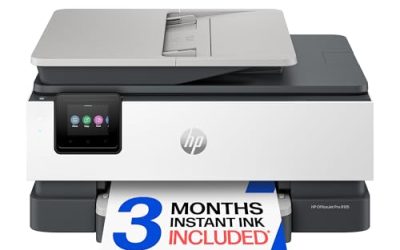
The OfficeJet Pro 8125 is a wireless color all-in-one that lists print, scan, copy, an automatic document feeder and duplex printing, plus a three-month Instant Ink trial. It targets the freelancer who needs a feeder and two-sided pages without moving up to a laser. A consultant who scans client paperwork and prints proposals before a meeting is the buyer it has in mind.
- Strength: ADF and duplex together cover most day-to-day paperwork.
- Strength: Wireless all-in-one aimed specifically at home office use.
- Trade-off: The Instant Ink trial is temporary, so plan ink costs for the long term.
Skip it if you want a printer with a very large ink reserve and the lowest cost per page, or if you never need to scan more than one page at a time.
HP DeskJet 2923
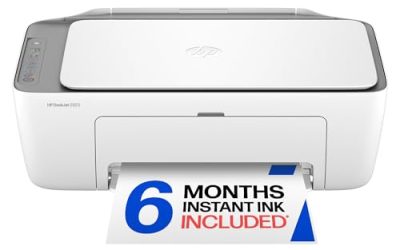
This is the lean option for someone who prints a few pages a week. It offers wireless color printing with scan and copy in an all-in-one body, along with mobile compatibility. A student-turned-freelancer with light needs, or a spare printer for a guest room office, would be a sensible home for it.
- Strength: Wireless all-in-one that covers the essentials without fuss.
- Strength: Mobile compatibility makes printing from a phone simple.
- Trade-off: The title lists no document feeder or duplex, which limits larger office jobs.
Skip it if you handle contracts, invoices or any regular multi-page scanning.
Canon PIXMA TR7120
The TR7120 pairs a compact design with duplex printing, a copier and scanner, and an auto document feeder. That combination gives a small desk a lot of capability, and the white finish suits a living-room workspace. It is the kind of machine that fits on a shelf beside a laptop and still handles a stack of forms.
- Strength: Auto document feeder plus duplex in a compact body.
- Strength: Wireless color inkjet with copying and scanning.
- Trade-off: The title does not give speed or page-yield numbers, so confirm them first.
Skip it if you need a heavy-duty machine for high monthly page counts, or if the office prints in black and white almost exclusively.
Brother DCP-L2640DW
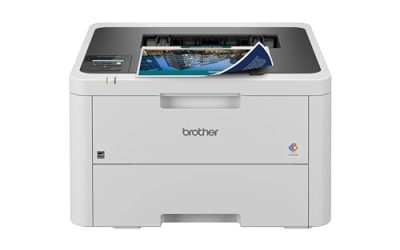
The DCP-L2640DW is the laser option of the group: a wireless compact monochrome multifunction printer with copying, scanning, duplex and mobile printing. Text-heavy work like reports, letters and forms is where laser shines. A bookkeeper, a writer or a teacher who prints drafts and worksheets in black and white gets the most from this design.
- Strength: Monochrome laser output suits crisp text documents.
- Strength: Duplex and wireless printing in a compact unit.
- Trade-off: No color, and the title lists no document feeder.
Skip it if you need to print color charts, brochures or photos.
Canon PIXMA TS6520
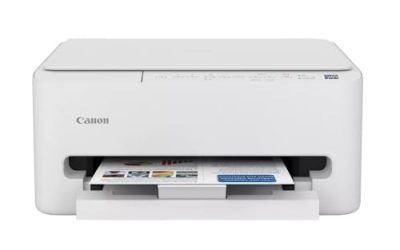
The TS6520 offers duplex printing, a copier and scanner and a 1.42-inch OLED display on a compact white body. It suits a desk where space is tight but versatility still matters, such as a bedroom workstation or a shared dining-table office.
- Strength: Duplex and an OLED display make everyday tasks easier.
- Strength: Compact, with print, copy and scan in one unit.
- Trade-off: The title does not list an automatic document feeder.
Skip it if you scan multi-page documents frequently.
Canon PIXMA TS4320
The TS4320 is the simpler Canon: a wireless color inkjet with print, copy and scan, described as cost efficient for home use. It is a fit for light needs rather than a busy work-from-home schedule. Think of a household where one person prints a few shipping labels and forms each week.
- Strength: Basic multifunction setup at the entry tier.
- Strength: Wireless color printing for documents and the occasional photo.
- Trade-off: No duplex or feeder is mentioned in the title.
Skip it if you want two-sided printing or a feeder.
HP Smart Tank 5003
The Smart Tank 5003 is the volume pick. Its title describes a cartridge-free refillable ink system with three years of ink included, an all-in-one design and wireless printing, aimed at low-cost printing. A home business that prints flyers, order sheets and packing slips in bulk gets the clearest benefit from a tank system.
- Strength: Three years of ink included, per the listing, reduces refill worries.
- Strength: Refillable tank design is built for low-cost printing.
- Trade-off: The title lists no document feeder or duplex, so check the full specs.
Skip it if you print so rarely that tank economics will not matter, or if you need an automatic feeder for scanning stacks of paper.
HP OfficeJet Pro 8139
The 8139 shares the 8125’s core features of print, scan, copy, an ADF and duplex printing, and it adds fax. It also lists a one-year Instant Ink trial, the longest trial among the cartridge models here. A small office that sends the occasional fax to a bank, clinic or government agency will find it handy.
- Strength: Fax, ADF and duplex in one wireless all-in-one.
- Strength: A one-year Instant Ink trial helps early running costs.
- Trade-off: Fax adds little if your office communicates only by email.
Skip it if you do not need fax and would rather skip the extra feature, since the other feeder models cover the same ground.
Which One Fits Your Situation
You print and scan paperwork daily
The HP OfficeJet Pro 8125 or the Canon PIXMA TR7120 both pair a document feeder with duplex printing. Choose the HP for a trial subscription and the Canon for a compact body. Both save the daily annoyance of feeding pages onto the scanner glass one at a time.
You print mostly black-and-white text
The Brother DCP-L2640DW fits best. Monochrome laser output is sharp for reports and letters, and a laser does not suffer from dried-out ink between jobs.
You print many pages every month
The HP Smart Tank 5003, with its refillable system and three years of ink included, is built for that. It is the pick for a home business that churns out volume, because refilling a tank is a very different routine from ordering and swapping small cartridges every few weeks.
You still need to send and receive faxes
The HP OfficeJet Pro 8139 is the only model in the group with fax listed in the title, along with an ADF and duplex.
Common Mistakes
- Buying a printer without an ADF, then lifting the lid for every page of a 20-page contract.
- Treating a subscription trial as lasting savings and ignoring what happens when it ends.
- Choosing color inkjet for text-only work when a monochrome laser would cost less to run.
- Paying for fax when the office only emails and scans documents.
- Ignoring cartridge page yield and judging a printer on its sticker price alone.
Related guides
- Warranty Considerations When Buying On Sale
- How To Use Camelcamelcamel For Amazon Deals
- Browser Extensions For Finding Deals
Frequently Asked Questions
Is laser or inkjet better for a home office?
Laser is better for black-and-white text, while inkjet handles color and photos. If your work mixes both, a color inkjet or an ink tank model is usually the more flexible choice.
Do I need an automatic document feeder?
If you scan or copy multi-page documents, yes. Without a feeder you have to place each page on the glass by hand, which gets old quickly.
What is an ink tank printer?
It uses large refillable reservoirs instead of small cartridges. That design is meant to lower the cost of each page, particularly for heavy printing.
Is Instant Ink worth it?
It can help if your page count is steady, but trials end and monthly plans vary. Compare it with buying cartridges before relying on it.
Related guides
More from Amazon
Programs that pair well with the guide above. Offers and eligibility are set by Amazon and may change.
Free shipping on eligible items, Prime Video and more. Eligible new members can start with a free trial.
Start a Prime free trialAd-free music streaming. Eligible new subscribers can start with a free trial.
Try Music Unlimited freeA Prime membership for ages 18-24 with a trial period. Eligibility is set by Amazon.
See Prime for Young AdultsAudiobooks and podcasts to listen to on the go. Eligible new members can start with a free trial.
Try Audible freeAs an Amazon Associate we earn from qualifying purchases.